Changelog
This document describes the changes made in each release.
2026.08.13
This release fixes several issues:
- Improved support for console platforms, including scenarios where online play is restricted due to platform policies.
- Added the Is Voice Chat Enabled, Is Voice Chat Disabled by Platform Override and Set Voice Chat Enabled blueprint nodes to control whether voice chat is enabled globally for a local player.
- This can be used to simplify push-to-talk implementations.
- Turning off voice chat does not remove the player from the underlying RTC room. Instead, it causes microphone data to cease being sent, and it silences audio received from other players. This ensures that toggling voice chat for push-to-talk scenarios is responsive.
- Fixed a potential crash in the editor if play-in-editor was stopped while the cross-platform presence lobby was in the process of being created.
- Fixed an issue where increasing volume above 100% could cause audio data to clip.
- Fixed a memory leak when processing audio data for voice chat.
- Fixed a deprecation warning when compiling for Unreal Engine 5.8.
2026.07.29
This release fixes several issues:
- Improved reliability of itch.io authentication by switching to new API endpoints that itch.io has made available.
- Fixed an issue where voice chat components could be accessed in a thread-unsafe way when adding components internally.
- Fixed an issue where querying friend leaderboards did not include the local player in the leaderboard results.
- Fixed a compilation error when building dedicated servers.
- Fixed a compilation warning regarding usage of the deprecated
PLATFORM_64BITSmacro on Windows. - Fixed a compilation warning regarding an unreachable return in
FAppleRuntimePlatformVoiceChatService. - Fixed a nullable usage warning in
RedpointEOSBuild.Build.cs - If a global leaderboard query fails, the name of the queried leaderboard is now logged in the error message.
- Internal improvements to the room system to support joining groups of players to lobbies and sessions in a transactionally consistent way. These changes support ongoing work to improve the sessions implementation.
2026.07.10
This release fixes several issues:
- Added the "Silenced when no Anchor Point" setting to voice chat components, which configures whether or not voice chat audio from a player is silenced when they are no longer possessing a pawn, or whether voice chat audio is anchored to the player state instead.
- Added
FExecuteOnCancellationwhich can be used to register asynchronous cleanup code to run when an asynchronous function is cancelled via imposed or requested cancellation. - The plugin now automatically applies the required configuration changes for Lyra projects.
- Fixed linker errors when compiling for Linux caused by explicit template instantiation semantics on Clang.
- Fixed an issue where voice chat anchor points would not be recomputed correctly when player characters die and respawn.
- Fixed an issue when fetching DLC on Steam when inventory is enabled but no inventory items are defined.
- Fixed a compilation error when building dedicated servers.
- Fixed a possible crash during cook when the plugin and engine versions are mismatched on the patch version.
- Fixed a hitch that could occur when plugging in a headset on console platforms due to audio device polling.
- Improved stability of proximity voice chat.
2026.07.01
This release adds experimental support for Unreal Engine 6.0 and fixes several issues:
- Added experimental support for the Unreal Engine 6.0 development branch.
- As this support is experimental, bug reports and feature requests that affect Unreal Engine 6.0 are not accepted at this time under Standard Support.
- Added support for cancelling asynchronous functions.
- Added the
-NoEOSNetDriveroption which can be used to test networking without the EOS net driver. This option is intended for debugging, and should not be used in production. - Added the Set Party Voice Chat Enabled and Is Voice Chat Enabled in Primary Party? blueprint nodes to the "Redpoint Local Player Subsystem".
- These nodes can be used to toggle party voice chat at runtime, and are intended to be used to turn off party voice chat when joining a multiplayer server that uses proximity voice chat, and to turn party voice chat back on when returning to the main menu.
- Fixed an issue where automatic encryption would prevent testing multiplayer games under Gauntlet.
- Fixed a very rare scenario where launching a game in response to a party invite could result in the party being joined and then replaced with a new party.
- Fixed a potential crash when network connections were garbage collected.
- Fixed a warning about a missing dependency on the
VoiceChatplugin in Unreal Engine 5.8. - Fixed an issue where voice chat anchor point components would not deregister themselves from the voice chat subsystem immediately upon destruction, but would instead linger around until they were garbage collected. They are now correctly deregistered from the subsystem when the owning actor is destroyed.
2026.06.18
This release adds support for the stable release of Unreal Engine 5.8:
- Added support for Unreal Engine 5.8 stable.
- Free Edition users will need to update their engine version when updating to this release.
- Added a blueprint wrapper for the "On Connection Status Changed" event.
- Fixed an issue where a Development client would not have the public key option in the connection string when connecting to a Shipping server.
2026.06.12
This release adds support for EOS SDK 1.19.1.2:
- Added support for EOS SDK 1.19.1.2.
- If you are using the Free Edition, you will need to update to this version of the EOS SDK.
- Added the
SkipWaitForRemoteAuthCompleteINI setting which can be used to bypass the wait forRemoteAuthCompletewhen using Easy Anti-Cheat. This drastically reduces the time taken to connect to Anti-Cheat connected servers, at the cost that connecting players may initially be cheating. Game servers can use the new Get Remote Player Anti-Cheat Status blueprint node to check whether a player has finished Anti-Cheat verification, and restrict certain game actions until they have done so. - The plugin now detects the system default input audio device (e.g. microphone) and uses that as the default input device for players in voice chat, instead of defaulting to the first available input device.
- Fixed an issue where EAC would timeout when a trusted client was hosting the game.
- Fixed a crash that could occur during packaging due to a missing check for
RF_ArchetypeObjecton voice chat components. - Removed the
REDPOINT_EOS_UE_CHANGELISTandREDPOINT_EOS_UE_COMPATIBLE_CHANGELISTmacros which caused the plugin to require a rebuild every time the engine was updated from Perforce.
2026.05.28
This release adds support for EOS SDK 1.19.0.7 and Unreal Engine 5.8 Preview 1:
- Added support for EOS SDK 1.19.0.7.
- If you are using the Free Edition, you will need to update to this version of the EOS SDK.
- Added support for Unreal Engine 5.8 Preview 1.
- Downloads for the 5.8 Preview are available via the License Manager and GitLab; they will not be available on Fab until 5.8 stable.
- If you are currently using Unreal Engine 5.5, please note that Standard Support will no longer cover this engine version when Unreal Engine 5.8 has a stable release later this year. If you would like to continue using 5.5 beyond the release of 5.8, you will need to be covered under a Premium Support plan.
- Added the Get Dedicated Server Public Key blueprint node, which can give you the public key on a dedicated server so you can send it to an external system that clients receive their connection information from. This is only necessary if you are not using EOS sessions or matchmaking functionality.
- Further stability improvements to voice chat.
2026.05.07
This release improve voice chat and fixes several issues:
- Voice chat now allows you to set the output volume and mute status at the channel level, in addition to setting it per-member per-channel.
- The input and output mute/volume settings on the voice chat component now apply only to the voice chat group that component is assigned to. This allows you to independently adjust the mute and volume levels when you multiple voice chat components on a player controller (e.g. when you have both team and global voice chat).
- Fixed an issue where voice chat on listen servers was limited to 4 players when using the voice chat component.
- Fixed a crash when friends lists were synchronised during engine shutdown.
- Fixed an issue where voice chat audio was garbled when the
AudioCallbackBufferFrameSizesetting had been changed in your game's INI files. This is the case for games based on Lyra, which ships with different defaults. - Fixed an issue where standalone clients could not connect to servers when testing in the editor with "multi-process" mode turned on.
- Fixed an issue for some developers where the destructor of
URedpointVoiceChatSoundWavewould cause a linker conflict due to UHT generation. - Fixed an issue where non-friend party members were not included in the friends list. This also impacted the "Include Local Player in Party Section" setting.
- Fixed an issue where clients could not connect to game servers when Anti-Cheat was enabled.
- Fixed a crash in the
ConnectManagedChannelandDisconnectManagedChannelfunctions when the local user had since been signed out of Epic Online Services. - You can now create derived blueprint classes of
URedpointVoiceChatComponent, to allow developers to override defaults and use the voice chat component with Lyra's game feature system.
2026.04.29
This release fixes several issues:
- Improved stability of voice chat.
- Fixed an issue where clients could not authenticate to a multi-process editor server, due to automated encryption.
- Fixed an issue where the development-only connection addresses would not be returned correctly for game sessions.
2026.04.20
This release fixes several issues, and upgrading is recommended:
- Fixed an issue where clients did not always correctly join voice chat via the voice chat component when connecting to a game server.
- Fixed a very rare scenario where a crash could occur in
RedpointVoiceChatSoundWavedue to the hardware device ID endpoint implementation. This crash appears to have been more likely to occur if the game already had other memory issues, such as missingUPROPERTY()declarations on fields inUObject-based classes. - Fixed an issue where the engine would swap out the audio output device for voice chat if the selected audio device goes away (e.g. was unplugged). This was undesirable as the automatically selected audio output device would not be reflected in the voice chat settings.
- Fixed a crash on Windows that would occur when the audio output device for voice chat was disconnected in Shipping builds.
- Fixed compilation errors when building dedicated servers.
- Fixed compatibility with newer versions of Clang by silencing the
-Wc++20-compatwarning. - The following console variables can now be enabled in Shipping builds via your
DefaultEngine.inifile. These console variables should only be used if you need to mitigate an urgent issue in production - if you need to change these console variables, please open a support case so we can address the underlying issue.vc.RouteInputAudioThroughEnginevc.RouteOutputAudioThroughEnginevc.AlwaysUseMainSubmixDevicevc.OverrideInputChannelsvc.AlwaysPopulateInputDevicesOnGameThreadvc.DelayProximityAudioComponentPlay
2026.04.08
The "Recent" and "Blocked" enumeration values on "Redpoint Friend List Entry Invite Status" for friend list binding have been removed, and replaced with separate "Is Blocked" and "Is Recent Player" boolean values on friend list entries. This is because friends and pending inbound/outbound invites can also be recent players or blocked players, independently of their invite status.
If you are using friend list widget binding and querying the invite status of friend list entries, you will need to update your blueprints.
This release simplifies dedicated server configuration and fixes several issues:
- Dedicated servers no longer require a public/private key pair to be generated in Project Settings. Instead, dedicated servers now generate a unique encryption key when they first start. The public key is automatically stored as a session attribute and included in the connection string for clients.
- You must get the connection string for dedicated servers by calling
GetResolvedConnectStringon the session search result, as this includes the?PublicKey=option necessary for connecting to the dedicated server.
- You must get the connection string for dedicated servers by calling
- Android now uses the new Credential Manager library for signing into Google Play, to mitigate issues on some devices when using the older authentication library.
- Fixed an issue where friends would not appear in the "recent players" or "blocked players" section of bound UMG widgets. This required the breaking change outlined above, and recent and blocked states are now provided separately to the invite status of friend list entries.
- Fixed an issue where changes to parties would never complete, when multiple party operations are started immediately in response to party events.
- Fixed an issue when accepting a friend request from someone who already has the other player as a friend, or who has removed that player from their friends list since they sent the original invite.
- Fixed an issue in the latest Xcode where Clang 21 would error on
-Wallocator-wrapperswhen compiling for macOS. - Fixed an issue where proximity voice chat could prevent play-in-editor from starting correctly.
- Fixed an issue where the game would crash if attempting to display Steam friends in the cross-platform friends list, where those Steam friends have not yet played the game.
- Reduced log severity of presence logs when the game is exiting.
2026.03.17
This release improves the asynchronous task library and fixes several issues:
- Added thread policies to asynchronous tasks, which makes writing cross-thread code easier.
- Fixed an issue where exceptions thrown by asynchronous functions using
TTask<>were not re-thrown. This improves diagnostics when debugging crashes in Visual Studio that involve asynchronous functions. - Fixed a crash when the engine runs
OnRegistertwice for the same voice chat component. - Fixed a crash that could happen if voice chat was polling hardware devices for audio during game exit.
- Fixed a build error that could occur when extracting SDK files for Android builds.
- Improved the performance of the asynchronous task library and reduced the number of allocations that occur when invoking an asynchronous function.
- Increased the size of audio buffers in voice chat to reduce the chance of buffer underruns.
- Improved logging when audio buffers underrun for voice chat.
- Changed the implementation of
URedpointVoiceChatSoundWaveused by the voice chat system in an attempt to mitigate a crash caused by the audio processing logic inUSoundWaveProcedural. - Removed legacy code guards referring to engine versions prior to Unreal Engine 5.5.
2026.03.06
This release fixes several issues:
- Fixed a potential crash if the procedural sound wave object used by voice chat was unexpectedly garbage collected.
- Fixed an issue where clients would not connect to voice chat channels correctly if there were multiple voice chat components referencing the same voice chat group.
- Fixed an issue where clients would not reconnect to voice chat channels when the server performs server travel, or the client otherwise disconnects and then quickly reconnects to the same game server.
- Fixed an issue where presence was not working correctly on Meta Quest.
- Fixed a crash that could happen when signing in with Google on some Android devices.
- Fixed a crash that could happen when the matchmaking engine shuts down on game exit.
- Fixed an issue where
MaxPacketHandlerBitswas not set correctly on the net connection. - Added a new low-level
IMetaPlatformSystemC++ API for performing custom calls to the Oculus platform SDK. - Unreal Engine 5.3 has been removed from the build matrix, as we no longer have any Premium support customers who require support for this engine.
2026.02.21
This release adds support for EOS SDK 1.19 and fixes several issues:
- Added support for EOS SDK 1.19.0.3.
- Free Edition users will need to download and install the newer EOS SDK from the Epic Games Developer Portal when upgrading to this release. If you need to use an older EOS SDK version, please use the Paid Edition instead.
- Fixed an issue where voice chat audio could be delayed if proximity voice chat was enabled.
- Fixed an issue where voice chat audio would not be played back correctly if the audio output device was not configured for 48000hz, or did not have 2 audio channels, on desktop platforms.
- Fixed a rare crash when polling audio input and output devices on Windows.
- Fixed a crash that would occur if the presence system queued up too many presence updates without being able to perform the updates due to a lack of Internet connectivity.
- Fixed a crash that would happen if you pressed
;to open the debug camera during play-in-editor. - Fixed a deadlock when the voice chat channel joined and left events that would occur if you attempted to change voice chat settings in response to those events.
- Reduced memory usage by removing excessive padding in internal data structures.
2026.02.12
This release improves stability and fixes several issues:
- Added the On Voice Chat Channel Joined and On Voice Chat Channel Left blueprint events on the voice chat component, allowing you to synchronise volume levels and mute state when the player connects to the underlying voice chat channel.
- Sign in with Apple will now use the nickname or first name of the player's Apple account before falling back to "Anonymous".
- Added the following user attributes for user accounts that are linked with Epic Games. Please note that Epic Games privacy restrictions may prevent this data from being populated if the linked Epic Games account has not yet played the game:
externalAccount.epic.displayNameSanitized: The Epic Games display name sanitized for the current platform.externalAccount.epic.displayNameUnsanitized: The Epic Games display name without sanitization.externalAccount.epic.best.displayName: The best display name for this user, based on the current platform they are playing on, without sanitization.externalAccount.epic.best.displayNameSanitized: The best display name for this user, based on the current platform they are playing on, sanitized.externalAccount.epic.best.nickname: The best nickname for this user, based on the current platform they are playing on.externalAccount.epic.best.platform: The platform that the best display name and nickname are from; one of:Epic,PSN,Nintendo,XBL,SteamorUnknown.externalAccount.epic.linkedAccountTypes: A comma-separated list of platforms that the user's Epic Games account is linked with.externalAccount.epic.linkedAccount.<platform>.id: The ID of the platform account that the user's Epic Games account is linked with.externalAccount.epic.linkedAccount.<platform>.displayName: The display name of the platform account that the user's Epic Games account is linked with.externalAccount.epic.linkedAccount.<platform>.displayNameSanitized: The display name of the platform account that the user's Epic Games account is linked with, sanitized.
- Fixed a crash that could happen when cleaning up voice chat components on the game client.
- Fixed Unreal Engine 5.4 compatibility on Windows.
- Fixed an issue where the
NickNamefield in leaderboard entries would be blank. - Fixed an issue where using startup screens would prevent dedicated servers from starting properly.
- Fixed an issue where OpenSSL was not initialized on some platforms, leading to failures when connecting to dedicated servers with automatic network encryption.
- Fixed a potential crash in
ARedpointGameSessionwhen logging after the current world has been garbage collected. - Fixed an issue where clients were not correctly joined to voice chat on dedicated servers when using voice chat components.
- Fixed a rare crash that could occur when audio levels were measured in voice chat.
- Fixed an issue where clients would disconnect from game servers when servers travelled to a new map.
- Fixed an issue where the product user ID would not be linked with the local platform account if the user signs into an Epic Games account already linked to a product user ID, when the game is configured to have optional cross-platform accounts.
- Fixed an issue where settings would not be saved in Project Settings when the engine and project were located on the same drive, but the project was not underneath the engine directory.
- Fixed an issue where a player would not be able to accept a friend request on the cross-platform friends database if the users were already friends but the pending friend request was still present in the cross-platform friends database. The cross-platform friends database will now automatically accept friend requests from users who are already friends.
- Fixed an issue where two players could send friend requests to each other while offline, and they would not be able to accept the friend request from each other. In this scenario, the players will now automatically become friends as if they had accepted each other's friend request.
- Fixed an issue where internal messages sent by the cross-platform friends system would be lost if two players connected to each other at the exact same time.
- Fixed an issue where players would not disconnect from a voice chat group when the voice chat group was changed from a positive integer to a negative integer.
- Added the
redpoint friends inspect <file>console command which can be used to dump the state of cross-platform friends databases downloaded from the Epic Games developer portal. You must decrypt the downloaded file first using the EOS File Decryption Tool before it can be read with this command. - Added the
vc.RecordStutterToDiskandvc.RecordAlignStartconsole variables to change the behaviour ofvc.RecordPcmToDiskwhen diagnosing voice chat issues. - Added the
friends.DoNotOpenConnectionsconsole variable which can be used to prevent the cross-platform friends system from connecting to other players to send friend requests. This can be turned on to emulate players in the editor being offline, and to force messages to be queued in the cross-platform friends database. - Added the
friends.ImmediatelyRetryMessagingconsole variable which makes the cross-platform friend system ignore the "next attempt" date of queued messages. With this turned on, the cross-platform friend system will always try to send queued messages regardless of when they were last tried, every two minutes. - Refactored the cross-platform friend system code to improve stability and prevent crashes on shutdown due to the behaviour of the
TPromise<>destructor. - Added a warning if "join by presence" is turned off but "publicly advertised" is enabled on a party. Public advertisement implies allowing join-by-presence in the EOS SDK, so it is not possible to publicly advertise a party or lobby without also allowing join-by-presence in the Epic Games overlay.
- Improved the Intellisense type hinting when using
TTask<>andco_await. - Added support for binding asynchronous lambdas with captures to the lifetime of a
UObjectorTSharedFromThis<>via theBind()function, improving the usability ofTTask<>andco_await. - Replaced
TTask<Result>::With<Binding>withTTask<Result, Binding>to improve type deduction. - Removed the
bRejoinAfterKickRequiresInviteparameter forFInvitesRoomFeatureRequest, as it prevented players from accepting Steam invites if they had been previously kicked (as the EOS SDK is not aware of invites on Steam).
2026.01.19
This release improves voice chat component replication and fixes several issues:
- Added the Block Member and Unblock Member blueprint nodes for blocking and unblocking players in voice chat.
- Improved replication behaviour of voice chat components. This should fix issues where voice chat is not spatialised correctly on multiplayer servers.
- When users sign in with Apple on iOS for the first time, their display name will now be set to their nickname, or if not available, their given name, instead of "Anonymous".
- Improved type support for
UOnlineLeaderboardWrite, which now supportsdoubleandint32types. - Editor preferences are now stored in
DefaultEditor.iniso that they are preserved when cleaning the project from source control, and when sharing the project with other team members. - The audio levels of voice chat members are now visible through the gameplay debugger.
- Fixed an issue where attenuation settings would not apply in some circumstances.
- Fixed a crash when the game instance does not implement
IRedpointEOSAuthWidgetFactory. - Fixed a crash in voice chat when running on Steam Deck under WINE/Proton.
- Fixed voice chat channels not being left automatically on clients when changing maps.
- Fixed a crash when a voice chat component is garbage collected while synchronising voice chat component state.
- Fixed a crash when sending room invites on some platforms, due to the local platform not implementing required APIs.
- Fixed the
MatchmakingMatchmakermodule headers not being in thePublicfolder. - Fixed an assertion failure when cross-platform presence reconnects with the same connection ID.
- Session attributes are now logged when calling
UpdateSession. - Removed usage of the legacy
OnlineJsonSerializer.hheader files.
2025.12.04
This release improves the stability of proximity voice chat and fixes several issues:
- Improved the stability of the voice chat system on platforms such as Android by limiting hardware device selection only to platforms that support it (Windows, Linux).
- Added development-only console variables which can be used to diagnose issues with the voice chat system.
- Added "editor auto-mute", which silences the input audio of the currently focused play-in-editor to avoid undesired echo cancellation effects when testing with multiple players in the editor.
- Added the Is Global Voice Chat Audio Feature Enabled and Set Global Voice Chat Audio Feature Enabled blueprint nodes to toggle audio features like echo cancellation and noise suppression.
- Updated the Minute of Mayhem example project:
- Launching games via matchmaking or simple session search has now been abstracted into "launch providers", which can be located under
Redpoint/MainMenu/LaunchProvidersin the Content Browser.
- Launching games via matchmaking or simple session search has now been abstracted into "launch providers", which can be located under
- Fixed an issue where changing unrelated Project Settings could result in dynamic configuration layers being unloaded; we use dynamic configuration layers to automatically configure things like net driver definitions. This fix only applies to Unreal Engine 5.7.
- Fixed an crash that could happen when a remote socket did not have a peer address set.
2025.11.28
This release adds support for proximity voice chat, anonymous title storage access, and fixes several issues:
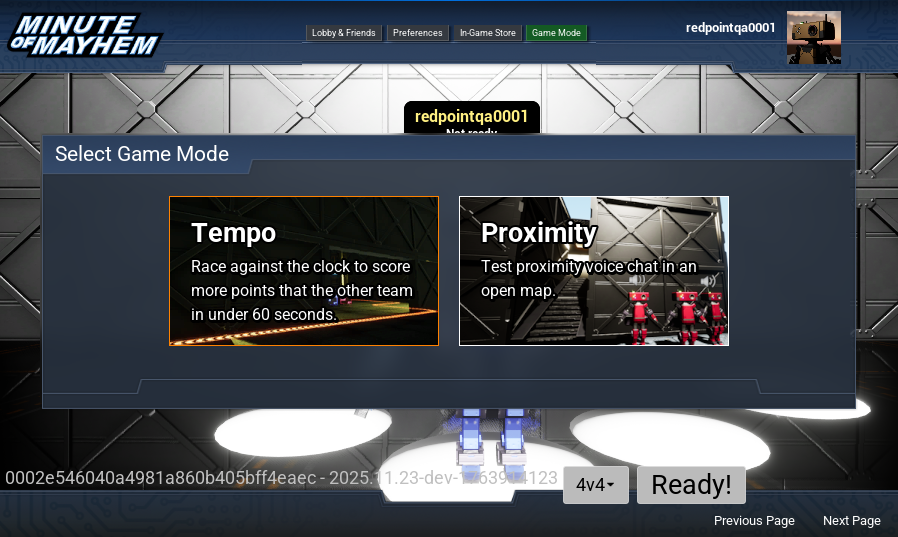
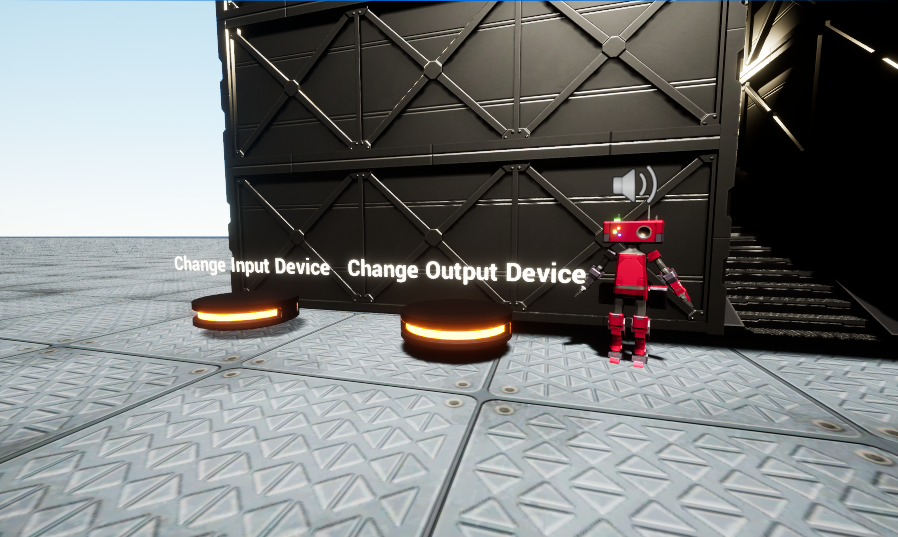
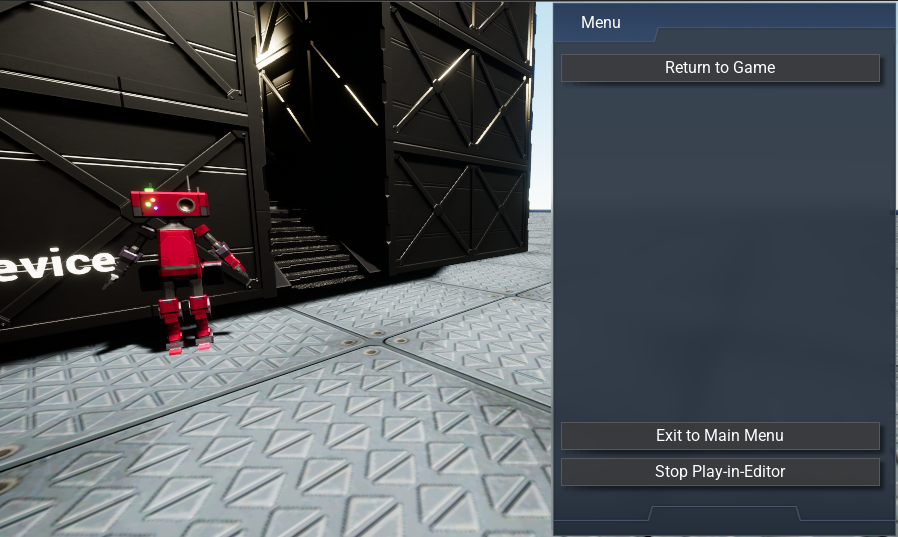
- Added support for proximity voice chat via the Redpoint Voice Chat component. This component can manage voice chat channel connections for you on listen servers and dedicated servers, and vastly simplifies voice chat implementations in multiplayer games.
- If you are currently managing voice chat connections manually on game servers, it is recommended that you use the Redpoint Voice Chat component instead.
- The Minute of Mayhem example project has been updated:
- Minute of Mayhem now targets Unreal Engine 5.7.
- Added a new game mode selection, to select between 'Tempo' and 'Proximity'.
- Added a new 'Proximity' game mode and map, which demonstrates using the new Redpoint Voice Chat component and proximity voice chat.
- Added a new in-game options menu that allows you to return to the main menu or exit the game.
- Improved support for controllers, including movement during gameplay and interacting with login prompts during startup.
- Added support for anonymous access to Title Storage, allowing game clients to download files from Title Storage before the first user signs in.
- Customizing widget presentation during authentication is now done via the IRedpointEOSAuthWidgetFactory. This allows you to display widgets with Common UI, and makes routing focus easier for games that have controller support.
- The existing "EOS Subsystem" and the events it provides are now deprecated and will be removed in a future release.
- We have added a "Redpoint Widget Reference List" data asset type, which makes it easier to ensure your custom authentication widgets are included when your project is cooked.
- Sanction checks now allow players to connect if the EOS SDK returns
EOS_UnexpectedErrorduring EOS outages. - Added a "Is Play-in-Editor?" blueprint node, which can be used to detect when the game is running in the editor.
- Improved logging when overriding the game mode in team-based matchmaking.
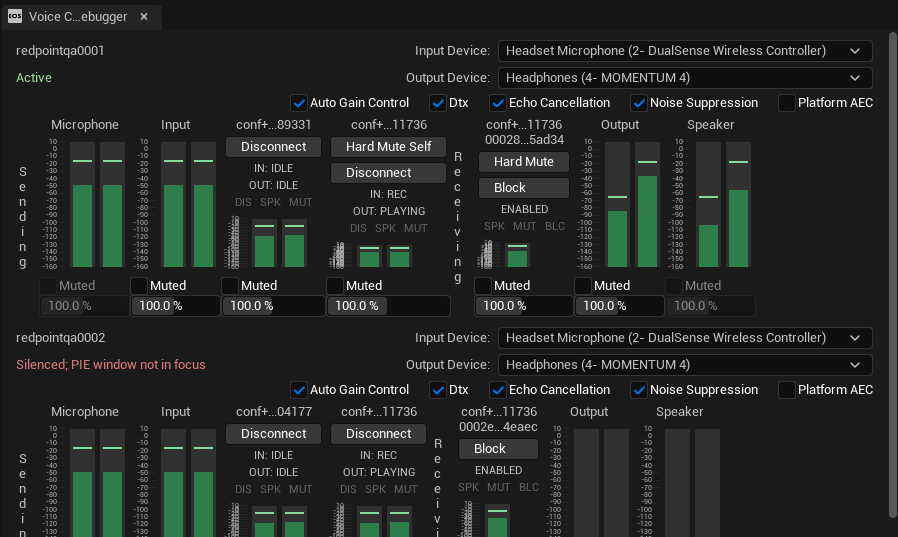
- Improved the Voice Chat Debugger, and documented this editor tool.
- Fixed an issue where invites on Meta Quest were processed before the local user was signed in.
- Fixed a periodic lag spike when the plugin refreshed audio devices; refreshing the audio device list is now done on a background thread.
- Fixed a rare deadlock when voice chat channels are being cleaned up.
- Removed support for EOS SDK 1.16.
2025.11.16
This release adds support for Unreal Engine 5.7, EOS SDK 1.18.1.2, and routes voice chat audio through the engine:
- Added support for Unreal Engine 5.7.
- Free Edition users will need to update their engine version when updating to this release.
- Added support for EOS SDK 1.17.1.3, 1.18.0.4 and 1.18.1.2.
- Free Edition users will need to download and install the newer EOS SDK from the Epic Games Developer Portal when upgrading to this release. If you need to use an older EOS SDK version, please use the Paid Edition instead.
- Voice chat audio is now captured and emitted through Unreal Engine, in preparation for supporting proximity voice chat in a future release.
- Added the "Voice Chat Debugger" tool in the editor, which can be accessed from the "Tools" menu. This shows you the state of all voice chat channels and participants, and allows you to easily toggle voice chat settings while testing with play-in-editor.
- Fixed an issue where voice chat did not activate the microphone correctly on iOS.
- Fixed an issue where packaging with Anti-Cheat would fail if the staging directory was read-only.
2025.10.29
This release adds a game session implementation that can automatically manage player registration for you, adds support for joining and inviting friends to games via friend widget binding, and fixes several issues:
- Added support for automatic player registration management via the new Redpoint Game Session class:
- Developers no longer need to call "Register Players" or "Unregister Players" when using the Redpoint Game Session class as their game session implementation, and we recommend games move to this implementation instead of calling "Register Players" and "Unregister Players" manually.
- Redpoint Game Session also supports maintaining a
__RedpointEOS_AnonymousPlayerCountsession attribute for you, which reflects the number of anonymous players on the game server (applicable to Steam games with split-screen support). - Added the "Get Game Session" blueprint node to allow the game session instance to be accessed on the game mode from blueprints.
- Added support for joining games and invite friends to games via friend widget binding.
- The
bIsInvitablevariable onRedpointFriendListEntryhas been separated intobIsInvitableToPartyandbIsInvitableToGame - Added the
bInGamevariable onRedpointFriendListEntrywhich indicates if the friend is already in the same multiplayer game session. - Added the
bInJoinableGamevariable onRedpointFriendListEntrywhich indicates if the friend is a multiplayer game session that can be joined. - Added the "Can Invite to Game" and "Can Join Game" blueprint nodes on
RedpointFriendListEntry. - Added the "Invite Friend List Entry to Game Session" and "Join Game Session of Friend List Entry" blueprint nodes.
- The
- Added a "Kick Player Controller" blueprint function which can be used to call the
KickPlayerC++ function on the game session, for projects that are not using C++. - "Show Invite UI" now works with parties. To show the platform's invite UI for the player's primary party, pass
PartySessionas the session name. - The dedicated server client ID, client secret and private key can now be provided via environment variables instead of the command line.
- Fixed an issue where automatic login with startup screens caused dedicated servers to not start correctly.
- Fixed an issue where the public module dependencies for the
OnlineSubsystemBlueprintsmodule were not correct. - Fixed an issue where the cross-platform presence was not updated when the session advertised for presence changed.
- Fixed an issue where presence for the Epic Games Overlay did not respect the 'Presence Advertises' setting in Project Settings.
- Fixed the enumeration display names for
Int32andFloatfor variant data to clarify that these types work for EOS stats. - Fixed an issue the session data returned by
GetNamedSessiondid not reflect the updated attributes after callingUpdateSession. The updated attributes are now reflected immediately in the local session data, and rolled back if the session update fails. - Fixed an issue where the session state of joined sessions did not get set to
CreatingandPendingas the join occurs. - Added additional logging when sessions are modified; visible when setting
LogOnlineSubsystemRedpointEOStoVeryVerbose. - Added a warning and editor check when developers are updating rooms (parties or lobbies) too frequently for the plugin to flush updates to the Epic Online Services backend.
2025.09.29
This release removes EOS SDK 1.17.1.3 from the supported version list due to a regression in the EOS SDK that impacts players being able to sign into games:
- EOS SDK 1.17.1.3 will no longer be used by the plugin due to a bug in the EOS SDK. Please download and use EOS SDK 1.17.0 instead.
- EOS SDK 1.18.0.4 is also impacted by this same bug, and is not included in the EOS SDK supported version list for this reason.
- Added support for setting a custom game mode when the matchmaker starts a listen server.
- Added support for specifying dedicated server client ID, secret and private key on the command-line with editor-based dedicated servers (i.e. using
-serverwith the editor binary). We also improved log messages when dedicated servers are missing required configuration on the command line. - Added new blueprint nodes that can automatically convert between data values (string, 64-bit integers, boolean and double values) and the "Online Session Setting" blueprint type. This makes blueprint graphs that interact with session settings much cleaner.
- Added support for overriding the assigned teams for party members when initially queuing into matchmaking. This allows you to intentionally split the party to different teams.
- Added the "Presence Status Text" property to the "Redpoint Friend List Entry" object, allowing you to display a friend's custom presence text in bound friend lists.
- Added the
IgnoreCommandLineSandboxAndDeploymentconfiguration option. When turned on, builds launched from the Epic Games store will always use the Live sandbox, even when launched on the Dev or Stage channels. - Fixed an issue where the cross-platform fallback authentication graph was not selected when testing in the editor.
- Fixed an issue where local platform accounts would not be linked to the product user ID upon the first login when Epic Games is selected as the cross-platform account provider.
- Fixed indentation used when the plugin applies post-staging hooks to the engine.
- Fixed an issue where players would not see the "link Steam to Epic Games" prompt when cross-platform accounts are required.
- Fixed an issue where the Epic Games overlay would not display when launching on the Epic Games Store without Epic Games set as the cross-platform account provider.
- Added Unreal Engine 5.3 back to our build matrix to support a customer with a premium support plan.
2025.08.25
This release adds support for EOS SDK 1.17.1.3 and fixes several issues:
- The "Minute of Mayhem" example project has been updated:
- Minute of Mayhem is now available for download on Google Play so you can test it on Android without building it yourself. This app will be continually updated as we make further improvements to the Minute of Mayhem example project.
- Minute of Mayhem now displays the user ID and build version in the bottom-left corner of the main menu.
- Voice chat is now enabled by default for parties in Minute of Mayhem.
- Fixed an issue where the "Sign In or Create Account" prompt did not get cooked and included in Shipping builds.
- Added support for EOS SDK 1.17.1.3.
- Improved the enumeration value names for "EOnlineKeyValuePairDataType" to accurately reflect which data types are supported by Epic Online Services.
- Fixed a matchmaking issue where the match would be immediately queued if everyone is ready except for the party leader, and the party leader leaves. When a player in a party is now promoted to party leader due to the leader leaving, matchmaking now automatically marks the new leader as not ready.
- Fixed a matchmaking issue where players were not marked as "not ready" after matchmaking is complete and the match is started. This could cause players to be immediately queued back into matchmaking.
- Fixed an issue where a friend who left our party recently would have the "Join Party" option displayed via friend widget binding, even though the advertised party is still the party we are already a member of.
- Fixed an issue where the "Are all expected players connected?" blueprint node for matchmaking did not correctly return true when matchmaking had run via play-in-editor.
- Fixed an issue where auto-configuration of the "Sign in with Apple" entitlement did not write out the correct entitlement value.
- Fixed a very rare crash that could occur if the host of a lobby leaves at the exact same time as a player joined.
- Fixed an issue where the patching process for UnrealBuildTool could cause build errors due to NuGet package vulnerability warnings. You can mitigate these errors by either upgrading to Unreal Engine 5.6.1 or by updating the plugin to this version.
- Fixed an issue where enabling Anti-Cheat would prevent multiplayer play-in-editor games from working.
- The plugin no longer sets the minimum iOS version in Project Settings, as all versions of iOS supported by Unreal Engine now include support for "Sign in with Apple".
- Removed Unreal Engine 5.3 from our build matrix; Unreal Engine 5.3 will not receive this or future updates on Fab. Please upgrade to a supported engine version, or build the plugin from source code via GitLab.
2025.08.11
This release updates the "Minute of Mayhem" example project to demonstrate submitting match results for skill-based matchmaking, and fixes several issues:
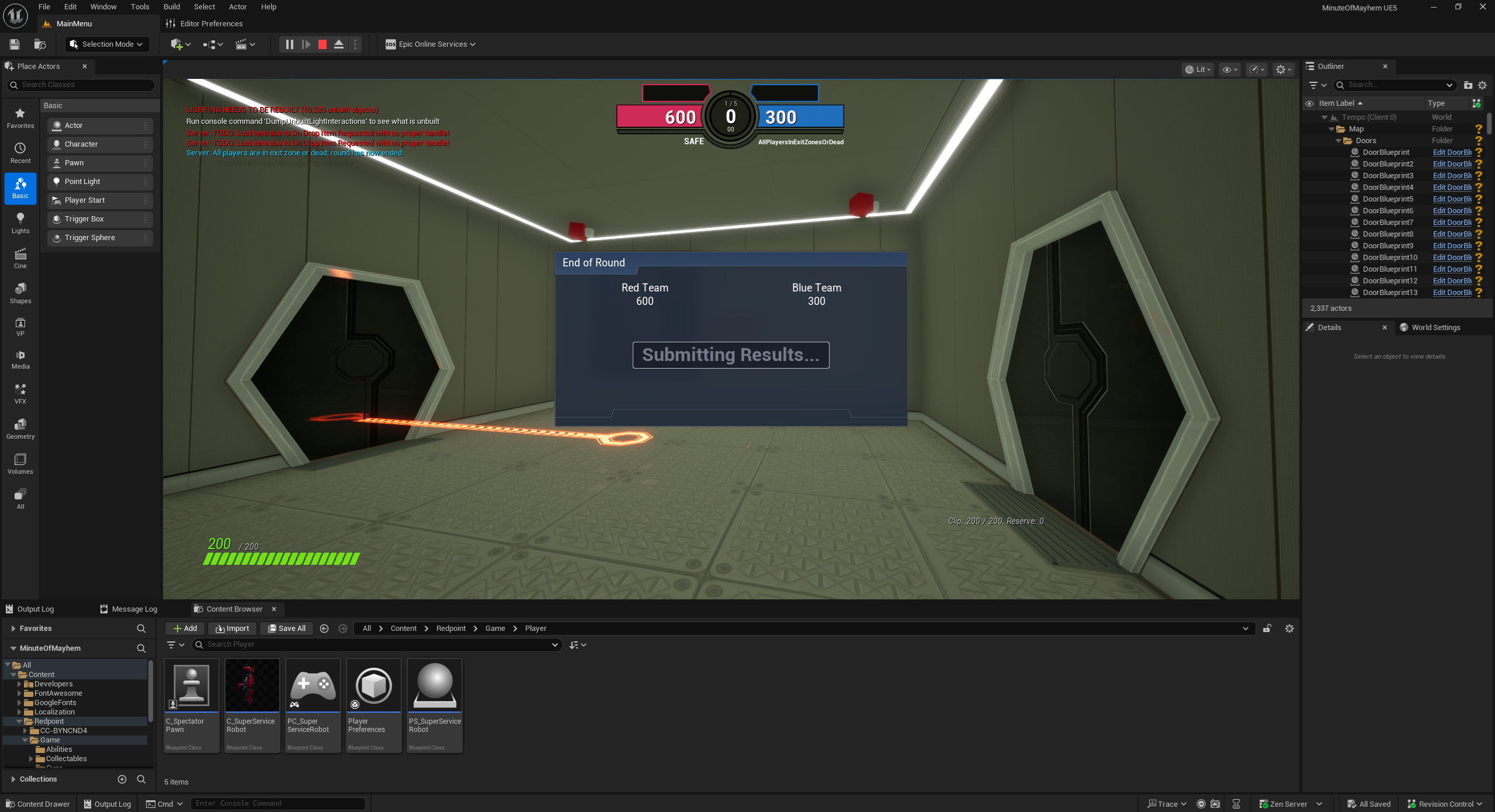
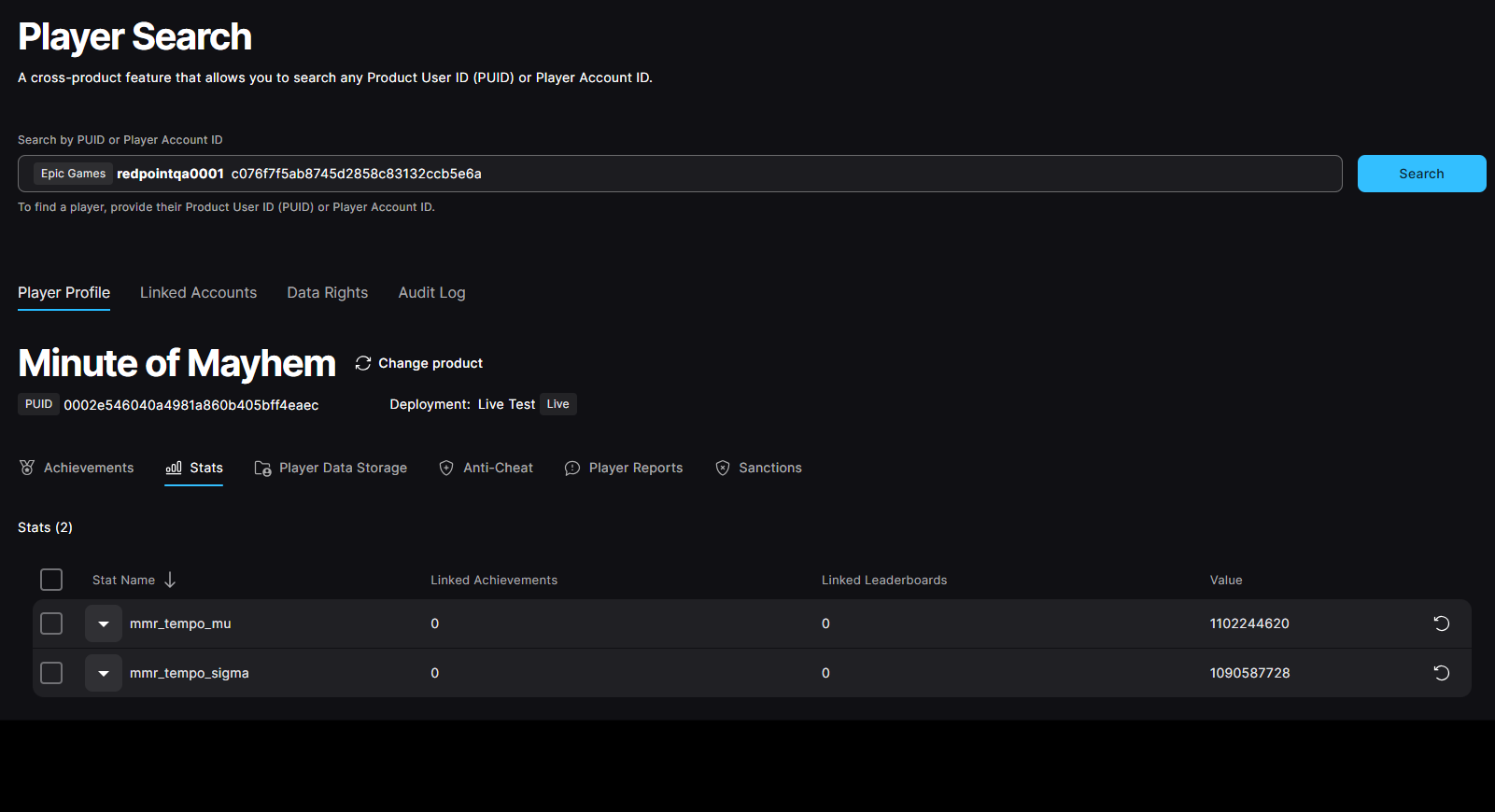
- The "Minute of Mayhem" example project now demonstrates how to submit match results for skill-based matchmaking.
- Fixed an issue where players in Minute of Mayhem would remain alive if the server player died first.
- Fixed an issue where the main menu UI in Minute of Mayhem did not display when returning to the main menu after a match.
- Fixed an issue where players were not considered to be in the safe zone at the end of the round in Minute of Mayhem.
- Fixed an issue where changing Project Settings would result in repeated source control operations, making it frustrating to change Project Settings if you had source control enabled.
- Fixed an IWYU compilation issue when building for iOS in Shipping configuration.
- Fixed an issue in friend widget binding where a player on your friends list who has recently left the party you are in would display the "Join Party" option, even though that operation would result in you joining the party you are already in.
- Fixed an issue where network connections could be reset if a client disconnected from a game server during the initial connection sequence, and then attempted to reconnect to the same game server.
- Added the
FSendPlayerBehaviorReportAPI to the memory safe C++ APIs. - Added an
OnlineSubsystemBlueprintsOnly.upluginplugin file to the GitLab repository for developers who want the online subsystem blueprint nodes without EOS integration. - Removed the old "Accept Stat Write Requests from Servers" configuration option in Project Settings.
2025.07.29
This release updates the "Minute of Mayhem" example project to demonstrate the "Add Friend by Friend Code" flow, and fixes several issues:
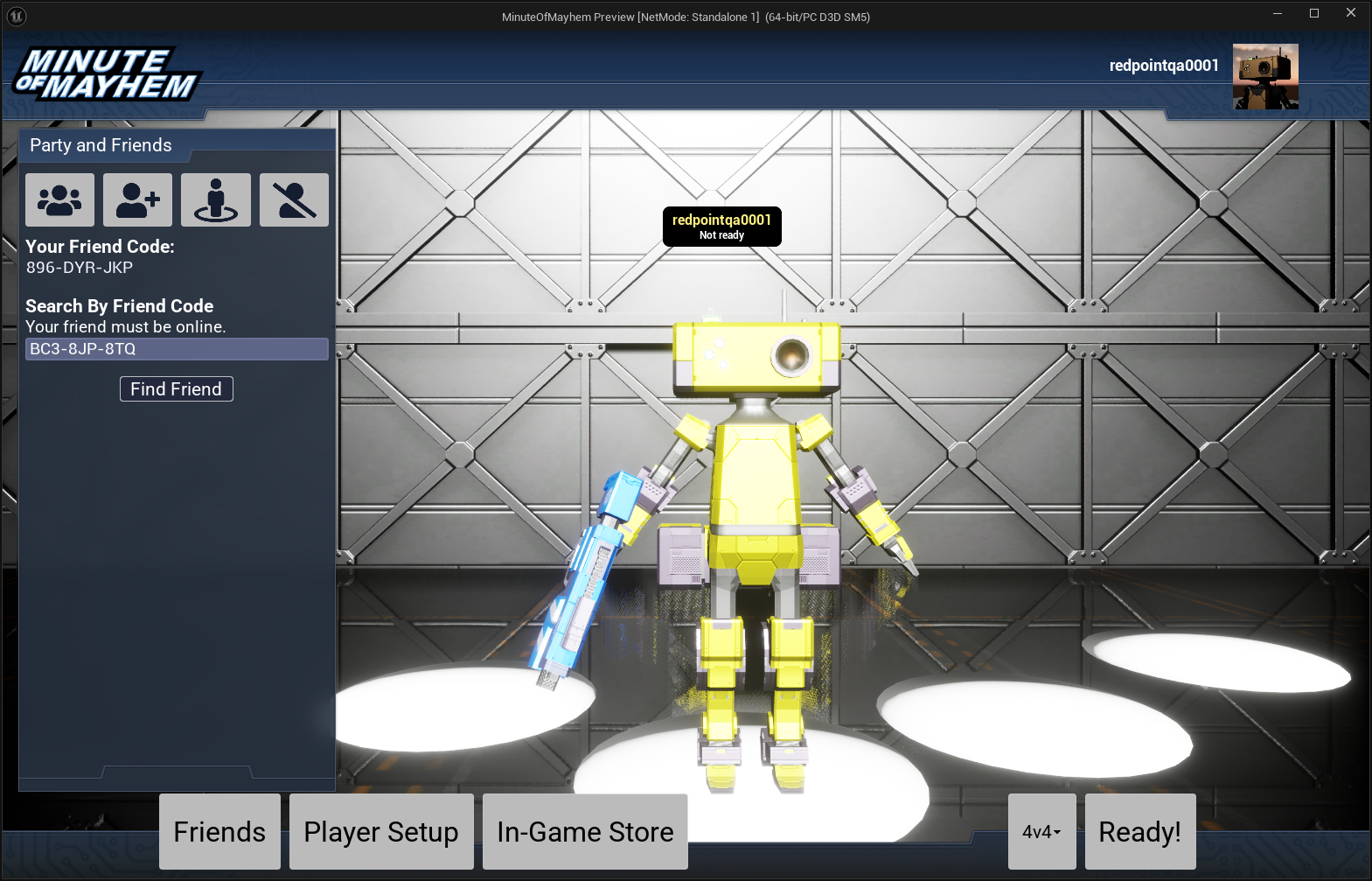
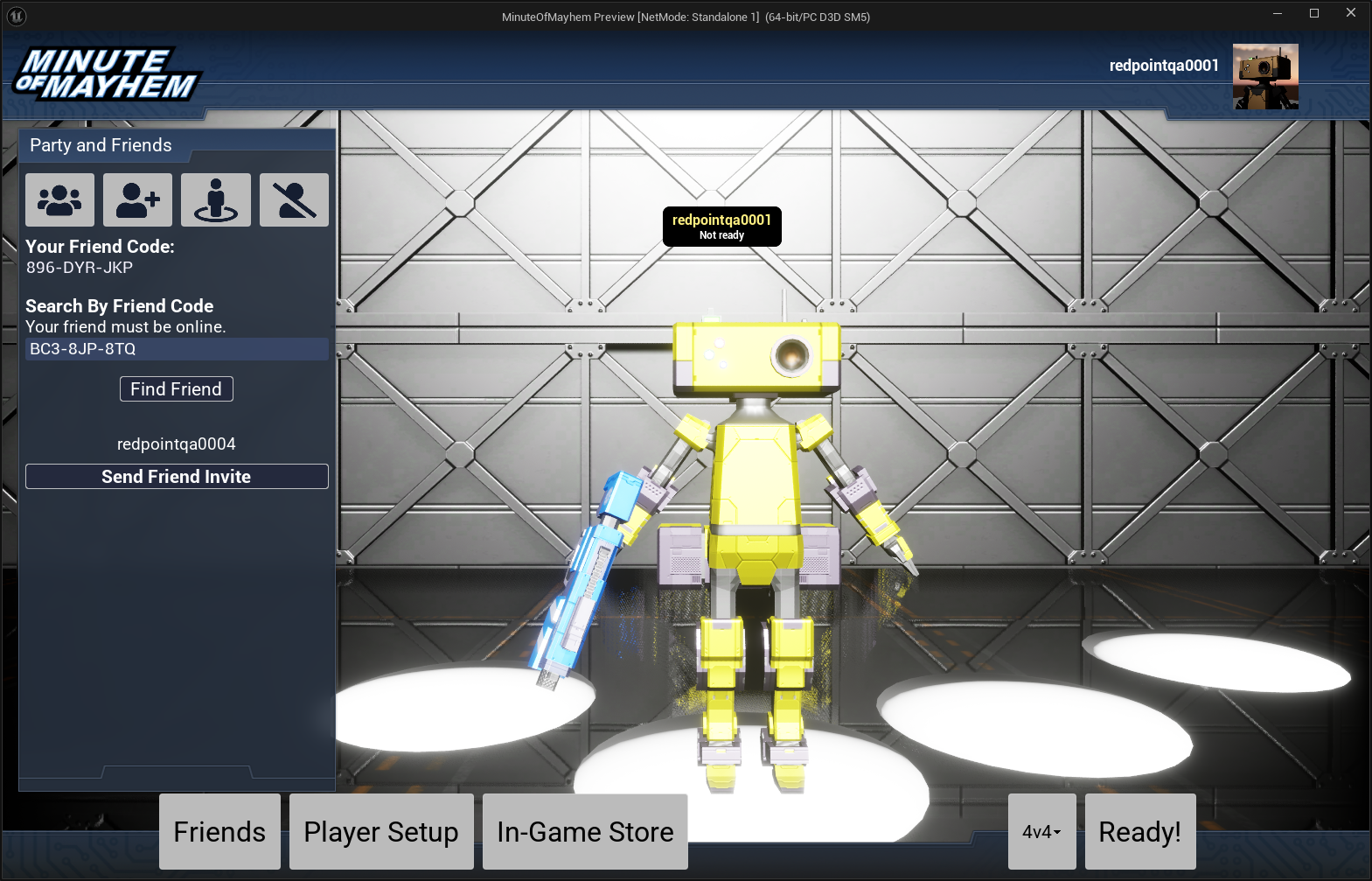
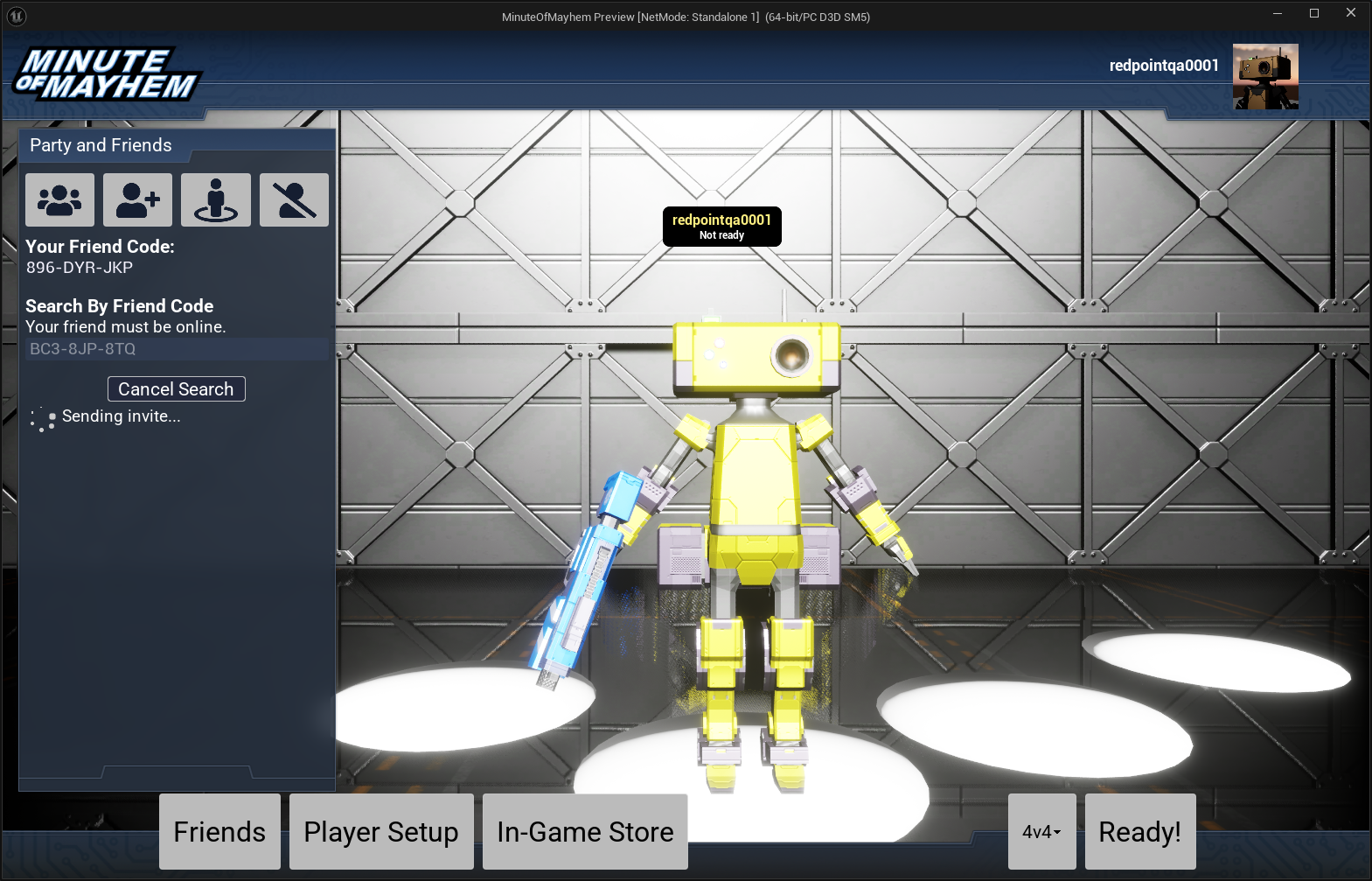
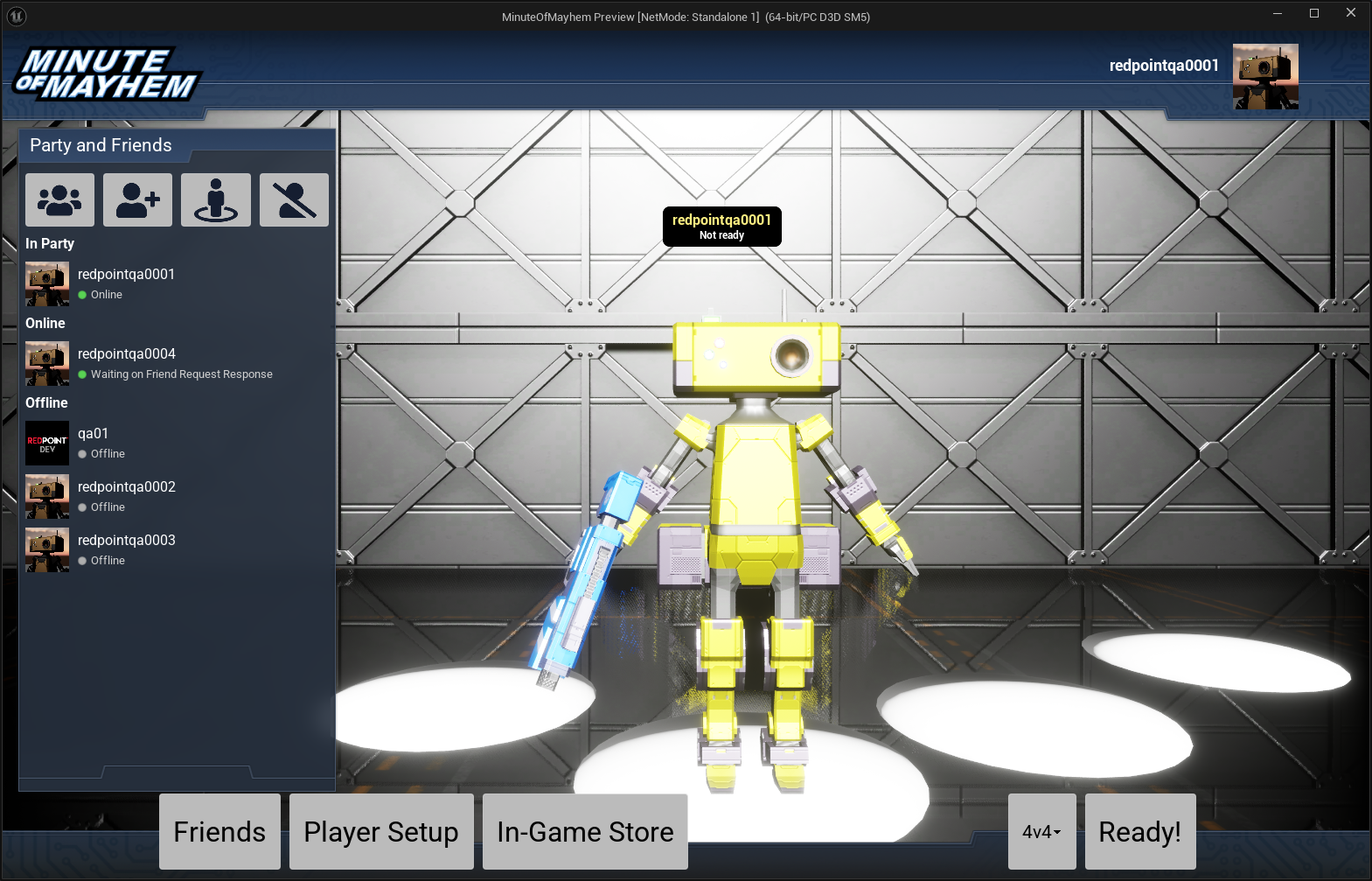
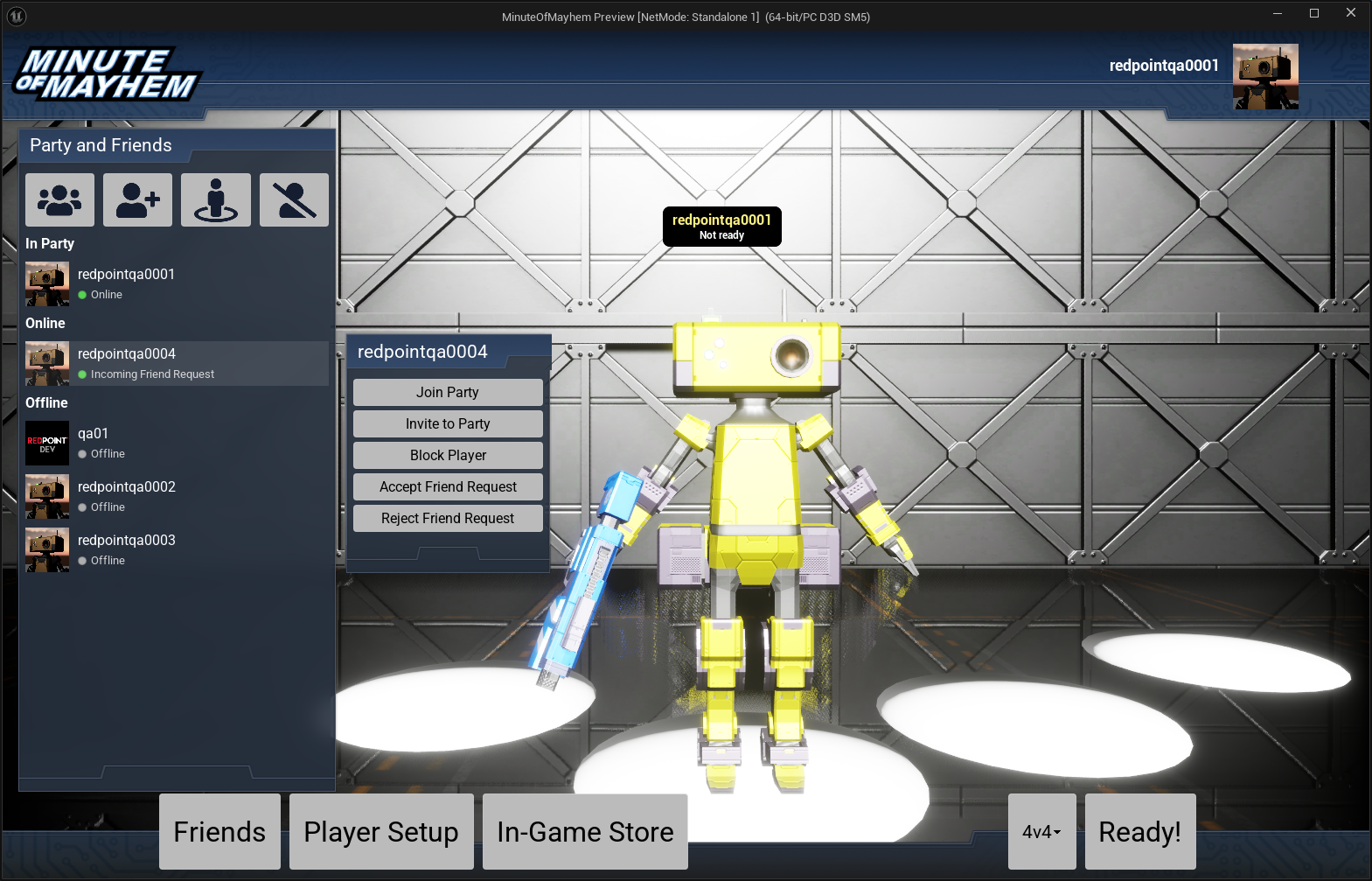
- The "Minute of Mayhem" example project now demonstrates how to implement "Add Friend by Friend Code" flow with cross-platform friends.
- Fixed an issue where several functions for the friend list widget binding did not correctly indicate whether the action was appropriate for the friend list entry.
- Fixed an issue where console clients could not join an Anti-Cheat protected dedicated server.
- Fixed an issue where the Paid Edition download from the License Manager would not rebuild under Visual Studio if the build environment or SDK was different than the pre-built binaries.
- Fixed an issue where post-staging hooks did not locate the EOS SDK correctly if it was placed in the project's Plugins folder.
2025.07.23
This release fixes several issues:
- The plugin now automatically ensures that it is the default online subsystem.
- Fixed a critical issue in the cross-platform friends database which resulted in saves occurring every 2 minutes, instead of only when there are active changes in the cross-platform friends database.
- Fixed an issue where "recent player" entries would override unified friend entries, resulting in cross-platform invites failing to send.
- Fixed an issue where the plugin would look in the incorrect folder when the EOS SDK has been placed under the project's
Plugins/folder. - Fixed deprecation warnings emitted when building in Unreal Engine 5.6.
- Fixed a crash that could occur when sessions were updating during game shutdown.
- Added a 'source' attribute to friend entries for diagnostics. This attribute indicates whether the friend object is sourced from friend unification or the cross-platform friends database.
- C++20 is now required.
2025.07.14
This release improves support for Google Play on Android and fixes several issues:
- Minute of Mayhem now includes an example of e-commerce on Google Play. We'll expand the "in-game store" of Minute of Mayhem to support e-commerce on other platforms in the future.
- Lyra has been updated for Unreal Engine 5.6.
- Updated the Google Play billing library to 8.0.0, and added support for non-consumable purchases on Android.
- To consume a purchase on Android, pass
consumeas the "Receipt Info" argument when finalizing the receipt. - To acknowledge a purchase without consuming it on Android, pass
acknowledgeas the "Receipt Info" argument when finalizing the receipt.
- To consume a purchase on Android, pass
- Added the "On Party Request to Join Received" blueprint event for games that want to intercept "Join Game" requests coming from the Epic Games overlay.
- Added experimental support for the
SessionIdandbIsJoinableproperties onFOnlineUserPresence. - Added logs when a network connection is about to close due to an anti-cheat error.
- Added support for Iris networking.
- Fixed a crash that occurred if you were using automatic startup screens, but specified None as the widget class (instead of leaving it as the default or specifying your own implementation).
- Fixed an issue where Android builds would incorrectly request the
READ_EXTERNAL_STORAGEpermission. This is no longer necessary on Unreal Engine 5.6, so we have removed it. For earlier engine versions, you may need to explicitly request theREAD_EXTERNAL_STORAGEpermission in your Project Settings. - Fixed an issue where Google Play receipts could be duplicated when calling "Get Receipts" due to an incorrect transaction ID.
- Fixed an issue where "Purchase Receipt" objects in blueprints would never retain their purchase information due to incorrect shared pointer lifetimes.
- Fixed an issue where
JoinPartydid not return correct error codes on failure. - Fixed the parameter names for the "On Achievement Unlocked" blueprint node, and documented how to get notified of unlocked achievements.
- Fixed the experimental matchmaking component
URedpointMatchmakerTeamComponentnot detecting match results. Games must now useARedpointGameSessionas the game session implementation or implement theIRedpointNotifyUniqueIdInterfaceon their game session implementation to use this component. - Fixed an issue where clients would not disconnect from listen servers if they failed to verify the anti-cheat integrity of the listen server.
- Fixed an issue where a friend on the friends list would not be updated correctly if they were becoming only a recent player.
- Fixed an issue where an anti-cheat protected listen server would incorrectly register itself as a peer player.
- Lobbies that are created through the online lobby interface now default to 64 players instead of 4 players. This is to avoid unexpected player limits when you don't explicitly call "Set Capacity" when creating a lobby.
- Moved classes and types that are only for the Minute of Mayhem example project to their own
RedpointEOSFrameworkExtramodule, which is turned off by default. This is to avoid polluting class, widget and attribute lists in games that are not using these features specific to the example project. If you are upgrading to this plugin version and have used Minute of Mayhem as a base for your project, you'll need to add theEnableFrameworkExtraModule=Trueoption to your configuration, as per the latest Minute of Mayhem example project.
2025.06.24
EOS Online Framework is now available and brings team matchmaking and blueprint support into the EOS plugin, along with many more features, improvements and bug fixes.
To upgrade to the EOS Online Framework:
- If you already own the 'EOS Online Subsystem' plugin, you can upgrade to EOS Online Framework through the Fab launcher or GitLab. EOS Online Framework replaces EOS Online Subsystem and is an in-place upgrade.
- If you own another Redpoint plugin, including 'Online Subsystem Blueprints' and 'Matchmaking', and have not previously purchased 'EOS Online Subsystem', you can now upgrade on Fab and GitLab through the License Manager for free.
The changes in EOS Online Framework 2025.06.24 are as follows:
- Team matchmaking is now included in EOS Online Framework.
- Blueprint support is now included in EOS Online Framework, for both Paid and Free Edition users.
- We've overhauled our documentation to make it easier to find what you're looking for depending on how you're integrating Epic Online Services. Our documentation is now also on GitHub and we accept pull requests for contributions.
- We've released a brand new example project "Minute of Mayhem", which demonstrates how to use EOS parties, team matchmaking, player preferences and synchronising those preferences to other party members, first-person gameplay and more.
- Added support for Unreal Engine 5.6.
- Added support for EOS SDK 41373641-v1.17.0.
- Added a "Get Party Configuration" blueprint node on the online party type.
- Added support for packet handlers to support Oodle network compression.
- Added a new RedpointGameInstance base class that provides automatic login and startup screens.
- Added support for querying Steam DLC without enabling the Steam inventory service.
- Added support for automatically creating parties when the player signs in, and ensuring that the player is always in a party even if they leave via the overlay.
- Added support for specifying
-DevAuthToolName=on the command line for non-Shipping games to use a specific credential in the Developer Authentication Tool for login. - Added a new RedpointAvatar UMG widget which greatly simplifies displaying player avatars in your game.
- Added a "Set Entry Spacing for List View" blueprint node that can be used to set the list entry spacing for UMG list and tree views without relying on the CommonUI plugin.
- Added support for the
bIsPlayingThisGamefield on friend presence. - Added support for binding the friend and party list to UMG tree view widgets, which greatly simplifies adding friend lists to your game.
- Added a "Get Release Version" blueprint node which reads the release version information generated by the Unreal Engine Tool.
- Added various gameplay ability system and backpack classes to the plugin. These are primarily intended to support the "Minute of Mayhem" example project and to allow the example project to be used without any C++. They should be considered experimental until documented in the future.
- Added a
RedpointMatchmakerTeamComponentthat can be added to player state classes. This component is intended to replace the current "Get Team and Slot for Player" blueprint nodes, and will be documented in the future. - Added support for "Sign in with Apple" without relying on engine code. The engine no longer needs to be built from source in order to sign in with Apple on iOS.
- Added low-level memory tracker tags to the plugin to allow for more granular memory profiling.
- Added a "Are All Expected Players Connected from Matchmaker?" blueprint node, which returns true when all players have connected to the game server and the match can start.
- Added support for pre-caching files from Player Data Storage during login.
- Added blueprint conversion nodes to make converting to and from
FVariantDataBPmuch simpler. - Updated the default values of
FOnlinePartyConfigurationto more closely match what most games will need to use. - The "login before play-in-editor" setting is now remembered across editor restarts. If the setting was previously turned on, the editor will start the Developer Authentication Tool on launch if it isn't already running.
- Improved login behaviour on Meta Quest and itch.io when Epic Games accounts are enabled.
- Fixed an issue where the Developer Authentication Tool did not start if the path was too long.
- Fixed an issue where outages with the EOS sanctions service would prevent players from connecting to any multiplayer servers. Sanctions checks now "fail open"; if the sanctions service can not be reached by the server, players will be allowed to connect regardless.
- Fixed an issue that prevented users from signing in with itch.io.
- Fixed an issue where CreateSession would not work on dedicated servers if the dedicated server user ID wasn't passed in as the hosting user ID. On dedicated servers, CreateSession now defaults to the dedicated server user ID if no user ID is provided.
- Fixed an issue where cross-platform friends would not load if a runtime platform provided at least one blocked user.
- Fixed an issue where authentication with the Meta SDK would be attempted on machines with the Meta Quest Link App installed, even if the game has no Meta app ID configured.
- Fixed an issue where setting the license key in the Free Edition would not apply until the editor was restarted.
- Fixed an issue where the "Party Member Changed" event on the RedpointPartyMember actor would not fire in response to a player being promoted to party leader.
- Fixed a crash that could occur when network connections were closed.
- Fixed support for the
LinuxArm64platform. - Fixed an issue where unified friends would not source presence information from the local platform if it was available.
- Fixed an issue where the Epic Games integration would incorrectly fire the presence change event internally when only the local player's presence status was changing.
- Fixed an issue where a player blocked on the local platform could still be displayed as a cross-platform friend.
- Fixed an issue where the Developer Authentication Tool could not be used for authentication in non-Shipping packaged games for testing scenarios.
- Fixed an issue where games with Easy Anti-Cheat enabled could take a long time to complete network connections, due to game content being verified by EAC. You must now enable 'Pak Signing' in Project Settings if you enable Easy Anti-Cheat, which allows Unreal Engine to perform much faster verification of content than EAC can.
- Fixed an issue where persistent Epic Games credentials were not cleared when the user signs out and the game is using the "Cross-Platform Only" authentication graph.
- Fixed an issue where the Epic Games overlay would not appear if the game was launched on the Epic Games Store but did not have cross-platform accounts enabled on other platforms.
- Fixed an issue where friends deleted on the local platform were not deleted from the cross-platform friends cached stored in Player Data Storage.
- Fixed a crash on shutdown if the game instance was no longer valid when the online subsystems were being destroyed.
- Fixed a crash if a room transaction finishes after play-in-editor stops.
- Fixed a memory leak in API calls that use the
ObjectSyncCopypattern. - Fixed an issue where identity hook logs were not emitted in Shipping builds with "enable logs in Shipping" turned on.
- Fixed an issue where matchmaking would not automatically destroy the existing game session before attempting to create a new one when starting a listen server, resulting in matchmaking failures.
- Fixed an issue where a stale friend cache would be used if a user no longer had any friends.
- Fixed support for calling the receipt-less version of
Checkouton the purchase interface when using Epic Games e-commerce. - Fixed an issue where party attribute values were not visible to blueprints on the
RedpointPartyMemberevents. - Fixed an issue where the gameplay debugger for P2P networking did not show NAT status.
- Fixed an issue where
ShowInviteUIon the external UI interface would fail with "This platform does not have a native subsystem", even though external UI functionality is now provided internally in the plugin. - Fixed an issue where Meta Quest invites could be consumed prior to the user being signed in.
- Searches for lobbies and parties are now automatically retried with exponential backoff if the EOS SDK returns
EOS_TooManyRequestsorEOS_TimedOut. - Replaced integration with the Discord Game SDK with the Discord Social SDK. If you have enabled Discord support in your game, you will need to download the new Discord Social SDK.
- Renamed several framework classes for more consistent naming. The plugin automatically sets the necessary class redirects.
- Dedicated servers will now exit if they are unable to initialise the EOS SDK, instead of continuing to run with the NULL subsystem.
- Removed support for Unreal Engine 5.2.
- Removed the call to
UpdatePresenceInterestinsideGetAdvertisedParty. TheGetAdvertisedPartycall on the online subsystem APIs can now only be used to query the party advertised by friends, unless you explicitly subscribe to presence information of other users via the presence system C++ APIs.
2025.03.12
This release fixes several issues:
- Calling
AutoLoginin your game map while "login before PIE" is enabled will now return a successful result, instead of a linking failure. Since the editor already logged you in before play-in-editor, the secondAutoLoginwas previously treated as a call to start the account link flow, which would never succeed since the local user would already be an Epic Games account. - Fixed an issue where querying for user information on dedicated servers did not work.
- Fixed an issue where the initial connection timeout could be set too low for EOS P2P connections. The networking driver now enforces a minimum timeout of 120 seconds for P2P negotiation regardless of your configuration settings.
- Fixed an issue where the
epic.authenticatedWithuser authentication attribute was not available. - Fixed a crash when the editor was run with the
-serverparameter. - Fixed an issue where if game A connected to game B over P2P on channel X, but game B was only listening for connections on channel Y, game A would be unaware of the connection failure and network packets would be dropped silently. As of this release, when a game is unable to route an incoming packet for a P2P channel, it will notify the connecting client and cause it to close the connection specific to the unroutable channel.
- Fixed an issue where the
bHostingfield was not set to true on sessions that were created withCreateSession. This resulted in session join failures in Lyra when host reservation beacons were enabled (which they are by default). Host reservation beacons are now correctly created in Lyra, as thebHostingfield is set correctly. - Added the
UseFallbackAddressesInDevelopmentconfiguration option, which defaults toTrue. If you set this toFalse, it is the same as passing-emulateeosshippingon the command-line, and causes the plugin to not attempt multiple IP addresses when routing an IP connection to a dedicated server. - Added the
FallbackAddressTimeoutSecondsInDevelopmentconfiguration option, which defaults to 2 seconds. You can use this to adjust the amount of time the plugin will spend attempting to connect to each IP address when multiple IP addresses have been provided by a dedicated server's session.
2025.03.04
This release fixes several issues:
- Fixed a crash if you attempted to start a multiplayer game in the editor and didn't have Online Subsystem Blueprints enabled.
- Fixed a crash if you attempted to start a multiplayer game and did not have a client ID or secret configured in Project Settings.
2025.03.03
This release fixes several issues:
- The Free Edition now ships without debugging symbols, which makes the Free Edition download much smaller. Debugging symbols are not useful in the Free Edition anyway, as the Free Edition does not include source code or support.
- Fixed an issue where EOS sessions could not be joined via Steam presence in some circumstances.
- Fixed an issue where dedicated servers would not have their sessions marked as listening.
- Fixed the networking driver paths that are automatically set in configuration files in Unreal Engine 5.4 and earlier.
- Fixed an issue where the session interface would incorrectly warn about the networking drivers not being set in Unreal Engine 5.5, due to the new dynamic configuration layer system.
- Fixed an issue where the plugin would attempt to install the post-stage hooks multiple times when using a source-based engine.
- Fixed an issue where the post-stage hooks would incorrectly attempt to run on packaged Windows dedicated servers when using the DebugGame or Debug configurations.
- Fixed an unused function warning when compiling on Unreal Engine 5.4 and earlier.
- Fixed the Agones orchestrator implementation invoking the incorrect callback when the session ends.
- Fixed an issue where calling
KickMemberon the same lobby member multiple times would cause a crash. - Fixed an issue where configuration files would not be written if they don't currently exist.
2025.02.23
This release continues our refactoring work, modernizing our networking code in preparation for OSSv2 support, and fixes several issues:
- Fixed an issue where inbound P2P connections would continue to fail on console platforms even after Internet connectivity was restored.
- Fixed an issue where MSVC could not compile the
RedpointEOSAsyncmodule on some compiler versions. - Fixed an issue that prevented Linux ARM64 dedicated servers from loading the EOS SDK.
- Fixed an issue where the user's display name would use "Anonymous" on Meta Quest, instead of falling back to the user's Oculus ID.
- Fixed a crash that could occur when the editor exits due to in-flight SDK requests from the Fab plugin.
- Added an editor hint that tells you to install the external Meta XR plugin if you connect a Meta Quest device to Unreal Engine, but don't have the Meta XR plugin installed.
- Moved networking code and related classes, including the
UNetDriverimplementation for EOS, to a separateRedpointEOSNetworkingmodule to support OSSv2 in the future.
If you are using the plugin on Unreal Engine 5.5 or later, or have "Automatically Configure Project for EOS" turned on in the Editor Preferences (this is the default), you don't need to make any changes when upgrading to this release.
If you are using the plugin on Unreal Engine 5.4 or earlier and have "Automatically Configure Project for EOS" turned off in the Editor Preferences, you will need to manually update your INI files for the new networking driver paths:
[/Script/Engine.Engine]
!NetDriverDefinitions=ClearArray
+NetDriverDefinitions=(DefName="GameNetDriver",DriverClassName="/Script/RedpointEOSNetworking.RedpointEOSNetDriver",DriverClassNameFallback="/Script/OnlineSubsystemUtils.IpNetDriver")
+NetDriverDefinitions=(DefName="BeaconNetDriver",DriverClassName="/Script/RedpointEOSNetworking.RedpointEOSNetDriver",DriverClassNameFallback="/Script/OnlineSubsystemUtils.IpNetDriver")
+NetDriverDefinitions=(DefName="DemoNetDriver",DriverClassName="/Script/Engine.DemoNetDriver",DriverClassNameFallback="/Script/Engine.DemoNetDriver")

[/Script/Engine.GameEngine]
!NetDriverDefinitions=ClearArray
+NetDriverDefinitions=(DefName="GameNetDriver",DriverClassName="/Script/RedpointEOSNetworking.RedpointEOSNetDriver",DriverClassNameFallback="/Script/OnlineSubsystemUtils.IpNetDriver")
+NetDriverDefinitions=(DefName="BeaconNetDriver",DriverClassName="/Script/RedpointEOSNetworking.RedpointEOSNetDriver",DriverClassNameFallback="/Script/OnlineSubsystemUtils.IpNetDriver")
+NetDriverDefinitions=(DefName="DemoNetDriver",DriverClassName="/Script/Engine.DemoNetDriver",DriverClassNameFallback="/Script/Engine.DemoNetDriver")
2025.02.14
This release adds support for EOS SDK 1.17.0, introduces an early preview of the Redpoint EOS Framework and several other features:
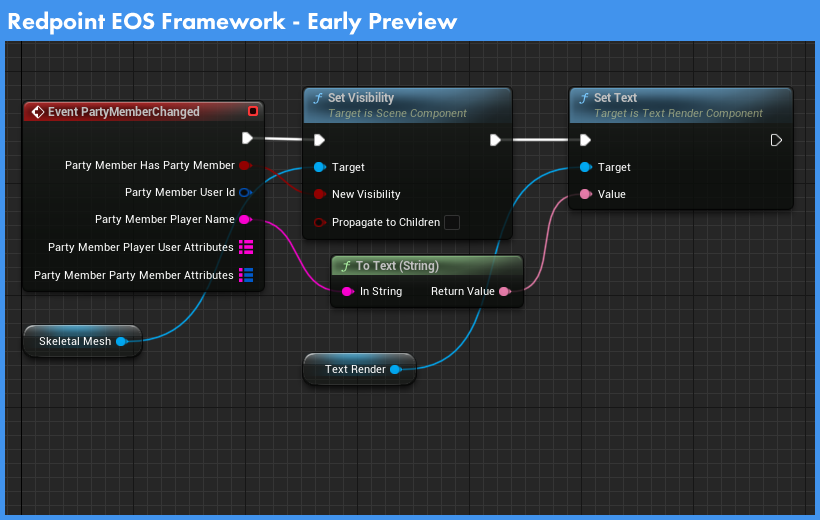
- Added support for EOS SDK 39599718-v1.17.0.
- Free Edition users will need to download and install the newer EOS SDK from the Epic Games Developer Portal when upgrading to this release. If you need to use an older EOS SDK version, please use the Paid Edition instead.
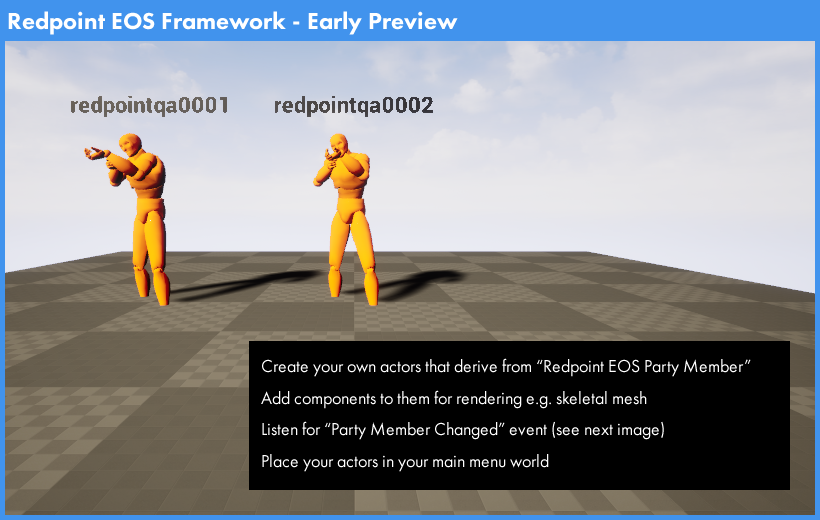
- Introduced an early preview of the Redpoint EOS Framework, which provides pre-made actors and components for faster prototyping of multiplayer games.
- You can use the new
Redpoint EOS Starter Game Modewhich gives you a character controlled by WASD / space-bar inputs and a third-person camera view. - These starter components use Enhanced Input. To override the input controls or actions, you can create a new blueprint that inherits from
Redpoint EOS Starter Player Controller, and select your derived implementation as an override on the game mode. - Added the
Redpoint EOS Party Memberactor, which lets you easily display party members in your main menu world.- You can create a new blueprint that inherits from this actor, and override the
Party Member Changedevent. When the local player joins or leaves their primary party, or when the members in the primary party change, this event will fire with all of the information about that party member, such as the person's display name and party attributes. - The
Party Member Slotvariable on the actor indicates which party member that actor represents; i.e.0for the first member of the party,1for the second member of the party and so on. - It is expected that your derived blueprint will add skeletal mesh and text components, and use the
Party Member Changedevent to toggle their visibility and other rendering settings to render a party member when they're present.
- You can create a new blueprint that inherits from this actor, and override the
- Further documentation on the Redpoint EOS Framework, as well as example projects demonstrating the features, will be available in a future release.
- You can use the new
- Added support for Linux ARM64 dedicated servers.
- Internally moved Anti-Cheat code to a separate module to support OSSv2 in the future. This is an internal change and should have no impact on game developers.
- Internally moved dedicated server orchestration support to a separate module to support OSSv2 in the future. This is an internal change and should have no impact on game developers.
- Moved all remaining itch.io code from the itch.io OSSv1 module to a runtime platform integration. If you have any game code currently referencing
RedpointItchIoas an online subsystem, you will need to use the EOS interfaces instead, which will delegate their functionality to itch.io when running on that platform.
2025.02.07
This release adds compatibility with the Fab plugin in Unreal Engine 5.5, improves synthetic session and invite support on console platforms, and fixes a significant number of issues:
- Added compatibility with the Fab plugin in Unreal Engine 5.5. You can now have the EOS Online Framework plugin and the Fab plugin enabled at the same time in the editor.
- Added support for fetching friends and blocked users on Meta Quest, and improved Meta Quest compatibility with older engine versions.
- Added experimental support for presence and invites on Meta Quest. You must configure destinations in the Meta Quest Developer Portal in order for presence to work.
- Parties created through the OSSv1 APIs now have the "public member list" feature. This allows you to inspect party members when searching for parties via the lobby interface.
- Passing an already prefixed lobby ID to
ParseSerializedLobbyIdis now handled correctly. You could only run into this scenario if you calledToDebugStringon a party or lobby ID instead ofToString. - Added the
OnInternetConnectivityChangedevent to the presence system for modern C++. - The
OnConnectionStatusChangedevent for the OSSv1 online subsystem is now broadcast when the plugin detects a disruption in Internet connectivity. You can use this event to notify the user and recreate lobbies and parties when Internet connectivity is restored. - Events triggered from room synchronisation (such as party update events) are now deferred if there is currently a room transaction running (such as a party update operation). This ensures that when your game code responds to an event, if you attempt to start a room operation you won't get an "already pending" error code due to a running transaction.
- Room operations that would internally conflict if running in parallel (such as party operations that act on the same party type ID) are now automatically deferred and run in sequence instead of failing with an "already pending" error code. You no longer have to worry about party operations potentially conflicting, as the plugin will execute them in sequence when needed.
- Developers can now intercept the "Join Game" event from Steam and other platforms, by setting the
JoinRequestActionof the party configuration toManual.- When the join request action of a party is set to
Manual, you should listen for theOnPartyRequestToJoinReceivedevent on the party interface. In handling the event, you must later call theApproveJoinRequestand setbIsApprovedtotrueif you want to continue the join, orfalseif you want to cancel the join. - The
GetPendingRequestsToJoinfunction is now implemented on the party interface, and returns the list of pending joins you are yet to callApproveJoinRequestfor. - Using
ApproveJoinRequestto reject a party join triggered via the Epic Games Overlay will also notify the user via the Epic Games overlay that the join was rejected.
- When the join request action of a party is set to
- The plugin now automatically enables the
net.AllowPIESeamlessTravelconsole variable in the editor, which allows you to test multiplayer map changes in the editor. - Fixed an issue where the Developer Authentication Tool was started with the wrong port number on Windows.
- Fixed an issue that prevented multi-address resolution from working when testing against dedicated servers in non-Shipping builds.
- Fixed an issue where Meta Quest authentication did not check entitlement before obtaining the authentication token to pass to EOS on login.
- Fixed a compilation error that could occur under unity builds due to a redeclaration of
DestructInterface. - Fixed an issue where login would fail if the client policy configured in the EOS Developer Portal did not permit access to the lobbies service.
- Fixed an issue where you could not join a presence-enabled room while already in one.
- Fixed an issue where the mute status of other participants in a voice chat would be incorrect if you changed the mute state.
- Fixed an issue where room transactions would not acquire the exclusive keys correctly when performing an operation, which caused inconsistent behaviour when using presence-enabled parties.
- Fixed an issue where joining a party with a party type set by the host, when the client is already in a party with that party type, would not result in the client automatically leaving the existing party even though the party type conflicts.
- Fixed an issue where updating a presence-enabled party would result in that party being automatically left due to room transaction exclusive keys.
- Fixed an issue where updating a party would fail due to an incorrect check on the
bShouldRemoveOnDisconnectionvalue of the new party configuration. - Fixed an issue where the cross-platform presence lobby needed to be recreated after a temporary loss in Internet connectivity on platforms such as Steam. The plugin will now automatically restore previously set presence on Steam after Internet connectivity is restored.
- Fixed an issue the EOS SDK could cause a crash in the plugin if the EOS SDK incorrectly invoked a callback multiple times. This represents a bug in the EOS SDK. The plugin now detects these scenarios and emits diagnostic information to the logs so that you can report them to Epic Games.
- Fixed an issue where lobbies were always created as public lobbies, even if
Transaction.Publicwas set to false. - Fixed an issue where calling
SendInvitationfor a party could result in incorrect behaviour when the recipient is a friend from the local platform. - Fixed an issue where a voice chat enabled party would not have echo enabled even if "Enable Voice Chat Echo in Parties" was turned on in Project Settings.
- Fixed a crash if you called
ShowInviteUIfor a session while that session was in the process of being destroyed. - Fixed an issue where updating the party configuration would in some cases not trigger the
OnPartyUpdatedevent. - Fixed an issue where updating an existing room feature would not trigger room events from room synchronisation.
- Fixed an issue where if you attempted to send an invite to a friend on the local platform immediately after creating or joining a session or party, the invite could fail if the cross-platform presence system had not yet started advertising the session or party on the local platform.
- Fixed an issue where
runtimePlatform.friendattributes on users were incorrectly formatted. - Fixed an issue where linking an Epic Games account could fail if the EOS SDK required a PIN grant code to continue.
- Improved performance when the
RedpointEOSRoomslog category is not set toVeryVerbose, and in Shipping builds, by skipping construction of debugging JSON used for diagnosing room state. - Switched UObject pointers to use
TObjectPtr<>in UPROPERTY fields for compatibility with Lyra in Unreal Engine 5.5. - Improved reliability of calls to OSSv1 subsystems for platforms that still use OSSv1 for synthetic sessions and invites, such as Steam.
- Replaced the workaround in
RedpointEOSUtilswith a more modern solution in Unreal Engine 5.5 and later. This makes the plugin compatible with Hot Reload again, and prevents warnings about class paths on startup. - Added the
RedpointEOSAsyncmodule which provides async/await APIs similar to C#. This module relies on C++20 features, and while enabled by default, is not relied on by the plugin.- If you run into compilation issues with this enabled, change
REDPOINT_EOS_ENABLE_ASYNC_LIBRARY=0inRedpointEOSAsync.Build.csand report the incompatibility in our support Discord. If you don't report compatibility issues, there's a high likelihood that the rest of the plugin starts depending on this async library in the near future and this setting will go away (as it will now be a required part of the build).
- If you run into compilation issues with this enabled, change
- Added a gameplay debugger that shows all of the EOS SDK calls that are "in-flight", so you can observe what calls are currently running.
- Removed old files related to the Cloud Messaging Hub implementation that were no longer used.
- Increased automation test coverage of presence-enabled rooms and parties to ensure that invites, join, update and create operations work for presence-enabled rooms.
- Added Anti-Cheat API bindings to
RedpointEOSAPI. - The plugin now logs the version of the EOS SDK it was built against, so it is more obvious in game logs when the build version and runtime version of the EOS SDK differ.
2024.11.25 (Beta)
Unreal Engine 5.5 removed APIs that the plugin was previously dependent on. To add support for Unreal Engine 5.5, we've had to make significant internal changes to the plugin. This release should be considered a beta release. While it is suitable to upgrade to this release for in-development games, live/published games should remain on the previous version until the next stable release is available. Please note that the following limitations apply:
- While authentication works on Meta Quest, friend and invite functionality has not yet been reimplemented following the removal of
OnlineSubsystemOculusin Unreal Engine 5.5. - Console platform support has not yet been updated to support this version of the main plugin. We'll make announcements in the private console support channels when each console platform is compatible again.
You should consider upgrading to this beta release only in the following cases:
- You require support for Unreal Engine 5.5.
- You need compatibility with the Meta XR plugin.
- You need one of the fixes outlined in the changelog below.
This release has only been published on Fab for Unreal Engine 5.5. The binary releases for earlier Unreal Engine versions will remain at 2024.09.23 until the next stable release.
This release adds support for Unreal Engine 5.5, adds support for EOS SDK 1.16.4, overhauls cross-platform friends and platform invites to parties/sessions and fixes several issues:
- Added support for Unreal Engine 5.5.
- If you're using the Free Edition, you should start upgrading your project to Unreal Engine 5.5 now. 2024.09.23 is still a permitted version for existing Free Edition users who are using Unreal Engine 5.4, but you will need to upgrade to a newer plugin version in the future and this will require your project to be on Unreal Engine 5.5.
- If you need to continue using Unreal Engine 5.4, you can switch to using the Paid Edition instead.
- Added support for EOS SDK 36651368-v1.16.4.
- Free Edition users will need to download and install the newer EOS SDK from the Epic Games Developer Portal when upgrading to this release. If you need to use an older EOS SDK version, please use the Paid Edition instead.
- Extraction of the Developer Authentication Tool ZIP is now handled entirely in C++, and the shell scripts have been removed. This should significantly improve the reliability of extracting the Developer Authentication Tool when it is launched for the first time.
- The platform-specific authentication graphs have been replaced with the
Runtime Platformauthentication graph, which is now smarter when it comes to determining the correct authentication method to use on a given platform or store. The plugin no longer relies on the OSSv1 code provided by Epic Games for determining the authentication platform.- If you want to override the platform that the game will authenticate with, you can set the
AuthServiceOverrideconfiguration value under the[EpicOnlineServices]section ofDefaultEngine.ini. You should not need to do this; please let us know in a support ticket if you do so that we can improve the code that determines the authentication platform automatically. The valid values forAuthServiceOverrideareSteam,RedpointDiscord,GOG,RedpointItchIo,AppleandGooglePlay. - The default authentication graph can no longer select Discord as the default authentication method. Previously this could only occur if you launched the game via the Discord Game Store, which has not been available for several years now. If you want to authenticate via Discord, set
AuthServiceOverride=RedpointDiscordin the[EpicOnlineServices]section ofDefaultEngine.ini. - Note: Documentation will be updated to reflect these changes in the next stable release. Since this beta release is only being published for Unreal Engine 5.5, our existing authentication documentation is remaining unchanged for customers using the previous stable release on Unreal Engine 5.4.
- If you want to override the platform that the game will authenticate with, you can set the
- Added modern C++ APIs for interacting with Player Data Storage and Title Storage, via the new
IStorageSysteminterface. - Added modern C++ APIs for interacting with friends, recent players, blocked players and the cross-platform friends database, via the new
IFriendSysteminterface. - You no longer need to call
ReadFriendsList,QueryRecentPlayersorQueryBlockedPlayerson theIOnlineFriendsOSSv1 interface. Friends, recent players and blocked players are now queried as part of the login process, and kept up-to-date automatically by the plugin. - The
eosSynthetic.subsystemNamesattribute on friends has been renamed toruntimePlatform.platformNames; the behaviour is otherwise the same. - The
eosSynthetic.friend.<subsystemName>.<attribute>attribute on friends has been renamed toruntimePlatform.friend.<platformName>.<attribute>; the behaviour is otherwise the same. - Session results from
IOnlineSessionnow correctly set theOwningUserIdwhen the session is owned by a player (and not a dedicated server). - Fixed an issue where internal phases of the login and logout process would unintentionally run in parallel when they should have run in sequence.
- Fixed an issue where internal phases of presence synchronisation with the local platform would unintentionally run in parallel when they should have run in sequence.
- Fixed an issue where
IOnlinePartySystemwould not fire the "party data changed" and "party member data changed" events if no changes were made. The OSSv1 APIs for parties do not have a completion delegate forUpdatePartyDataandUpdatePartyMemberData, so these events needed to always fire for Online Subsystem Blueprints to detect completion. - Fixed an issue where
IOnlinePartySystemwould not fire the "party data changed" event under all scenarios. For example, it did not fire when the maximum number of members changed, or when presence/invite permissions were changed. - Fixed a potential crash when retrieving presence data of Steam friends.
- Fixed a potential crash when handling incoming socket connections where the notification object was not valid.
- Fixed a crash if the HTTP request when downloading a Steam avatar failed without a response.
- Fixed a crash in the simple first-party cross-platform account provider that only occurred in Shipping builds.
- Fixed an issue where enabling Meta Quest support on Windows would result in a hard dependency on
LibOVRPlatform64_1.dll, even when deploying to platforms such as Steam. The plugin now gracefully handlesLibOVRPlatform64_1.dllnot being present, in which case authentication through Meta Quest is not available. - Fixed an issue where invites on Steam could not be accepted due to the plugin not setting
BuildUniqueIdof the synthetic Steam session correctly. - Fixed an issue where the cross-platform presence system would call the completion delegate twice when removing room advertisements on the local platform.
- Fixed an issue where presence message connections would not be cleaned up correctly on hosts when the client is the one initiating the disconnection.
- Fixed a crash that could occur when the plugin was forcibly signing the local user out due to an unexpected logout event from the SDK.
- For Unreal Engine 5.5 and later, fixed an issue where the plugin would cause comments to be removed from configuration files when either performing auto-configuration, or when you changed Project Settings. Comments and configuration setting order is now preserved when configuration is changed.
- Added a "Config Inspector" tool to the editor for Unreal Engine 5.5 and later, which shows the full configuration hierarchy that is currently loaded. This is intended to be used an internal debugging tool.
- Search paths for the EOS SDK are now unified between the build system (which uses the headers and links against libraries) and the editor (which launches the Developer Authentication Tool). Search paths are stored in the
RedpointEOSSDK/RedpointEOSSDKInfo.jsonfile. This should improve consistency between the build system and the editor. - Added support for a modified version of the Fab plugin in Unreal Engine 5.4 on GitHub. Due to the way GitHub works, you must request access to this repository via a support ticket. We plan to improve compatibility with the Fab plugin in Unreal Engine 5.5 and later in the next stable release of the plugin.
- Added a build-time warning when the plugin detects that console support has been incorrectly copied into the main plugin folder. Console support code must remain in a folder separate from the main plugin code.
2024.09.23
This release fixes several issues:
- Fixed an issue where the Developer Authentication Tool could not be extracted when using the latest EOS SDK.
- Fixed an issue where events would not fire if the user was unexpectedly signed out.
- Fixed an extremely subtle login stall that could happen when multiple play-in-editor windows are signing in at the same time.
- Fixed an issue where voice channels for voice-enabled parties would not appear when calling
GetChannels. - Fixed an issue where dedicated servers would not start up when "Require Epic Games Launcher" is enabled.
- Fixed an issue where console commands for the identity system did not work. These console commands have been replaced with new console commands.
2024.09.10
This release improves the developer experience in the editor with regard to localised presence, and fixes several issues:
- Added support for calling
GetSourceDisplayNameon party join info instances received from invites. You no longer need to useIOnlineUserto query the user information for the sender of an invite if you're just looking to get their display name. - The presence system will now automatically enable game localization preview in the editor upon sign in, so that localised presence values work in the editor without game localization preview having to be turned on manually.
- Documented how to pass dynamic data into presence statuses when updating presence for a local user.
- Fixed an issue where presence was not updated correctly in the Epic Games overlay.
- Fixed an issue where localized text strings were not passed to the Steam subsystem correctly.
- Fixed a crash on Android mobile phones after signing into the game.
- Fixed an issue where Google Play integration would not be removed from the build after switching a project to target Meta Quest instead.
- Fixed an issue where the
EOS_TimedOutresult code did not result in an automatic retry with exponential backoff.
2024.09.05
As of this release, the StatusStr value provided to IOnlinePresence::SetPresence must now a localisable text key in the form <Namespace>_<Key> to ensure your game is compatible with platforms such as Steam that require localisable presence statuses.
This release continues our room system and refactoring work, introduces cross-platform presence, enables the new party system, adds support for friend codes, overhauls the example projects and fixes several issues:
- Added support for EOS SDK 35276460-v1.16.3 and removed support for EOS SDK versions prior to 1.16.0.
- Free Edition users will need to download and install the newer EOS SDK from the Epic Games Developer Portal when upgrading to this release. If you need to use an older EOS SDK version, please use the Paid Edition instead.
- Added a new cross-platform presence system, which allows players to see when friends are online, regardless of the platform you're running on and without requiring Epic Games accounts.
- Breaking Change: To ensure your game is compatible with platforms that require localised presence (such as Steam), the
StatusStrparameter provided when callingIOnlinePresence::SetPresencemust now be a localisable text key in the form<Namespace>_<Key>. For example,NSLOCTEXT("A", "B", "My Text")maps to a value ofA_Bwhen setting theStatusStrparameter. You must ensure that the localisable text keys are cooked into your game via the localisation Project Settings, otherwise the cross-platform presence system will not be able to convert the text keys back into text when presence statuses are received. - This cross-platform presence system means that devices such as Meta Quest now have access to presence.
- You can also access the presence system with modern C++ APIs via
IPresenceSystem:
- Breaking Change: To ensure your game is compatible with platforms that require localised presence (such as Steam), the
- We've added support for friend codes, which you can use to look up user IDs without needing to run your own API.
- To access the local user's friend code, read the
friendCodeauthentication attribute on theFUserOnlineAccountobject, or callIPresenceSystem::GetFriendCode. - To resolve a friend code to a user ID, call
IOnlineUser::QueryUserIdMappingand passFriendCode:<Friend Code>as theDisplayNameOrEmailparameter, or callIPresenceSystem::FindByFriendCode. - Friend codes are generated on login and are not persisted.
- When resolving friend codes to user IDs, multiple users may match in extremely popular games. It is recommended you use
IPresenceSystem::FindByFriendCodein these cases as it can return multiple user IDs for the player to pick from, whereasIOnlineUser::QueryUserIdMappingwill only return the first matching user.
- To access the local user's friend code, read the
- The example projects for the Redpoint EOS Online Framework and Online Subsystem Blueprint plugins have been fully replaced with modern versions.
- These new example projects remove the complexity of the "task" system that was present in previous versions, making it much clearer what code is relevant for accessing online subsystems.
- Because the task system has been removed, it is now safe to copy the example project code and blueprint assets into your own projects.
- To use these new example projects, you must also install the free Online API Explorer plugin from Fab or download it from our GitLab instance.
- The new party system code has been enabled by default and the previous
ONLINE_SUBSYSTEM_EOS_ENABLE_OSS_INDEPENDENT_CODEsetting has been removed. You can remove this from yourProjectDefinitionsif you were previously using it to opt into the party system.IOnlinePartySystem::GetAdvertisedPartyis now implemented and uses the cross-platform presence system to retrieve this data.- Parties can now be joined and left from the Epic Games overlay.
- Fixed an issue where party events would sometimes not fire.
- Fixed an issue where
UpdatePartyDataandUpdatePartyMemberDatacould crash if passed a non-shared data instance. - Fixed an issue where party configuration would not be the same on all clients.
- To search for parties via the
IOnlineLobbyinterface, you must now set the search parameterbucketto a value ofParties.
- Project Settings is now clearer that you should enter the Live sandbox and deployment IDs, and not the sandbox and deployment IDs for the Dev or Stage environments.
- When a game is launched via the Epic Games Store, the
-epicsandboxid=and-epicdeploymentid=parameters are now used for the sandbox and deployment instead of those configured in Project Settings. This allows the same game build to work across the Dev, Stage and Live environments on the Epic Games Store. - Added
OnStartSystemandOnStopSystemhooks toIIdentitySystemHook. These can be used to reliably start and stop background tasks in response to local users sign in and out. - Fixed an issue where a confidential platform would attempt to load
RedpointEOSPlatformDesktop. FPlatformHandle::GetService<T>()has been replaced withFPlatformHandle::GetSystem<T>()to match the naming convention of the interfaces.- The staging hook installation script now assumes Unreal Engine 5, which fixes an issue where it could assume Unreal Engine 4 when building the engine from source.
- Fixed a crash that could occur if a session was destroyed at the same time
UpdateSessionwas called. - Fixed an issue where if a lobby owner only updated their member attributes, the backend would not be notified of the new attributes and the EOS SDK and backend would become inconsistent with each other.
- Fixed the
OnVoiceChatAvailableAudioDevicesChangedevent not firing. - Fixed a potential crash in sanction checks during network authentication if the server has not had
AutoLogincalled. - Fixed an issue where the user ID registry for OSSv2 could crash if an invalid
EOS_ProductUserIdwas passed to it. - Fixed an issue where beacons could unexpectedly close if a client has multiple beacons.
- Fixed an issue where the plugin could be unexpectedly rebuilt by UBT every build when installed in the engine.
- Fixed an issue where the authentication graph could stall if it need to sign out an Epic Games account in response to a profile conflict during linking.
- Fixed an issue where calling
IOnlineIdentity::Logoutdid not sign the local user out of EOS Connect and did not sign the user out of the Epic Games overlay. - Fixed an issue where the Developer Authentication Tool would not be extracted properly.
- Fixed a compilation error that would occur when building the editor for Linux.
- Fixed a compilation error that would occur when building for the Test configuration.
- Fixed a runtime issue where a missing
xaudio2_9redist.dllduring build would result in the EOS SDK failing to start. If this file is missing, a build error is now issued instead.
2024.07.10
This release continues our room system and refactoring work and fixes several issues:
- Added the new
IIdentitySystemservice and related C++ APIs specific to Epic Online Services. These APIs provide a modern experience for interacting with the EOS SDK in C++, and are documented as follows: - Updated
IOnlineIdentityto use the newIIdentitySystemservice internally. - Fixed some public types in
RedpointEOSAuthnot being declared withREDPOINTEOSAUTH_API. - Fixed ambiguous C++ type resolution errors that could rarely occur for some developers due to the way C++ namespaces and unity C++ compilation interact.
- Fixed an issue where some modules were incorrectly declared to build for the
TVOSplatform. The plugin does not support tvOS, as the EOS SDK does not support it. - Fixed an issue where editor features of the plugin were not available when using the editor on Linux.
- Fixed an issue where 'Remote Mac' builds for building iOS on Windows would not work due to
SupportedVersions.jsonnot being copied to the remote macOS machine. - Fixed an issue where 'Remote Mac' builds for building iOS on Windows could fail due to the build system selecting an EOS SDK with only partially copied files. In order to use 'Remote Mac' builds for iOS, you'll need to install the EOS SDK on the remote macOS machine in a global location such as the 'Downloads' directory.
2024.06.25
This release is a resubmission to the Unreal Engine Marketplace, to address an issue where long paths prevented publishing. There is no Free Edition release for this version, as the Free Edition was not impacted by the issue. Free Edition users can continue to use 2024.06.20.
- Fixed an issue where the
RedpointEOSPlatformIntegrationOnlineSubsystemmodule name caused filepaths to exceed the maximum limit of 260 characters on Windows. This internal module has now been renamedRedpointEOSPlatformIntegrationOSSv1. - Removed
RedpointEOSBuild.ApplyEngineVersionDefinesToModule. If you have been relying on this call, update your module's private module dependencies to includeRedpointEOSBuildandOnlineSubsystemRedpointEOSinstead. - The implementation of
IOnlineAvatarnow uses the newIUserCacheSystemservice internally. There should be no impact or changes visible to developers or players.
2024.06.20
This release continues our room system and refactoring work, adds new C++ APIs specific to Epic Online Services, and fixes several issues:
- Added the new
IUserCacheSystemservice and related C++ APIs specific to Epic Online Services. These APIs provide a modern experience for interacting with the EOS SDK in C++, and are documented as follows: - Added the
RequireOnlinePlayUserPrivilegeconfiguration option, which makes the default authentication graph check that the local user has theEUserPrivileges::CanPlayOnlineprivilege on the local subsystem before proceeding with authentication. This can be used to ensure that console games are compliant with "online subscription" checks prior to login. - Added a check that detects when the Google Play Services component on an Android device is out-of-date, preventing Google authentication from working. The plugin will now return a more helpful error message that instructs the player to upgrade Google Play Services on their phone.
- Players who are automatically sanctioned by Easy Anti-Cheat and have the
RESTRICT_GAME_ACCESSsanction applied will now be prevented from joining multiplayer servers. You no longer need to apply the customBANsanction specifically. - Fixed compatibility with EOS SDK 1.15.4.
- Fixed an issue where e-commerce operations on Steam could stall or crash in Shipping builds.
- Fixed an issue where the staging hooks were not compatible with non-Windows platforms.
- Fixed compatibility when using Clang to compile for the Windows platform.
- Fixed an issue where calling
GetPresenceon Steam friends could result in a crash. - Fixed an issue where dedicated servers were unable to call Title File APIs.
- Fixed an issue where
OnVoiceChatAvailableAudioDevicesChangedevent did not fire. - Fixed an issue where an unnecessary call to
IPluginManager::Get().FindPlugin()caused a crash in packaged games in very specific environments. - Fixed an issue that prevented iOS games from loading the EOS SDK.
- Fixed an issue where rejecting a party invite would result in rate limiting.
- The plugin will now provide better error messages in the log when platform-specific modules fail to load.
- Updated the "UEOSNetDriver not available" error message to make it clear that the real error message related to the EOS SDK failing to load will be located at the top of the log file.
- Updated the implementation of the
IOnlineUserinterface to use the newIUserCacheSystemAPIs.- User accounts returned by the
IOnlineUserinterface will now include Epic Games account information, when the local user is signed into an Epic Games account and the target user has an Epic Games account linked.
- User accounts returned by the
- Added a new implementation of the
IOnlinePartySysteminterface that uses the room system APIs.- This implementation is not yet enabled by default, as it does not currently support advertising EOS parties sythentically on Steam or other local platforms. It will be enabled by default in the future once synthetic party support is restored.
- If you are not using synthetic parties and wish to opt into the new implementation, add the following to your
.Target.csfiles:ProjectDefinitions.Add("ONLINE_SUBSYSTEM_EOS_ENABLE_OSS_INDEPENDENT_CODE=1");
2024.05.01
This release adds support for Unreal Engine 5.4 and fixes several issues:
- Added support for Unreal Engine 5.4.
- If you're using the Free Edition, you should start upgrading your project to Unreal Engine 5.4 now. 2024.04.22 is still a permitted version for existing Free Edition users who are using Unreal Engine 5.3, but you will need to upgrade to a newer plugin version in the future and this will require your project to be on Unreal Engine 5.4.
- If you need to continue using Unreal Engine 5.3, you can switch to using the Paid Edition instead.
- Fixed an issue where optional platform modules were automatically loaded by the engine, causing a launch error even when they should not block loading.
- Fixed an issue where required platform modules were not forced to load.
- Fixed an issue where the Google Play support code could fail to compile due to missing
finalspecifiers. This issue appeared to only affect a small number of build environments.
2024.04.22
This release adds support for EOS SDK 1.16.3 and fixes several issues:
- Added support for EOS SDK 1.16.3.
- Free Edition users will need to download and install the newer EOS SDK from the Epic Games Developer Portal when upgrading to this release. If you need to use an older EOS SDK version, please use the Paid Edition instead.
- Added an option in Project Settings to turn off the Epic Games overlay, even for players who are signed in with Epic Games accounts.
- Fixed an issue where games packaged for Android on mobile would incorrectly try to access the Oculus subsystem, resulting in a crash.
- Fixed an issue where the Developer Authentication Tool could not be used in packaged games. The Developer Authentication Tool also now appears as an option for the Authentication Graph setting in Project Settings.
- Fixed an issue where the updated signature of "Add Widget to Viewport" and "Remove Widget from Viewport" meant that widgets could not be added to the viewport via blueprints. These functions have been changed back to use
UUserWidgetagain. - Fixed an issue where existing projects would not use the new default Slate-based widgets for sign in or PIN code entry.
2024.04.12
This release fixes high priority issues that were introduced in 2024.04.05:
- The plugin will now show an editor hint if your game code uses
IOnlineSubsystem::Get()orOnline::Get...()APIs without a world context and then callsAutoLoginon them. You must useOnline::GetSubsystem(this->GetWorld())in order for your code to be compatible with play-in-editor. - Fixed an issue where project files could not be generated due to optional plugins not being present.
- Fixed an issue where persistent authentication for Epic Games accounts did not work.
- Fixed an issue where Steam authentication did not work, due to integration calls being omitted on startup.
- Fixed an issue where the "Steam Web API key missing" error would be repeatedly logged.
- Lowered EAC logs on dedicated servers from
VerbosetoVeryVerbosedue to the frequency at which they're logged.
2024.04.05
This release adds support for EOS SDK 1.16.2, experimental support for Unreal Engine 5.4 Preview 1, and fixes several issues:
- Added support for EOS SDK 1.16.2.
- Free Edition users will need to download and install the newer EOS SDK from the Epic Games Developer Portal when upgrading to this release. If you need to use an older EOS SDK version, please use the Paid Edition instead.
- Added experimental support for Unreal Engine 5.4 Preview 1.
- Added experimental compatibility with Iris networking.
- Fixed an issue where a project built for Meta Quest would incorrectly include Google Play related code on Unreal Engine 5.3. The build server has been updated to package a test project for both Quest and Google Play to ensure Android packaging code does not regress in future.
- Fixed an issue where UBT would emit warnings due to unreachable code in the
.Build.csfiles. - Fixed an issue where building for iOS would fail if the EOS SDK library had the quarantine bit set on newer versions of macOS.
- Fixed an issue where Steam e-commerce operations could stall indefinitely if concurrent requests were made, or if the local player did not have any item definitions to load.
- Fixed an issue where Recent Players would not add newer players once the player count reached 100, due to an incorrect sort predicate.
- Fixed an issue where the
authenticatedWithauthentication attribute was not correctly set if the user authenticated with Oculus. - Fixed an issue where synthetic invites would incorrectly return an error if the target friend was an Epic Games friend. The invite would still be correctly sent, but the invite call returned an error result even on success.
- Fixed an issue where sessions could not be searched for in the Lyra example, due to old engine version guards that were not removed.
- Engine version guards have been changed from
defined(UE_X_Y_OR_LATER)toREDPOINT_EOS_UE_X_Y_OR_LATER. If you are relying on our internal engine version defines, it is recommended that you set your own engine version defines instead.
- Engine version guards have been changed from
- Fixed an issue where
IOnlineIdentity::GetPlatformUserIdFromLocalUserNumandIOnlineIdentity::GetLocalUserNumFromPlatformUserIddid not return the correct values. - Fixed an issue where authentication could stall indefinitely if multiple users had
AutoLogincalled concurrently in the same process. This affected play-in-editor scenarios where "login before PIE" is turned off, and split-screen games that sign in multiple local users at the same time. - Moved the authentication graph and cross-platform account provider classes to a separate
RedpointEOSAuthmodule, in preparation for implementing OSSv2 APIs. - Updated the documentation on Epic Games friends to reflect that friends are not returned by the EOS SDK if they have not yet played the game, even for games that have been purchased on the Epic Games Store.
- Removed the old "Authorize Epic Games Account" button from the toolbar. Using this flow has not been required since EOS SDK 1.15.5.
2024.03.13
This release fixes a few issues reported in the previous release:
- Fixed an issue where some template classes in RedpointEOSRooms incorrectly had
REDPOINTEOSROOMS_API. This caused linker errors during compilation for some developers. - Fixed a few IWYU (include-what-you-use) compilation errors that impacted Marketplace submission.
2024.03.11
This release introduces the first pass of the new room system, upgrading the IOnlineLobby interface to use the new implementation:
- IOnlineLobby now uses the new room system implementation, which allows developers to retrieve lobby members from search results again in EOS SDK 1.16.0 and later.
- The Matchmaking plugin is now able to be used with EOS Online Framework 2024.03.09 and EOS SDK 1.16.0 and later. If you are currently using EOS SDK 1.15.4 due to the regression in 1.16.0, you can now upgrade the EOS SDK as the plugin provides the "see members of lobby search results" feature required for Matchmaking to work.
- Fixed an issue where packaging for Meta Quest on Unreal Engine 5.3 resulted in errors, due to Google Play code being incorrectly included in the compilation.
- Fixed an issue where an unintended warnings-as-error would be enabled for modules that are not yet compatible, specifically when compiling for console platforms.
- There are also some changes that are primarily internal to the plugin, but may impact you if you reference plugin headers:
- The locations of some plugin headers inside
PublicandSharedhave changed. If you are referencing plugin code directly, you may need to update your#includedirectives to the new paths. - Significantly increased the number of EOS SDK APIs covered in RedpointEOSAPI. This module is still considered experimental; you could use these more modern bindings in game code, but you should expect that there might be slight changes to the public API surface in future.
- Implemented support for OSSv2 user IDs through the
IOnlineAccountIdRegistryinterface. OSSv2 user IDs are used internally in the room system.
- The locations of some plugin headers inside
2024.02.19
This release fixes several issues:
- Fixed an issue where the Free Edition could not be used in C++ projects, due to the
.Build.csfiles being omitted from 2024.02.06 onwards. - Fixed an issue where enumeration-based settings in Project Settings would not load or save correctly.
- Fixed an issue where the staging hook installation could revert engine changes made by Git or Perforce.
- Reduced "Dropping auth status change notification on server" logs to VeryVerbose level.
2024.02.08
This release fixes a few urgent issues reported in 2024.02.06:
- Fixed an issue where Anti-Cheat clients could not connect to game servers at all, and extended our functional test suite to ensure that clients are able to fully connect to game servers after the EAC negotiation has completed.
- Fixed an issue where the "backend unreachable" editor hint would appear when it should not.
- Potentially fixed an issue where players on Android would be prompted to sign into their Google account every time, instead of automatically signing them in with the account they previously used.
- Removed all legacy 4.27-related code from the plugin.
2024.02.06
This release fixes issues and continues our internal refactoring work to better support sessions and lobbies moving forward:
- Added the Cloud Messaging Hub to replace the existing P2P messaging layer for the cross-platform friends database.
- The existing messaging implementation uses EOS P2P to communicate friend invites across platforms. This implementation will be phased out in the future, as it can cause excessive load on the EOS infrastructure when your game has a significant number of players and a significant number of pending invites for players that are currently offline.
- The replacement messaging implementation requires deploying a "Cloud Messaging Hub" onto Google Cloud and configuring your project to connect to the endpoint. The implementation is extremely efficient and it is expected most small projects will incur no costs under the Google Cloud Run free tier.
- Migrating to the Cloud Messaging Hub at this time is recommended for games that foresee having a large number of concurrent players (greater than 1000). In future, all projects will be required to migrate to the new implementation.
- To deploy the Cloud Messaging Hub:
- Clone the CMH source code from GitLab.
- Ensure you have a Google Cloud account and have authorized your local computer with the Google Cloud SDK.
- In a terminal, run
set EOS_CLIENT_IDS=..., replacing...with a comma-separated list of client IDs that your game uses as per the EOS Developer Portal. - Run
dotnet runinside thecmh-deployfolder to deploy the Cloud Messaging Hub onto Google Cloud. - In your
DefaultEngine.ini, set theCloudMessagingHubUrl="wss://<domain>/messaging/v1"configuration option, replacing<domain>with the hostname thatcmh-deploydisplays after deployment.
- More detailed documentation will be available on this topic in the future closer to the phase out of the P2P messaging implementation.
- Added API version 2023-10-27, after which
IsPlayerMutedonly reports the local mute status of remote players, instead of their remote mute status. This ensures that this function only reports the value that has been set locally throughSetPlayerMuted. - Fixed issues where clients on trusted console platforms could not connect to Easy Anti-Cheat protected servers.
- We've added new automation tests to catch issues with EAC and trusted clients, and have added documentation on platform compatibility with verifying EAC protection status of game clients.
- Fixed support for the experimental "Late Join" play-in-editor feature of the Unreal Editor.
- Fixed a crash that could occur when DestroySession was called when the internal SessionInfo data of the session had already been released.
- Attempt to fix an issue where clients and servers could destroy the wrong EAC session when a client connects from one server to another without passing through standalone mode.
- Fixed an issue where inconsistent synthetic session and synthetic party names led to synthetic invites not working on some console platforms.
- Fixed an issue where a system-wide installation of .NET 8 would result in build failures when patching UnrealBuildTool, due to newer versions of the .NET SDK having additional build checks. The plugin will now always attempt to use the .NET SDK that ships with the engine instead of the system-wide installation.
- Fixed an issue where the Recent Players section of the cross-platform friends database could grow without limit. The Recent Friends list is now limited to 100 players, with the oldest players automatically removed from the list when the database is saved.
- Fixed an issue where application and network lifecycle handlers were not registered correctly on console platforms.
- Internal refactoring to support OSSv2 means that the EOS SDK instances are now managed by the
RedpointEOSCoremodule. If you directly call the EOS SDK you can continue to access it via the online subsystem, or you can use the headers inRedpointEOSCore. - Updated the staging hook installation to check if
SkipStagingHookInstallation=Trueis set inDefaultEngine.iniof the project. If you have this configuration value set, staging hooks will not be patched into UnrealBuildTool, which can be a workaround if they are preventing your project from building. - Fixed an issue where muting and unmuting voice chat could result in rate limiting on SDK 1.16.1.
- Fixed an issue where rapidly muting and unmuting a player's voice input could cause an increase in voice chat latency.
- Fixed an issue where
ConvertErrorAPIs had incorrect linkage. - Fixed an issue where the voice chat login callback delegate would be called multiple times.
- Fixed build compatibility with EOS SDK 1.15.1.
- Fixed an issue where Android would not package correctly due the browser dependency version.
- Fixed an issue where querying the voice chat devices would cause frame hitching. The plugin now queries voice chat devices asynchronously when using EOS SDK 1.16.0 or later.
- Fixed an issue where voice chat settings would be set to the inverse of what they were expected to be.
- Fixed an issue where the voice chat settings would be synchronised more than once per frame.
- Renamed the log categories in the plugin to ensure that they do not cause the editor to assert if the project incorrectly has the Epic Games plugin enabled at the same time.
- The Free Edition now excludes all source folders, so that we can eventually move the contents of
Sharedback into thePublicfolder forOnlineSubsystemRedpointEOSand simplify header inclusion for Marketplace customers that want to use the OSS APIs directly.
2023.10.07
This release fixes compilation errors that were specific to the Marketplace:
- Fixed an issue where the Marketplace binaries would not be able to locate include files in Unreal Engine 5.3. This did not impact developers using the plugin from Git.
- Fixed an issue where configuration files were not correctly checked out when using Perforce as the source control provider.
- Fixed a minor Unreal Engine 5.3 deprecation warning.
- Updated internal APIs in the main plugin for improved console platform support.
2023.09.11
This release adds support for Unreal Engine 5.3 and EOS SDK 1.16.1:
- Added support for Unreal Engine 5.3.
- If you're using the Free Edition, you should start upgrading your project to Unreal Engine 5.3 now. 2023.08.21 is still a permitted version for existing Free Edition users who are using Unreal Engine 5.2, but you will need to upgrade to a newer plugin version in the future and this will require your project to be on Unreal Engine 5.3.
- If you need to continue using Unreal Engine 5.2, you can switch to using the Paid Edition instead.
- Added support for EOS SDK 1.16.1.
- Free Edition users will need to download and install the newer EOS SDK from the Epic Games Developer Portal when upgrading to this release. If you need to use an older EOS SDK version, please use the Paid Edition instead.
- Fixed an issue where the plugin would not compile if you were targeting the older EOS SDK 1.15.x series.
- Fixed an issue where enabling lobby state diagnostics could result in a crash at runtime.
2023.08.21
This release fixes several issues, notably a change introduced in 2023.08.17 that would result in excessive logs when the editor or game is no longer focused:
- This release includes the Free Edition as well; 2023.08.17 was not released for the Free Edition.
- As of this release, Free Edition users must be using Unreal Engine 5.2.
- Free Edition users will need to download and install the newer EOS SDK from the Epic Games Developer Portal when upgrading to this release. If you need to use an older EOS SDK version, please use the Paid Edition instead.
- Fixed an issue where the application status was incorrectly set when using EOS SDK 1.16, resulting in erroneous logs to the console when the editor was not in focus.
- Fixed an issue where Android would crash on startup with 1.16, due to a new runtime dependency on
androidx.browser:browserin the 1.16 SDK. - Theoretical fix for an issue where the plugin attempts to fix configuration files, but the configuration files are tracked by Perforce source control and the editor has not yet connected to Perforce.
- Minor change to wording of the prompt shown when starting the Developer Authentication Tool, based on changes made for 1.16.
2023.08.17
This release adds support for EOS SDK 1.16, adds support for Epic Games e-commerce and includes various bug fixes:
- Added support for EOS SDK 1.16.
- Added support for using Epic Games e-commerce APIs when the game is listed on the Epic Games Store and run via the Epic Games launcher. Refer to the e-commerce documentation on how to use e-commerce on Epic Games.
- Added an editor hint when the EOS SDK is unable to reach the Epic Games backend, usually due to Internet connectivity issues or outages, so that developers understand the cause of API calls being slow in these scenarios.
- Added a warning if the networking driver attempts to connect to an EOS P2P address, but P2P connectivity is not available.
- Updated the "The current online subsystem is not the EOS online subsystem, so UEOSNetDriver can not work." warning so that it also now includes the name of the current subsystem for diagnostic purposes.
- Reduced a
check()to a warning to prevent a development-mode crash in some voice chat related edge cases. - Fixed an issue where avatars on Oculus did not return the default texture if the user had no avatar set.
- Fixed an issue where the cross-platform friends database would repeatedly fetch the avatar URLs. This caused issues with some native platform APIs that throttle requesting avatar URLs.
- Fixed an issue where the EAS presence implementation could crash on shutdown.
- Fixed an issue where platform initialisation did not correctly use UTF-8 encoding, which caused issues when the cache directory for Player Data Storage contained non-ASCII characters on machines that contain Unicode in the path to the user's profile directory.
- Fixed the error code not being present in one of the network authentication error logs.
- Fixed an incorrect timer delay in the cross-platform friends database.
- Fixed an issue where the mute status of a remote player was not correctly updated when the mute status changes.
- Fixed an issue where authenticating with a Steam account that has an Epic Games account linked would immediately start the Epic Games login prompt, even if cross-platform accounts are set to optional and the user has not chosen to sign in with Epic Games yet. This fix is only available if you're using EOS SDK 1.16 or later.
2023.05.18
This release adds support for the stable version of Unreal Engine 5.2:
- The Free Edition now targets Unreal Engine 5.2.
- Existing users can continue to use 2023.05.09 for now, but should start planning their upgrade to 5.2 as soon as possible.
- When changing settings in Project Settings, the plugin will now check out the relevant configuration files from source control automatically to ensure that they are writable.
- Fixed an issue specific to Unreal Engine 5.2, where making changes in Project Settings could result in the editor crashing.
- Fixed an issue specific to Unreal Engine 5.2, where the beacon automation tests would not pass.
2023.05.09
This release significantly overhauls Android support, adds experimental support for Unreal Engine 5.2 Preview 2 and fixes several issues:
- The plugin now directly supports Google Play authentication and e-commerce, rather than relying on the unmaintained
OnlineSubsystemGoogleandOnlineSubsystemGooglePlayplugins.- If you've previously been authenticating with Google on Android, you will need to reconfigure your project using the new instructions when upgrading to this version.
- If you've previously been using Google Play e-commerce on Android, you will need to use the e-commerce interfaces provided by EOS for Google Play, instead of the interfaces provided by the
OnlineSubsystemGooglePlayplugin.
- Added experimental support for Unreal Engine 5.2 Preview 2.
- Fixed an issue where FMultiOperation could access memory after it was released.
- Fixed a few console-specific issues.
- Fixed a crash that could be caused by recursive FlushNet calls when P2P connections are closed.
- Fixed an issue where
PromoteMemberon the party interface did not return the correct value when the callback was scheduled. - Worked around an issue where setting the application status to anything other than foreground on desktop platforms is not supported in EOS SDK 1.15.x.
2023.03.07
This release adds support for EOS SDK 1.15.5 and fixes several issues:
- Added support for EOS SDK 1.15.5.
- Free Edition users will need to download and install the newer EOS SDK from the Epic Games Developer Portal when upgrading to this release. If you need to use an older EOS SDK version, please use the Paid Edition instead.
- Fixed several IWYU (include-what-you-use) compilation errors that were not picked up by the previous Marketplace submission. We now run an IWYU build overnight to avoid this in future.
- Fixed a crash when fetching Steam items from e-commerce that lack an item definition.
- Fixed an issue where
UEOSNetConnectioncould remain open even when the underlying socket had been closed by the remote host. - Fixed an issue where network authentication could crash the server if the client disconnected before network authentication was complete.
- Fixed an issue where the default intended input volume was not calculated correctly if auto-gain control is turned on.
- Fixed an issue where
JoinChannelwould not error correctly if the user was already joined to the channel. - Fixed an issue where Android on Unreal Engine 5.1 would not correctly require the use of EOS SDK 1.15.4 or later.
- Added
LogRedpointEOSSocketLifecyclelogs which include information about how EOS P2P sockets change state over time. - The plugin now detects if an older version of the EOS SDK was loaded than the one that it was built with, and warns you in the editor if this is the case. This is usually caused by stale DLLs in your
Binariesfolder. - The plugin no longer uses the "write stat bug" workaround when built against EOS SDK 1.15.3 or higher. This workaround forwarded stat writing requests to clients from dedicated servers, as in earlier versions of the SDK it was not possible to write stats from dedicated servers properly. This also now obsoletes the
AcceptStatWriteRequestsFromServersconfiguration setting, which will be removed from the plugin when all EOS SDK versions prior to 1.15.4 are dropped from support. - Silenced a debug log in the
LogRedpointSteamcategory that accidentally got left in, where the log message reported that the Steam avatar was successfully obtained from the existing cache. - Removed support for EOS SDK versions 1.15, 1.15.1 and 1.15.3. The current supported SDK versions are now 1.15.5, 1.15.4 and 1.14.2-hf-2.
2023.02.14
This release improves lobbies and voice chat, and fixes a lot of outstanding issues:
- Free Edition users must now be on Unreal Engine 5.1. If you are still using 2022.12.01 on 5.0, you will be prompted to upgrade and must upgrade your project to Unreal Engine 5.1. If you have not already upgraded your project and need to remain on Unreal Engine 5.0, you will need to purchase the Paid Edition which currently supports 4.27 through 5.1 with the latest plugin version.
- Added support for controlling echo cancellation, noise suppression, auto gain control and DTX in voice chat via
IVoiceChatUser::SetSetting. - Added support for setting the bucket ID of lobbies through the special
bucketlobby attribute.- You can now also search for lobbies by bucket ID using the
bucketattribute. GetLobbyMetadataValuefor thebucketattribute will now return the bucket ID of the lobby.
- You can now also search for lobbies by bucket ID using the
- Added the
steam.sessionTicket.base64andsteam.encryptedAppTicket.base64authentication attributes, which can be used to retrieve these values base64 encoded (instead of hex encoded). - The lobby or party ID associated with a voice chat channel is now accessible through
IVoiceChatUser::GetSetting.- To retrieve the lobby ID for an associated voice chat channel, access the setting
__EOS_LobbyId:<channel name>, replacing<channel name>with the channel name. - To retrieve the party ID for an associated voice chat channel, access the setting
__EOS_PartyId:<channel name>, replacing<channel name>with the channel name. - If there's no lobby ID or party ID associated with a voice chat channel (e.g. it's a voice chat channel you have joined from a dedicated server), the attribute value will be an empty string.
- Note that because parties use lobbies underneath, party IDs are lobby IDs. This means that
__EOS_LobbyId:<channel name>and__EOS_PartyId:<channel name>are effectively the same and will return the same value.
- To retrieve the lobby ID for an associated voice chat channel, access the setting
- Updated the project auto-configuration to turn off bitcode for iOS, as per the EOS SDK requirements.
- Updated the example projects:
- Lobbies in the blueprint project now set and use bucket IDs via the
bucketattribute. - The voice chat UI in the blueprint project now shows the associated lobby/party ID for a given voice chat channel.
- The voice chat UI in the blueprint project now allows you to control voice chat features.
- Fixed an issue where avatars would not be fetched correctly in the example projects.
- Lobbies in the blueprint project now set and use bucket IDs via the
- Documented how to enable cross-platform invites and presence for sessions and parties.
- Fixed an issue where the plugin would prevent you from using interactive Epic Games authentication in the editor, when using EOS SDK 1.15.4.
- Between 1.15.0 and 1.15.3, the EOS bootstrapper was required to perform interactive Epic Games authentication. Since the bootstrapper was never present for the editor, we added a check that would preempt the EOS SDK call so we could provide a more useful error message to developers.
- Since the EOS bootstrapper is no longer required in 1.15.4 and later, this check has been removed when compiling with EOS SDK 1.15.4 and later.
- Fixed an issue that would occur if you had multiple accounts set up in the Developer Authentication Tool that needed to go through scope approval, and you launched play-in-editor with "login before PIE" enabled, the EOS SDK would launch multiple browser tabs to do scope approval for all the different accounts. Because the browser-based Epic Games scope approval page does not handle multiple accounts, the scope approval process would get confused and only allow you to approve one account with the remainder failing.
- Developer Authentication Tool accounts are now authenticated sequentially the first time they are used in an Unreal Editor session, which ensures that the EOS SDK will only be trying to perform scope approval in the browser one account at a time.
- Fixed an issue where avatars of arbitrary Steam users were not loaded. The plugin now correctly calls
RequestUserInformationbefore trying to fetch avatars, ensuring that Steam will download the required user information necessary for fetching avatars. - Fixed an issue where
IVoiceChatUser::SetPlayerMutedwould always mute the remote player (ignoring thebMutedparameter). This previously meant that you could not unmute remote players. - Fixed an issue where voice chat channels were not tracked correctly if you were kicked from lobbies or parties, or if the host left a voice chat enabled lobby.
- Fixed an issue where muting the input in voice chat would not work if auto gain control was enabled (which it is by default).
- Fixed an issue where the configuration system could save stale EOS settings under
Saved/Config/, which would result in the editor using out-of-date settings that were not reflected in Project Settings. - Fixed an issue where the configuration system would emit deprecation warnings in Unreal Engine 5.1 due to not calling
FConfigCacheIni::NormalizeConfigIniPath. The plugin now calls this function in all the necessary places. - Fixed an issue where the Anti-Cheat and bootstrapper packaging script would not detect EOS SDK 1.15.4.
- Fixed an issue where the Anti-Cheat signing process would fail due to a missing
runtime.conffile. This file is now automatically created when needed. - Fixed an issue where the Developer Authentication Tool would not be extracted if the path to
ExtractDevAuthTool.ps1had spaces. - Fixed an issue where the
InstallStagingHooksInEngine.ps1would not correctly detect Unreal Engine 5 if you were building the engine from source. - Fixed an issue where deprecated API usage in the automation tests could cause compilation failures if you have errors-as-warnings turned on in your Unreal Engine project.
- Fixed an issue in the example projects where avatars for the friends list were not loaded.
- Added logs that report changes to the session listening state (which is used for the
__EOS_bListeningattribute in session searches). These logs are associated with the newLogRedpointEOSSessionListeninglog category. - Added missing
#includedeclarations that were picked up as part of an include-what-you-use build. - Updated the scope approval hint that would appear when scope approval is necessary for an Epic Games account. This hint has been updated to reflect the new behaviour of scope approval in EOS SDK 1.15.4.
- Updated the
MetaClassandMustImplementattributes on the widget class UPROPERTYs in Project Settings so that they use full paths. This avoids any ambiguity when the project itself contains assets with the same name as the default assets provided in the plugin. - For clarity the
bDisableAutoAcceptConnectionfield onEOS_P2P_SendPacketOptionsis now explicitly set tofalsewhen sending packets. This was already the default value forEOS_P2P_SendPacket, but now it's clear in the source code what the behaviour will be. - The log level of logs emitted from
IOnlineParty::GetJoinedPartieshas been lowered toVeryVerbose, to prevent log spam when you're calling this function frequently and the user has not joined any parties. - The
UE_X_Y_OR_LATER=1public defines that were set by theOnlineSubsystemRedpointEOSmodule are now private to prevent conflicts with other modules. If you were using these in game code, you can copy thePrivateDefinitions.Add(...)code from theOnlineSubsystemRedpointEOS.Build.csfile into your game module's.Build.csfile. - The build system will now provide a more useful error if you try to compile for the x64 architecture on Android. The EOS SDK itself does not support the x64 architecture for Android; only the ARM architecture is supported.
- Removed an erroneous
#pragma onceinAuthBeaconPhaseContext.cpp. This did not impact most developers, as it would only have caused a compilation error if you turned on include-what-you-use builds. - Removed the Free Edition SDK constraint code in
RedpointEOSSDK.Build.csthat would cause build warnings due to unreachable code. These constraints had no effect as they only applied to old EOS SDK versions that we no longer support. - Removed compile-time code paths that were specific to EOS SDK versions that we no longer support.
- Removed code paths that were specific to authenticating with Steam encrypted app tickets. This method of authentication is no longer supported by the EOS backend.
2022.12.01
This release adds support for EOS SDK 1.15.4, adds support for unlocking achievements directly and fixes several issues:
- Added support for EOS SDK 1.15.4, and it is now the default SDK version.
- This SDK release fixes P2P networking issues that were present in 1.15.2 and 1.15.3, so it is highly recommended that you upgrade to this SDK release if you're using an older version.
- Added support for the new Country scope.
- Note: When upgrading to this release, you will need to enable the new Country scope on any applications you've configured in the Epic Games Developer Portal under the "Epic Account Services" section. If you don't do this, players will not be able to authenticate with Epic Games accounts.
- Note: If you have a live game, you will most likely need to create a new Epic Games application under the "Epic Account Services" section of your product in the portal. That's because the EOS SDK will not be able to authenticate unless the scopes exactly match, meaning that existing game clients using the older scope configuration will not be able to authenticate if you enable the Country scope. Creating a new application in the portal will give you a new client ID and secret, which you should update your project to use.
- Added support for unlocking achievements directly with
IOnlineAchievements::WriteAchievements. To use this API with the new behaviour, you should add achievements to theFOnlineAchievementsWriteobject with a non-zero value likeAchievementsWrite->Properties.Add(TEXT("TestAchievementId"), 1.0f)and then call theWriteAchievementsfunction.- To opt into this new behaviour, you must update the API version in your Project Settings to be 2022-10-28 or later.
- Added support for setting the
EOS_IGNORE_ORCHESTRATOR=trueenvironment variable, which will turn off Agones integration even if the dedicated server is running under Agones. You can use this environment variable if you want to integrate with Agones manually. - Added additional checks to detect misconfigurations of the EOS networking driver.
- Removed the legacy User Credentials mode of network authentication. All games upgrading to this release will use ID Token instead.
- Note: If you were previously using User Credentials so you could write to Player Data Storage on dedicated servers, this is a breaking change and you will need to update your code before upgrading to this release.
- Fixed an issue where synthetic presence and invites on Discord would not work unless the user authenticated to EOS using their Discord account. Now synthetic invites will work for Discord as long as it's set as a delegated subsystem and the user has Discord running, even if the game is launched via another means (such as Steam).
- Fixed an issue where
NAME_Nonewas treated as a port name forGetResolvedConnectString.NAME_NoneandNAME_Defaultare now both treated asNAME_GamePortto prevent unexpected behaviour. - Fixed an issue where
DefaultOnlineSubsystemRedpointEOS.iniwould not be loaded under Unreal Engine 5, and added an automation test to ensure that it loads correctly. - Fixed a potential issue with
EOS_HLobbyDetailshandles not being released as expected when using the lobby interface. - Silenced a harmless error regarding "Unable to get local player 0" that would appear in the logs for dedicated servers.
2022.11.22
This release adds support for Unreal Engine 5.1 and fixes several issues.
- Added support for Unreal Engine 5.1.
- If you're using the Free Edition, you should start upgrading your project to Unreal Engine 5.1 now. 2022.10.12 is still a permitted version for existing Free Edition users who are using Unreal Engine 5.0, but you will need to upgrade to a newer plugin version in the future and this will require your project to be on Unreal Engine 5.1.
- If you're targeting Android, you'll need to use EOS SDK 1.15.3 in order to compile with Unreal Engine 5.1. EOS SDK 1.15.3 has known networking regressions for P2P, so we recommend sticking with Unreal Engine 5.0 if you're shipping multiplayer player-hosted games on Android.
- Added support for EAC tooling 1.3.0 if you're using EOS SDK 1.15.3.
- Added support for the
EOS_Lobby_LobbyInviteRejectedevent when using EOS SDK 1.15.0 and later. This will raise theOnPartyInviteRemovedevent. - Added new logging for diagnosing various issues. You can see these logs by increasing the logging verbosity:
- Logging for the local user state as it goes through login and logout phases.
- Logging to show how stats are being encoded for storage into the EOS Stats service.
- Added additional checks to catch networking misconfigurations when using the legacy User Credentials mode.
- Voice chat related checks are now warnings emitted to the Output Log instead.
- Fixed an issue where
EOS_NoChangein party operations would be treated as a failure. This result code now emits a warning instead, as you will not receive thePartyDataUpdatedorPartyMemberDataUpdatedevents if no changes are actually made to the party or party member. - Fixed an issue where stat typing rules were not correctly loaded.
- Fixed an issue where splash screens for Anti-Cheat would not be correctly set. You can set a splash screen for Anti-Cheat by adding an 800x450 PNG image to
Build/NoRedist/AntiCheatSplashScreen.pngin your project. - Fixed an issue where the default authentication graph could try to select a platform authentication graph, even where support for that platform was not compiled into the game binary.
- Fixed compilation issues for dedicated servers.
- Fixed a compilation error that occurred if you were using EOS SDK 1.15.2 or later.
- Fixed a few include-what-you-use (IWYU) errors.
- Fixed a compilation error if you had Steam support compiled out.
- Fixed the
WriteAchievementsAPI so that it correctly sets theWriteStatefield of the providedWriteObject. - Fixed an issue where
GetNativeSubsystemNamewas not provided for Apple, Google Play and GOG platforms. - Removed defines relevant to 4.25 support. The plugin will no longer compile under Unreal Engine 4.25.
- A bug which prevented non-seamless server travel from working in Unreal Engine 5.0 has been fixed in Unreal Engine 5.1 by Epic Games. If you're impacted by this bug, you should upgrade the engine version to mitigate it.
The following depreciations are planned:
- We plan to entirely remove the old "User Credentials" network authentication method in the next release. This legacy mode of network authentication has known issues that are fixed by moving to "ID Token" network authentication. All customers should switch to using "ID Token" network authentication if they haven't already.
2022.10.12
This release fixes various bugs, adds provisional support for EOS SDK 1.15.3 and adds support for Steam e-commerce (see important notes below):
- Added provisional support for EOS SDK 1.15.3.
- We believe we have found networking regressions in the 1.15.3 SDK that impact reconnecting to a listen server immediately after disconnecting; i.e. quick reconnections do not work correctly.
- This issue is still being investigated to determine whether it is a regression in the EOS SDK itself.
- For the time being, EOS SDK 1.15.1 is still the preferred and default SDK version. You should not use EOS SDK 1.15.3 unless otherwise advised and you should definitely not use it if your game uses P2P networking (listen servers) in any capacity.
- We are not supporting 1.15.2.1; we believe it is also impacted by the same networking regressions, and the 1.15.2 series is no longer available for download in the Developer Portal anyway.
- Removed support for all EOS SDK versions other than those in the following list, in line with our previous deprecation announcement. Older SDKs do not support the newer Steam authentication required by the EOS backend as of September 2022, so we have removed them from the support list to prevent developers accidentally trying to use them.
- 1.15.3 (provisional, see above)
- 1.15.1
- 1.15 (mobile only, where there is no 1.15.1 release for mobile devices)
- 1.14.2-hf-2
- Added support for Steam e-commerce via the
IOnlineStoreV2,IOnlineEntitlementandIOnlinePurchaseAPIs. This will also work for a few console platforms. We do not yet support Epic Games Store e-commerce, but intend to support it in a future release. We've also updated the blueprint example project for e-commerce; the C++ example project does not include e-commerce examples yet, but we have documented how to use e-commerce in C++. - Added support for the new lifecycle APIs (application status and network status) on desktop and some console platforms.
- Added an automatic hint for the
EOS_Auth_WrongClienterror, which occurs when the client secret isn't the right one for the client ID you've specified. - The plugin now logs the specific EOS error code and the session name when a
RegisterPlayersorUnregisterPlayerscall fails. - Fixed an issue where the stateless connection packet handler in Unreal Engine could prevent a client from connecting to a server over a P2P connection. We've removed calls to the packet handler infrastructure when using P2P connections, as none of the built-in packet handlers are necessary for P2P connections.
- The built-in packet handlers inside Unreal Engine are either used to encrypt game traffic or mitigate DDoS attacks, neither of which are a concern for P2P connections as the EOS SDK handles both of these issues for us.
- If you have custom packet handlers and are impacted by this change, please let us know in the Discord so we can understand your use case.
- Fixed an issue where Agones game servers would not have the session ID label applied correctly.
- Fixed an issue where
GetResolvedConnectStringdid not use the Agones port attributes that are automatically added to sessions. - Fixed an issue where the Steam warning emitted when using a source engine build could not be prevented from displaying.
- Fixed an issue where an internal class
FUniqueNetIdNullwould conflict with a class of the same name in the engine itself. It has been renamed toFUniqueNetIdRedpointNull. - Fixed an issue where the plugin could downgrade the "Minimum SDK Version" for the Android platform. It now ensures that the minimum SDK version is at least 23, but will not lower it if you've set it to something higher than 23.
- Fixed an issue where the
DefaultOnlineSubsystemRedpointEOS.inifile inside the project'sConfigfolder would not be read under Unreal Engine 5. With this fix, network driver settings in that file are now loaded as intended. - Fixed an issue where a
checkf()assertion would fail if you had network authentication turned off in Project Settings.
2022.08.15
This release adds a gameplay debugger for network traffic and fixes a few issues with the Free Edition:
- Added a new gameplay debugger which shows the state of all P2P networking connections.
- Fixed an issue in the Free Edition where clang-tidy related files were incorrectly shipped in the package, preventing the Free Edition from working on Windows.
- Fixed an issue with the license validation for the Free Edition, which prevented relatively new license keys from working with the Free Edition. License keys obtained from the License Manager in the past were not affected. We've also added an automation test to our build system to prevent this issue occurring again in the future.
- Fixed an issue where party member data would not tolerate UTF8 string values correctly.
- Anonymous authentication is no longer supported on macOS. Limitations in the EOS SDK mean that it does not work with code signed applications on macOS, and we do not have an ETA on when these limitations will be addressed in the EOS SDK.
2022.08.10
This release improves Agones integration and adds more automatic hints:
- Dedicated servers running under Agones now set their session ID as the
agones.dev/sdk-sessionid-(lowercase session name)label in Kubernetes, allowing you to usekubectlto find the dedicated server that is being run for a particular session ID. - Added support for the
EOS_IGNORE_ORCHESTRATOR_PORTenvironment variable, which prevents Agones orchestrator integration from overriding the port when sessions are listed in the EOS session list. - Added an automatic hint when your client policy is missing permissions to perform one or more actions in the SDK.
- Added an automatic hint when you have networking configuration that needs to be migrated to the
DefaultOnlineSubsystemRedpointEOS.inifile. - Added an automatic hint when you've selected Play as client (or starting a separate dedicated server), but you haven't configured a client ID and secret for dedicated servers in Project Settings.
- Fixed an issue where calling
EndSessionorDestroySessionunder Agones did not call the required shutdown endpoint, which is necessary for Agones to terminate and replace the game server process.
2022.07.29
This release introduces automatic hints and suggestions, and fixes several issues:
- The plugin will now advise you in the editor when you need to fix issues or update Project Settings in order for things to work correctly.
- Refer to this post to see an example of what they look like.
- If the editor loads an incompatible or old version of the EOS SDK, the plugin will now tell you the path to the file so you can remove it.
- This most commonly happened in projects that also had the Epic plugin enabled by accident. It could also occur if you upgraded the EOS SDK and didn't clear out the
Binaries,IntermediateorSavedfolders correctly. The plugin now directly tells you the path of the old EOS SDK for you to delete when the editor starts.
- This most commonly happened in projects that also had the Epic plugin enabled by accident. It could also occur if you upgraded the EOS SDK and didn't clear out the
- If the editor detects that the Epic EOS plugin is enabled in the project, it now explicitly tells you to turn off those plugins at startup.
- Fixed a bug in the cross-platform friends database that prevented it from deserializing correctly due to endianness.
- As part of this change, cross-platform friends databases must now have the hash prefix introduced in 2022.06.22. If a database is missing the hash or it doesn't exist, the database will be discarded and reset to an empty database.
- Fixed an issue where the Developer Authentication Tool would not be found if the SDK was installed underneath the
Pluginsfolder. - Fixed an issue where the Developer Authentication Tool could not extracted from the SDK if the computer did not have the PowerShell execution policy already set to
Bypass. - Fixed an issue where authorizing an Epic Games account from the editor would not work if the project had spaces in the path to the
.uprojectfile. - Fixed an issue where login contexts for "Login with PIE" were offset by 1 when using "Play as client" mode. This is because the dedicated server was assigned
Context_1(even though it had no need for it). The plugin now correctly assignsContext_1to the first client play-in-editor window. - Fixed an issue where "Standalone Game" launches from the editor would not use
Context_1,Context_2, etc. from the Developer Authentication Tool in Unreal Engine 5.0 and later. - Fixed sending session invites to friends on certain delegated subsystems. This issue only affected some console platforms with multiple local players.
- Fixed a few minor IWYU compilation issues.
2022.07.18
This release fixes a few critical issues:
- Fixed the issue that prevented some developers from using the Developer Authentication Tool. You can now authorize accounts for use with the Developer Authentication Tool by clicking "Authorize Epic Games Account" under the "Epic Online Services" toolbar item. Refer to the authentication documentation for more information on how to do this.
- Fixed an issue that prevented packaging games on Unreal Engine 4.27 and earlier if you had the EOS SDK installed directly on the
C:\drive. - Fixed a crash that would occur if you manually unloaded the EOS online subsystem module (instead of allowing the engine to do it at the appropriate time).
- Replaced the web browser widget with a text version of the EULA for Free Edition users. This removes the web browser widget dependency for both Free Edition and Paid Edition users.
- Clarified some error messages that are specific to the Free Edition when license keys are not correctly set.
2022.07.13
This release fixes a few critical issues:
- Fixed a crash in network authentication that impacted all Clang-based platforms. This was caused by a bad tail call optimization by the Clang compiler in the network authentication code.
- Fixed an issue where the packaging script would try to wrap
EpicOnlineServicesInstaller.exewith the EOS bootstrapper. - Fixed an issue where
EOS_HOTFIX_VERSIONwas not defined correctly when using EOS SDK 1.14.2-hf-2. - Fixed an issue where Steam session tickets were not used when using EOS SDK 1.14.2-hf-2.
- Fixed a crash that could happen when the network connection is interrupted and User Cloud or Title File operations are in-progress. This was mostly visible when the network was interrupted while the cross-platform friends system was trying to save its database.
2022.07.04
This release adds support for EOS SDK 1.15.1 and EOS SDK 1.14.2-hf-2. These SDK releases were made available by Epic to fix a security issue with Steam encrypted app tickets:
- Added support for EOS SDK 1.15.1 and 1.14.2-hf-2.
- Free Edition users must upgrade to EOS SDK 1.15.1 for desktop builds. There is no 1.15.1 release for mobile platforms, so please also download the 1.15 SDK for iOS and Android if you plan on targeting these platforms.
- Free Edition users must now be on Unreal Engine 5.0. If you are still using 2022.03.29 on 4.27, you will be prompted to upgrade and must upgrade your project to Unreal Engine 5. If you have not already upgraded your project and need to remain on Unreal Engine 4.27, you will need to purchase the Paid Edition which currently supports 4.26 through 5.0 with the latest plugin version.
- Steam authentication now uses session tickets when on the latest SDK version to comply with the new authentication requirements. The session ticket used for authentication is available in the
steam.sessionTicketuser authentication attribute if you need it.steam.encryptedAppTicketcontinues to be available if you need to use it with your own custom APIs. - Improved the detail of the logged errors when submitting incorrect or empty stats to
IOnlineStats::UpdateStats. The error messages are now clearer as to why the operation failed. - Multiple concurrent queries to global leaderboards will now automatically queued up and executed in sequence. Previously the plugin prevented you from querying multiple global leaderboards at once as this is not supported by the SDK, but it will now queue operations internally for you.
- Fixed an issue where a missing or incorrect installation of MSBuild would prevent projects from building at all. This now emits a warning instead.
- If you're encountering this issue, you'll still need to repair your MSBuild or Visual Studio installation eventually, as a working version of MSBuild is required to package Windows games correctly due to the new mandatory EOS bootstrapper on that platform.
- Fixed an issue where Anti-Cheat protected dedicated servers would reject connections from reconnecting players.
2022.06.26
This release fixes a few critical issues:
- Fixed a compilation error that only occurred on 4.26 macOS builds, which prevented Epic Games from publishing 2022.06.22 to the Marketplace.
- Fixed an issue where the iOS SDK was missing from the 2022.06.22 submitted to the Marketplace.
- Fixed an issue where the
fastJSON.dlldependency was missing when the plugin attempted to patch UnrealBuildTool in Unreal Engine 5. This is a dependency of the engine required for rebuilding UnrealBuildTool with Anti-Cheat support, but it isn't provided when you install the engine from the Unreal Engine Launcher. The plugin now has it's own copy of this file which it copies into the correct place so that it can patch UnrealBuildTool. - Fixed an issue where an Anti-Cheat violation from one player would result in the server kicking all players in the game.
- Added a workaround for the broken macOS Developer Authentication Tool in 1.15. Epic Games has not packaged the macOS Developer Authentication Tool correctly since EOS SDK 1.11. The plugin now automatically applies workarounds so you can run the Developer Authentication Tool on macOS.
- Reduced the severity of some warning messages from EOS SDK 1.15 that are not actionable by the developer.
2022.06.22
This release adds support for EOS SDK 1.15, overhauls network authentication, and fixes several issues:
- Added support for EOS SDK 1.15.
- The plugin will now automatically apply the required EOS bootstrapper to packaged Windows games if you're using EOS SDK 1.15 and have Epic Games set as the cross-platform account provider. You don't need to run the EOS bootstrapper tool manually. We've also tested this to ensure it works with Anti-Cheat enabled.
- If you're a Free Edition user, you'll need to install the 1.15 SDK when you upgrade the plugin.
- Overhauled network authentication to provide a simplier, more reliable experience.
- You can upgrade to the new network authentication by setting network authentication to "ID Token" in Project Settings, or by leaving it set to "Default" and changing your API version to at least
2022-05-20. The rest of these network authentication notes only apply if you've upgraded into the new network authentication. - Connections to listen servers are now verified by checking the EOS P2P sending address on the inbound connection, instead of querying the provided user ID for existence. This provides stronger guarantees than the previous "Identity checks on listen servers" setting, and is more reliable as it does not rely on a call to the EOS backend.
- Connections to dedicated servers are now verified by sending the EOS Connect ID Token to the dedicated server. This allows network authentication to work on any platform, and is more secure than the previous mechanism. This change fixes issues where users on platforms like Oculus could not authenticate with dedicated servers.
- Sanction checks will allow connections with a warning if the listen server or dedicated server does not have the correct client policy to perform the check.
- Project settings for "Enable identity checks on listen servers", "Enable sanction checks" and "Enable trusted dedicated servers" have been removed. These features are always turned on when using the new network authentication. If you need to turn off any of these features, change the "Network Authentication Mode" to "Off" instead.
- Writing to Player Data Storage from dedicated servers is no longer supported in the new network authentication. If you require this feature, you'll have to remain on legacy network authentication.
- You can upgrade to the new network authentication by setting network authentication to "ID Token" in Project Settings, or by leaving it set to "Default" and changing your API version to at least
- The EOS Connect ID Token is now available in the
idTokenauthentication attribute viaFUserOnlineAccount::GetAuthAttribute. - The Epic Games ID Token is now available in the
epic.idTokenauthentication attribute viaFUserOnlineAccount::GetAuthAttribute, if the user is signed into an Epic Games account. - Added support for querying avatars of arbitrary users (including players on the multiplayer server you are connected to). Previously you could only query avatars of friends or users where you had the underlying local platform ID (e.g. Steam ID) already.
- Fixed an issue where Anti-Cheat would not permit a client to connect if the server currently thinks they're connected. This previously prevented users from reconnecting to a server if they were unexpectedly disconnected, until the server timed them out.
- Fixed an issue where
FEOSAuthTokenHoldercould cause a crash during shutdown. - Fixed an issue where the editor could crash when exiting if play-in-editor was active and there were sessions to clean up.
- Fixed a crash that would occur if you called
JoinSessionwith an invalid session result. You can obtain an invalid session result if you callFindSessionByIdand the target session is not found. - Fixed
JoinSessionnot calling the globalOnJoinSessionCompleteevent handler in a few scenarios. - Fixed a crash when signing into an Epic Games account on Android with the game in portrait layout.
- Fixed an issue on a console platform, where the platform required the session name of the synthetic party/session to meet certain requirements for invites to work.
- Fixed an issue where listen servers running a non-desktop device would not permit Anti-Cheat protected desktop clients from connecting.
- Fixed an unlikely issue where the 64-bit XAudio DLL could be incorrectly detected if you moved files around inside the SDK.
- Fixed
FUserOnlineAccount::GetAccessToken()not refreshing after login. - Fixed an issue where the
[/Script/OnlineSubsystemUtils.OnlineEngineInterfaceImpl] MappedUniqueNetIdTypes=configuration was not parsed correctly on specific console platforms. - Fixed an issue where a corrupt cross-platform friends database would cause a crash. The cross-platform friends database is now hashed and has the hash set as a prefix; this should ensure that partial or corrupted writes do not cause the game to crash when it is next started.
- Fixed an issue where cooking a game would emit an
OnlineFactories does not contain [RedpointEOS]warning, and cause the cooker to crash if it had to process anFUniqueNetIdReplproperty. The plugin now provides a stub implementation during cooking, which prevents the warnings and potential crash. - Fixed an issue where the default authentication graph would attempt to use Oculus to authenticate, even though the game isn't configured for Oculus. Oculus authentication will no longer be selected by the default authentication graph unless the
RiftAppId,MobileAppIdorOculusAppIdconfiguration values are set. - Fixed a race condition when making concurrent calls to
ReadLeaderboardsAroundRank. The EOS SDK does not support querying multiple global leaderboards at the same time, so the plugin now prevents you callingReadLeaderboardsAroundRankif there's already an operation in progress. Previously you'd get indeterminate results based on which call finished last. - Fixed a UE5-specific cooker warning related to
FStatTypingRule::Typeproperty not being initialized properly. - Fixed an issue where the Anti-Cheat session would not be re-created on the client if the server issued a
servertravelto a different IP address. - Fixed an issue where the installation of Anti-Cheat signing hooks could fail if the engine binaries ended up in an inconsistent state.
- Fixed an issue where Discord support could be enabled on non-Windows platforms. Discord integration is currently only supported on Windows.
- Updated the Discord integration to use delay loading for the
discord_game_sdk.dlllibrary. This permits the game to run without Discord support if the Discord Game SDK can't be found at runtime, rather than having the game quit due to a missing library. - Fixed an issue where party events (like
OnPartyDataReceived) could fire before theOnPartyJoinedevent fired.
2022.05.20
This release adds support for the Agones server orchestrator and fixes several issues.
- Fixed an issue that prevented Free Edition users from accepting the license agreement in Unreal Engine 5.
- Dedicated servers will now automatically send health checks and ready status to Agones when they're running in a Kubernetes cluster with Agones installed. You no longer need to manually integrate Agones.
- Added support for an
EOS_OVERRIDE_HOST_IPenvironment variable. This will override the IP address of the session in the EOS session list. This only overrides the IP address component; the port detection from orchestrators like Agones will still apply. - Fixed a crash caused by the cross-platform friends messaging hub.
- Fixed multiple issues that prevented Android projects from being packaged under Unreal Engine 5.
- Fixed a crash that could occur when deserializing a corrupted friends database from Player Data Storage.
- Fixed a crash that would occur when calling GetAvatarUrl on a Discord friend or user.
- Added a speculative fix for preventing a crash when Anti-Cheat tries to send data to an invalid user.
- The plugin source code has been migrated to src.redpoint.games/redpointgames/eos-online-subsystem. You must update your bookmarks and Git submodule URLs to point at the new server before May 31st.
- Documented how to run Unreal Engine dedicated servers at scale.
- Our documentation is now open source on our GitLab instance, so anyone can contribute updates and fixes to our documentation.
EOS_AntiCheatClient_PollStatusis no longer called on platforms that don't support Anti-Cheat, which should remove the associated warnings from game logs.
This is an interim release; we intend to do another bug fix release in the near future, but we wanted to get a fix out for the Free Edition license agreement issue as a priority.
2022.04.19
This release fixes several issues:
- Fixed an issue that prevented Epic from publishing a macOS build of the plugin for Unreal Engine 5.0. Once Epic publishes this update, the plugin should be downloadable in the Epic Games Launcher on macOS again.
- Fixed a crash that could occur on consoles in Unreal Engine 4.26 and 4.27, due to new Unreal Engine 5.0 compatibility code that was added.
- Added documentation on how to access the new Lyra example for Redpoint's EOS Online Framework. This is a preconfigured version of Lyra set up to use the Redpoint EOS Online Framework plugin instead of Epic's implementation.
- Fixed a compatibility issue with Lyra when it uses long bucket IDs for sessions. Bucket IDs are now automatically limited to 60 characters to match the backend limits, and a warning is printed if the provided bucket ID is too long and cut to 60 characters.
- Fixed a compatibility issue with Lyra to permit float attributes when updating or creating sessions. They will still be read as doubles when reading session data, but this allows you to submit them as floats.
- Fixed a compatibility issue with Lyra where it would attempt a session search with the magic
SEARCH_PRESENCEandSEARCH_LOBBIESfilters, where it does not also specify attributes with those names. These special search filters are only used by the Steam and Epic EOS implementations, so the fix in the Redpoint plugin is to simply ignore these search filter when they are provided. - Fixed a compatibility issue with Lyra where the online subsystem would not permit calling
SetNamedInterfaceon theIOnlineSubsysteminterface. This function call is now implemented. - Fixed a compatibility issue with Lyra where
FStatTypingRulewould prevent the Lyra project from cooking successfully. - Minor fixes to some logging messages.
2022.04.11
This release adds support for the release version of Unreal Engine 5, and fixes various issues:
- The Free Edition now targets Unreal Engine 5.0. If you are a Free Edition user, you must upgrade your projects to Unreal Engine 5.0.
- You should do this sooner rather than later. While 2022.03.29 will continue to run on 4.27 for now, you will need to upgrade to a newer version of the plugin in future, and you should do so early so you can work through an issues that appear from upgrading your project.
- The plugin now targets Unreal Engine 5.0, 4.27 and 4.26 as the supported engine versions.
- If you require ongoing support for Unreal Engine 4.25, please contact sales for a Premium support plan within 3 months of this release.
- Fixed an issue where P2P networking did not work in the release version of Unreal Engine 5.0.
- Fixed a few deprecated API call warnings.
- Fixed an issue where the Anti-Cheat hooks would not run correctly under Unreal Engine 5.0 when targeting a non-desktop platform.
- Add detailed logs for when the
IOnlinePartySystem::CreatePartyoperation fails. - Discord now requires explicit enablement by adding
ProjectDefinitions.Add("ONLINE_SUBSYSTEM_EOS_ENABLE_DISCORD=1");to your project definitions. It is no longer automatically enabled or disabled based on the presence of the SDK, which should ensure more consistent build behaviour across various build environments. - We added extensive documentation on how to set up EOS with dedicated servers. This documentation is still a work-in-progress, as we had to shift focus to Unreal Engine 5.0 support midway through writing it, but we plan to complete it in the near future.
2022.03.29
This release removes several deprecated features such as the Monolithic authentication graph, legacy networking stack and Unreal Engine 4.24 support. If you're upgrading and use one of those features, read the bottom of this changelog entry for more information.
This release adds support for floating-point, double floating-point and boolean stats. It also fixes several issues and removes deprecated features.
- Added support for floating-point, double floating-point and boolean stats. The EOS backend only supports storing 32-bit integers as stats, so you'll need to configure the types for each of the stats you plan on storing via Project Settings (the "stat typing rules"). Refer to the stat typing documentation for more information.
- Added support for using the Unreal Engine Network Profiler and Network Insights. You should now be able to see detailed networking performance information in these tools when using EOS P2P connections.
- The plugin now automatically configures your project for all EOS settings. This includes setting itself as the online subsystem and updating your networking driver configuration on all targeted platforms. You no longer need to manually edit INI files to set up your project for EOS Online Framework.
- Worked around an issue where you could not write stats for other users from a listen server. The EOS SDK currently has a bug that prevents the ingestForAnyUser policy from being honored. This workaround allows you to write stats for other users from listen servers, as long as the target users are currently connected to the listen server. You must turn on the "Accept Stat Write Requests From Servers" setting in Project Settings for this workaround to be enabled.
- Fixed compilation errors that would occur when targeting dedicated servers.
- Fixed an issue where a dedicated server launched in the editor (using the editor binaries) could crash due to the EOS SDK firing external UI events or trying to initialize the friends interface. Interfaces not relevant to dedicated servers (and that are compiled out when making a packaged dedicated server) are no longer initialized for editor-based dedicated servers.
- Fixed an issue where game networking traffic would incorrectly be sent in reliable mode when sent over EOS P2P.
- Fixed an issue where the local player's unique net ID would not be correctly set on the initial map when "login before PIE" is enabled.
- Fixed a few unused variable errors that were being detected by newer compilers on macOS.
- Fixed an issue where calling operations on unbound EOS sockets would cause a crash. These now cause an error to be emitted to the logs/console instead.
- Fixed an issue where sending an Anti-Cheat message to an invalid or disconnected client would cause the game server to crash.
- Fixed an issue where
ReadFriendsListwould cause an infinite loop of refreshing friends if the user was signed in with an Epic Games account. - Fixed an issue where the cross-platform friends system could cause the "unique pointer" ensure to fail for
IOnlineUserCloudwhen the online subsystem shuts down. - Documented how to run dedicated servers on PlayFab. This documentation addresses setting up the TLS certificates that are needed so the EOS SDK can communicate with the backend.
- Documented the default search filters that apply when searching for sessions in EOS.
- Removed the following deprecated features:
- The monolithic authentication graph, and the
IEOSNativePlatforminterface have been removed. You must upgrade to the newer authentication graph system. - The UI assets relating to the Monolithic authentication graph have been removed. You may need to update your blueprint nativization settings to ensure the packaging completes successfully.
- The legacy networking stack has been removed. This was only ever kept as a migration path for older games. Newer games should already be using the full networking stack.
- Fully removed support for Unreal Engine 4.24 and any code paths that existed to support this engine version.
- Settings related to the above features have been removed from Project Settings.
- Removed the old "Get Player Avatar" blueprint node. Developers should use Online Subsystem Blueprints to access
IOnlineAvatarfrom blueprints instead. - Removed API versions other than
2022-02-11. If you're on an older API version, you'll automatically be upgraded to2022-02-11.
- The monolithic authentication graph, and the
2022.03.09
This is by far the largest feature release for EOS Online Framework in a while. It contains a brand new cross-platform friends system, adds support for session invites via the local platform (e.g. Steam), adds support for the external UI interface, adds support for Unreal Engine 5.0 Preview 2 and fixes a huge of number of issues:
- Implemented a new cross-platform friends system, which significantly improves the experience for players:
- Friends from the local platform are now cached in Player Data Storage. For example, if you initially played the game on Steam, and then started playing on Epic, your Steam friends would appear in your friends list even when playing on Epic Games, as the Steam friends would be loaded from the cache. In addition, you can send session and party invites to any cached Steam friends who are currently playing the game, even when you're playing on a different platform.
- Avatar URLs of local platform friends are also cached in Player Data Storage. This means that you can retrieve the avatars and avatar URLs of cached friends while playing on a different platform. For Steam specifically, there's some additional set up required for this to work (see the notes about setting the
WebApiKeyin the list of "fixed issues" below). - You can send friend invites to any EOS user, without requiring Epic Games accounts! The
SendInvite,AcceptInvite,RejectInviteandDeleteFriendmethods on theIOnlineFriendsinterface are all implemented, as well as the related events. Friends added viaSendInviteandAcceptInviteare stored in Player Data Storage. If the target player to invite or accept as a friend isn't currently online, the request is queued and retried every 10 minutes. The queued invites are persisted in Player Data Storage, and they'll be retried even over multiple launches of the game. - The
FOnlineFriend::GetInviteStatusmethod is now implemented, and returns whether you have an inbound or outbound friend request for the given friend in the friend list. - You can invite friends added through
SendInviteandAcceptInviteto sessions and parties as you would any local platform or Epic Games friend. There's no additional configuration required for this to work. - You can now use the "friend aliases" feature of
IOnlineFriends. You can set and remove aliases for any friend on the friends list (including local platform friends), and this will override the string returned fromGetDisplayNameon the returned friend objects. - You can now use the "blocked players" feature of
IOnlineFriends. You can add and remove players to the block list, and query the list of blocked players. Refer to the documentation on how to use blocked players. - You can now use the "recent players" feature of
IOnlineFriends. You can query a list of recent players, and manually add EOS user IDs as recent players as well. Refer to the documentation on how to use recent players. - The plugin also automatically tracks which other EOS users a player has seen during multiplayer matches, and adds them to the recent players list for later retrieval.
FOnlineFriendinstances now have adeletableuser attribute. This attribute is set to the value oftrueif you can callIOnlineFriend::DeleteFriendon them; that is, if the friend is stored in Player Data Storage and isn't being provided by the local platform (e.g. Steam).- You can call
IOnlineFriend::DeleteFriendto cancel an outbound friend request that you no longer want to allow the recipient to accept. - The example projects have been updated to include:
- Sending, accepting and rejecting friend invites
- Viewing recent players, and sending them friend invites
- Blocking and unblocking players, and viewing the blocked player list
- Deleting friends from the friends list
- Unreal Engine 5.0 Preview 2 support
- Added support for EOS SDK 1.14.2 Hotfix 1. This is a bug fix release of the EOS SDK, so there are no new notable features for the SDK.
- For Free Edition users, you must upgrade to this version of the SDK when you upgrade the plugin.
- Added support for Unreal Engine 5.0 Preview 2. Early Access builds are no longer supported.
- This includes support for enabling Anti-Cheat on Unreal Engine 5.0 Preview 2.
- Configuration for dedicated servers has changed to fix issues and make it easier to configure the project correctly:
- If you have dedicated servers configured for your game, please go into Project Settings after upgrading and set the dedicated server ID and secret again.
- The dedicated server ID and secret are now always stored in
DefaultEditor.ini. They are additionally stored inDedicatedServerEngine.iniif the dedicated servers are configured for "developer only". TheBuild/NoRedist/DedicatedServerEngine.inifile is no longer used, so if you have this file in source control, you may delete it after upgrading. - Dedicated servers now work in-editor. You can start them by either turning on "Start Standalone Server" in the editor's Play preferences, or by choosing "Launch as Client" from the Play dropdown.
- If you're specifying the dedicated server client ID and secret on the command-line, you must now use
-ini:Engine:[EpicOnlineServices]:DedicatedServerClientId=...and-ini:Engine:[EpicOnlineServices]:DedicatedServerClientSecret=...instead of overridingClientIdandClientSecret. Refer to Preparing your game server (Additional instructions for dual distribution mode) for the most up-to-date information.
- You no longer need to call
ReadFriendsListafter receiving anOnFriendsChangeevent from a delegated subsystem. The plugin will now ensure the friends list you get fromGetFriendsListis always up-to-date when you receive theOnFriendsChangeevent. - As of API version 2022-02-11, session searches now only return non-full sessions by default. If you want to include full sessions, add a search filter for
"minslotsavailable" >= 0(the default is"minslotsavailable" >= 1). - Added support for synthetic sessions. This means that local platform friends (such as Steam friends) can join your EOS session directly from the Steam interface. To enable this, set "Presence Advertises" to "Sessions" in the Project Settings and set up the list of delegated subsystems as you would for parties.
- Added support for the
IOnlineSession::SendSessionInviteToFriendAPI. This works for both EOS users in all cases, and local platform friends (such as Steam) if synthetic sessions are configured as described above. - Session invites sent to EOS user IDs now cause the
IOnlineSession::OnSessionInviteReceivedevent to be fired in the receiving player's game. - Added support for calling the
IOnlineSession::FindFriendSessionfunction that accepts an array argument. The array must have exactly one user ID in it. This function is now supported (instead of returning an error), as Online Subsystem Blueprints only exposes the array version of this function. - Added support for the
bIsPlayingandbIsPlayingThisGamepresence properties for Epic Games friends. - Added support for the
IOnlineExternalUIinterface.- For
::ShowFriendsUI, this will show the Epic Games friends overlay if the current user is signed into an Epic Games account. Otherwise it'll show the local platform's friends list using the native platform subsystem, in the same manner that other methods pass through to the native subsystem as described below. - For all other methods, they'll be passed through to the native platform subsystem. This is the subsystem that is set in the
DefaultEngine.iniconfiguration withNativePlatformService=...(as opposed toDefaultPlatformService=...). On mobile and console platforms,NativePlatformService=is already set for you by Unreal Engine. On desktop platforms however, you'll need to set it to the store you are shipping on (e.g.NativePlatformService=Steam).
- For
- Calls to the
IOnlinePartySysteminterface now only warn if you pass a namespace other thanNAME_None,NAME_DefaultorDefaultPartyDataNamespace. Previously these calls would error and prevent the operation from running, but this was confusing for users who are accessing the interface via blueprints. - The Epic Games Overlay is no longer enabled if Epic Games is not set as the cross-platform account provider. The overlay has no functionality if you aren't using Epic Games accounts, so this reduces the chance of it causing issues on more advanced scenarios (such as VR/XR/AR).
- Fixed compilation errors that would occur if you had Discord support enabled.
- Fixed a build error that would occur if you tried to build the plugin on Windows while Epic's EOS plugin was also enabled.
- Fixed a crash that would occur if the editor was shutting down and the EOS SDK didn't initialize correctly.
- Fixed the following issues related to optional cross-platform accounts:
- A scenario where if your Epic Games account was linked with the native account, you would get an EOS account implicitly created for you, even if you had played on another device before (and had not yet linked that device's credentials with the Epic Games account).
- A scenario where if you were playing on e.g. Steam with an EOS-only account, and then linked your Epic Games account to Steam outside of the game (potentially in another game), then the next time you play the game you would get a new EOS account implicitly created for you by the Epic Games account.
- An issue where if you were implicitly signed into an Epic Games account, but then we later had to cancel authentication or authentication failed, the EOS SDK would remain signed into the Epic Games account. This issue is only partially fixed, due to a known bug in the EOS SDK.
- Fixed an issue where the two argument version of
IOnlinePresence::QueryPresencewould not correctly process presence data. - Fixed an issue where
IOnlineTitleFilewould not use the local user's ID for Title File operations if there was at least one user signed in. This prevented Title File operations from succeeding if your client policies require users to be authenticated before they can download files from the Title File service. - Fixed a crash that would occur if you tried to update a session that had no owning user ID set.
- Fixed an issue where
steam.encryptedAppTicketwould not be correctly updated after the Steam credentials were refreshed for the EOS backend. - Fixed an issue where the presence interface would not correctly read presence information for local platform friends who had played the game before (where they have an EOS user ID).
- Fixed an issue where the friends interface would try to call
ReadFriendsListandGetFriendsListon delegated subsystems, even if the local user wasn't signed into them. This previously caused (harmless) error messages to be emitted in the logs if the user wasn't signed into an Epic Games account. - Fixed an issue where the
IOnlineAvatar::GetAvatarUrlfunction would not work for Steam users. This function requires setting a client (not publisher) Web API key in yourDefaultEngine.inifile, like so:[OnlineSubsystemSteam]WebApiKey=... - Fixed an issue where the Developer Authentication Tool would not be used for standalone game launches in the editor (that is, where you select "Standalone Game" from the Play dropdown in the toolbar). Standalone game launches will now correctly use
Context_1,Context_2,Context_...credentials from the Developer Authentication Tool, matching the behaviour of play-in-editor launches. - Fixed the
IOnlineIdentity::OnLoginStatusChangedevent not firing when logging in or logging out a user, and fixed the order thatIOnlineIdentity::OnLoginChangedandIOnlineIdentity::OnLoginCompletefires to match the behaviour of other online subsystems. - Fixed a crash that could occur in the Steam, Discord and Oculus subsystems if the online subsystem shutdown while an avatar was being fetched.
- Fixed an issue where the callback for
IOnlinePartySystem::SendInvitationwould fire multiple times if the user being invited was a synthetic friend with both an EOS user ID and a local platform account (such as Steam). - Fixed an issue where the "deploymentid" field was not set when generating the Anti-Cheat settings file. This field was made mandatory in a recent update to EOS Anti-Cheat.
- Fixed an issue where the online subsystem and P2P sockets would tick as fast as the game is rendering. The online subsystem tick is now rate limited to a maximum of 60 frames per second, which should prevent the online subsystem from inducing network latency when players have high framerates.
- Fixed an issue where the default authentication graph did not automatically detect exchange code authentication when the game is launched from the Epic Games Store. Games using the default authentication graph will now authenticate using exchange code when it's available, as long as Epic Games is set as the cross-platform account provider.
- Silenced the "User 0 is not logged in (when calling GetUniquePlayerId)" error.
GetUniquePlayerIdis called from within engine code, so it is not possible for developers to resolve this error in all circumstances. - Clarified a Steam-related warning that would occur when building the plugin with a source-based version of Unreal Engine. This warning now references the correct filename for details on how to enable Steam support with a source-based version of Unreal Engine.
- Fixed various compilation errors that would occur if you built the plugin with "include-what-you-use" turned on. There were also a few unnecessary memory copies fixed as part of this change.
2022.02.06
This release adds support for EOS SDK 1.14.2, improves performance and fixes various issues:
- Added support for EOS SDK 1.14.2. This is primarily a bug fix release of the EOS SDK, so there are no new notable features for the SDK.
- For Free Edition users, you must upgrade to this version of the SDK when you upgrade the plugin.
- Implemented the new
KickMembercall onIOnlineLobby. If you're using the lobby, avatar or voice admin interfaces in your game, you must update your copies of the headers to the latest versions on GitLab or you will not be able to make lobby or avatar calls. - Unified the texture loading logic across subsystems (such as Steam, Oculus, etc). This fixes an issue where some avatars would not load or would have corrupted image data under subsystems.
- Loading user avatars through the
IOnlineAvatarinterface is now supported on PlayStation®4 and PlayStation®5. - The
FOnlinePartyConfiguration.bIsAcceptingMemberssetting is now honored. If you set this to false, the permission level of the underlying lobby will be set toINVITEONLYand invites will be disabled, thus preventing anyone from joining the party. - The party configuration used to create the party is now preserved locally, so that when you access the configuration on the
FOnlinePartyinstance you'll get the configuration back. Configuration is not yet synchronised with attributes, so it will continue to be empty on clients. - EOS SDK result codes are now correctly mapped to party system result values. This means that where you might have previously received
ECreatePartyCompletionResult::UnknownClientFailurefor errors such asEOS_Lobby_PresenceLobbyExists, you'll now get the correct result code ofECreatePartyCompletionResult::AlreadyInPartyOfSpecifiedType. You'll also get more accurate result code for errors such as passing an invalid user to e.g.UpdateParty. - Some errors messages now include the player ID and target IDs to help diagnose issues.
- Anti-Cheat checks are no longer run for beacon connections. Previously, beacon connections would always fail if you had Anti-Cheat turned on and hadn't connected to the target server at the game level.
- The Linux platform now supports logging in an unlimited number of users to the EOS online subsystem. Previously the identity interface honored the
MAX_LOCAL_PLAYERSsetting for Linux, which was always set to 1. This is primarily meant to support functional testing, where you want to have lots of EOS players signed into the headless Unreal Engine client instance. - Removed all unnecessary implicit memory copies in the plugin by using clang-tidy for Unreal Engine. This should significantly improve performance on devices where memory bandwidth is low (such as mobile devices).
- Party related events are now handled at the party system interface level, instead of registering the events per party each local user joined. This should reduce the number of calls back from the EOS SDK, improving performance.
- Fixed a crash that would occur if you called
IOnlinePartySystem::UpdatePartyDatawith a non-sharedFOnlinePartyData. You must useMakeShared<FOnlinePartyData>()or otherwise obtain a shared instance of party data in order to callUpdatePartyData. - Fixed an issue where restoring invites for multiple players at once would fail. The plugin now correctly queues up the
RestoreInvitescall if there is already an operation in progress. - Fixed an issue where the EOS SDK generates multiple
NotifyLobbyMemberStatusevents when a 3rd local user joins a party that two local users are already a member of. The plugin now correctly de-duplicates the event so you only recieve thePartyMemberJoinedevent once per local user that is already in the party. - Fixed an issue where multiple
EOS_LMS_JOINEDstatus events from the EOS SDK could result in the same member being added multiple times to the same party. - Fixed an issue where the
GetJoinedPartiesandGetPartyMemberfunctions would return inconsistent results during theOnPartyExitedandOnPartyMemberExitedevent callbacks. - Fixed a crash that could occur when the editor is shutting down due to open sessions. This crash was caused by an incorrect
ensureMsgf(). - Fixed a crash that would occur if a lobby was retrieved from search or locally, and the lobby ID no longer had a valid user ID for it's owner. In this case, the lobby's
OwnerIdwill now be null. - Fixed a few issues when the plugin is being built in IWYU mode.
- The party system now explicitly logs why a local user is leaving a party, such as whether or not it's due to an explicit
LeavePartycall or implicitly because there can only be one presence party.
The following known issues are present:
- EOS SDK 1.14.2 currently crashes when using on Nintendo Switch™. This is a bug in the upstream EOS SDK, and not something we can fix. You will need to use an earlier EOS SDK version on Nintendo Switch™.
- When you're using P2P connections (listen servers), one of the clients is running on Nintendo Switch™, and the host regardless of platform is using EOS SDK 1.12 through 1.14.1, the Nintendo Switch™ client will not be able to connect to the host. This is because 1.12 through 1.14.1 prefers IPv6 connections for P2P, which are unavailable to the Nintendo Switch™ client.
- Due to the aforementioned reasons, it's recommended that you use EOS SDK 1.11 on all platforms if you're building for Nintendo Switch™. However, EOS SDK 1.11 is not available through the Epic Games Developer Portal any more, so if you don't have a copy of it, you'll need to wait until Epic Games issues a proper fix for EOS SDK 1.14.2.
Important: We intend to remove the following legacy features in the first release of April 2022. These features have been deprecated for a long time and have recommended replacements:
- The monolithic authentication graph, including the legacy
IEOSNativePlatforminterface. All platforms that EOS supports, including consoles, are officially supported through the new authentication system. If you have your ownIEOSNativePlatformimplementations, you must migrate them to the new authentication graph system ahead of the April release. - The legacy networking stack. This implementation contains known bugs and was only present so that existing live games could gracefully migrate to the full networking stack.
- We intend to remove all existing API versions and replace them with a new
2022-04-..API version when the April release comes out. This is because most of the API versions relate to the above deprecated behaviour, and there's been no newer API version defined than2021-05-31that we can set as the default. If your project is not currently set to the2021-05-31API version, you should read the linked document to see what changes will impact you in the April release. - There's some console code paths that are only applicable on Unreal Engine 4.25 and earlier. These engine versions are not targeting console SDKs that can be submitted to cert, so almost all developers will need to upgrade to a newer version of Unreal Engine anyway. We intend to remove these legacy code paths to reduce code complexity.
2021.12.10 (Hotfix)
This is a hotfix release of EOS Online Framework for the Free Edition only. Some time after the initial release of EOS SDK 1.14.1, Epic pushed out an unannounced update to 1.14.1 that differs only in the revision number. Whereas the initial release for PC/macOS/Linux and the current release for all other platforms is currently 18059966-v1.14.1, the PC/macOS/Linux SDK is now currently at 18153445-v1.14.1. This causes issues for the Free Edition, which is precompiled and requires the version number (including the revision number) to match exactly in order to work.
Because this release also contains other experimental features and bug fixes that are not ready for a full release, it is highly recommended that you stay on 2021.11.11 with EOS SDK 18059966-v1.14.1 if you have that older SDK version available.
You should not upgrade to this hotfix release; it is only intended to be used by new users who are downloading the Free Edition and the EOS SDK for the first time, and are unable to obtain 18059966-v1.14.1 from the Epic Games Developer Portal.
Compatibility Notes
The following compatibility issues are known to exist specifically with this hotfix release, and will not be addressed until a full release in 2022:
- The lobby and avatar APIs implemented are newer than the blueprint nodes in Online Subsystem Blueprints. This means that you will not be able to access the lobby and avatar APIs from Online Subsystem Blueprints when using the hotfixed version of EOS Online Framework.
- There will be a synchronised normal release of EOS Online Framework and Online Subsystem Blueprints in 2022 that will allow the newer APIs to be used.
- It's possible that mobile support will not work in this version, due to the differing revision numbers between platforms. Due to the time constraints mentioned below, we haven't had time to test that mobile builds still work in this release of the Free Edition.
Alternative Options
If you need to use the lobby and avatar APIs before the January 2022 release, and you don't have access to the 2021.11.11 EOS release or the 18059966-v1.14.1 EOS SDK version, then your only option is use the Paid Edition. The Paid Edition ships with the older EOS SDK and thus does not have the version incompatibility that the Free Edition has.
If you have access to the previous plugin version and the 18059966-v1.14.1 EOS SDK version, you can continue using that older version of the Free Edition until next year's normal release.
FAQ: Why not do a normal release or why do a hotfix release?
This issue was made aware to us on the 9th December 2021, approximately 6 business days before we go on our scheduled Christmas break. No support is available to any customers while we're on Christmas break, so the risk of doing a normal release this late into the year is extremely high, as we would not be able to address or fix any issues that appear in the new version.
Other notes
This release does contain a range of other features and bug fixes, but we're not documenting them here in an effort to discourage people from upgrading to this release unless absolutely necessary. These new features and bug fixes will be documented as part of the normal release that will occur in January 2022.
As previously mentioned, there is no Paid Edition release for this version.
2021.11.11
This release fixes issues and adds new features:
- Added support for EOS SDK 1.14.1.
- For Free Edition users, you must upgrade to this version of the SDK when you upgrade the plugin.
- Free Edition users must also have upgraded to Unreal Engine 4.27 by this point, as previously mentioned in the release notes for 2021.09.03. If you are still on 2021.08.17, you will be prompted to 2021.11.11 and you must switch to Unreal Engine 4.27.
- Added support for a new
IOnlineAvatar::GetAvatarUrlfunction. This feature was contributed by a community member through a merge request. Obtaining URLs for avatars is supported on Steam, Discord, itch.io, Oculus and some console platforms. - The
IOnlineIdentity::GetAuthToken()andFUserOnlineAccount::GetAccessToken()functions now return the EOS Connect ID token if you're building against EOS SDK 1.14 or later. You can use this ID token to authenticate with your own web services, without having to manually handle each platform's authentication type. - Sessions are now automatically cleaned up when you stop a play-in-editor session. This prevents stale sessions from appearing in the session list and prevent rate limits from being hit when you're iterating in development.
- Functions and callbacks which return
FOnlineErrornow return errors in a standardized format based on the response from the EOS SDK. This allows you to more accurately respond to individual EOS SDK error states. - Updated the
MaxClientRateandMaxInternetClientRatesettings in the NetDriver to100000by default, in an attempt to mitigate P2P latency issues. - Added support for EOS SDK 1.14.
- Added support for custom arguments in credential obtainers used by the authentication graph. This is mostly an internal change to better support consoles, but if you've customized the authentication graph deeply, you can now make use of this feature.
- Dropped support for EOS SDK 1.7.1 and below. These versions of the EOS SDK are ancient and don't support many of the modern features.
- Fixed an issue where
IOnlineIdentity::Logincould not be called from theOnLoginCompletecallback. It now can be. - Fixed an issue where Steam synthetic parties did not work on Unreal Engine 4.27.
- Fixed an issue on console platforms where incompatible versions of the EOS SDK and Unreal Engine could be linked together and fail at runtime. The build system now detects incompatible SDK versions and errors out if the resulting build would not work at runtime.
- The
IOnlineLobby::DeleteLobbyoperation now treats anEOS_NotFoundresult as a success, since the lobby no longer exists. - We discovered a bug in the EOS SDK which resulted in lobbies and parties being disconnected and left in an inconsistent state if you attempted to join another party or lobby that did not exist. We reported this bug to Epic, and they've fixed this issue in EOS SDK 1.14.1. If you are impacted by this bug, please update your EOS SDK to the latest version.
2021.09.07
This releases fixes a packaging issue that only impacts the Paid Edition when installed through the Epic Games Launcher.
- Fixed an issue where the
Config/files were missing only after Epic Games built and packaged the plugin. This caused the EOS networking driver to not load correctly, and prevented networking from working.- This was due to the
Config/FilterPlugin.inifile not being in the package submitted to Epic Games.
- This was due to the
This release is only available for the Paid Edition. There is no Free Edition release for it, as the Free Edition is not impacted by this issue.
2021.09.03
This release significantly improves Voice Chat, adding new features and fixing support for mobile platforms. It is also the first release to support Unreal Engine 4.27 in the Free Edition:
- Unreal Engine 4.27 is now the supported engine version for Free Edition users, and will be the required engine version in the future.
- If you are a Free Edition user, you should start planning your upgrade to Unreal Engine 4.27 if you haven't already. A future required upgrade of EOS Online Framework will require Unreal Engine 4.27.
- For the time being, you can continue to use 2021.08.17 on Unreal Engine 4.26 until you upgrade your project. Again, this will not be the case forever, so you should plan your engine upgrade accordingly.
- If you need to stay on Unreal Engine 4.26, you can purchase EOS Online Framework on the Marketplace, which will allow you to remain on the older engine version.
- Added support for the transmit functions in Voice Chat. These allow you to constrain voice chat to emit on no channels, all channels or an arbitrary subset of channels.
- Added support for adjusting the volume controls of input and output devices in Voice Chat.
- Added support for toggling mute of input and output devices in Voice Chat.
- Sanction checks are now turned off by default, as they require a custom policy to be set up in the Epic Games Developer Portal first. Refer to enabling sanction checks to re-enable them in 2021.09.03.
- Adjusted the P2P packet buffers so they are now set to unlimited by default. The plugin now also handles the P2P overflow event, logging a warning if they overflow.
- Fixed an issue where the Developer Authentication Tool could not be found if you had the SDK installed in the
Pluginsdirectory inside the project. - Fixed an issue where connecting to a dedicated server within the editor would not work if trusted dedicated servers were enabled.
- Fixed an issue where voice chat would not be enabled on Android and iOS.
- Fixed a crash that would occur if the same account tries to connect an Anti-Cheat protected dedicated server.
- Fixed compatibility when compiling against EOS SDK 1.11.
- Fixed a crash that was caused by trying to initialize the EOS Voice Admin interface on non-desktop platforms. This interface is only available on Windows and Linux.
- Fixed a potential crash that could occur due to the Oculus VR plugin, when running the editor from the command line. This is a workaround for a bug in Unreal Engine.
- Silenced an incorrectly logged error relating to
EOS_RTC_LeaveRoomwhen joining an RTC-enabled lobby. This is a issue in the EOS SDK; we are silencing the error to reduce confusion. - Improved the voice chat documentation.
- Documented the requirement to set up itch.io scopes in order to use itch.io authentication.
2021.08.21
This release adds support for Unreal Engine 4.27.
- EOS Online Framework now supports Unreal Engine 4.27.
- Fixed a warning about
LocalRTCOptionsbeing set when voice chat is turned off.
This release was only ever made available on the Unreal Engine Marketplace. It was not released as a Free Edition release.
2021.08.17
This release adds initial support for EOS Voice Chat.
- Added support for using EOS Voice Chat in parties. Just turn on "Chat Enabled" when creating the party, and it will have voice chat enabled.
- Added support for using EOS Voice Chat on listen servers. You can create voice-enabled lobbies through the
IOnlineLobbyinterface, which can be used to access voice chat outside of parties. - Added support for using EOS Voice Chat on dedicated servers via the new
IOnlineVoiceAdmininterface, which is available in the Online Interfaces repository. - Added support for the
IVoiceChatandIVoiceChatUserinterfaces, which allow you to control which channels players join, control audio input and output devices, mute and block other players and detect when players are talking in voice chat. - Voice chat functionality is available in blueprints via the new release of Online Subsystem Blueprints.
- The documentation on this website relating to EOS voice chat also includes blueprint examples. You can directly copy and paste the blueprint nodes from the documentation pages into your project by selecting the nodes and pressing Ctrl-C/Ctrl-V.
- The blueprint example project has been updated to enable voice chat in parties and lobbies, and to allow you to control voice chat from the UI.
- Voice chat does not yet support 3D audio/spatialization; this is planned for a future release.
2021.08.06
This release fixes a critical issue that prevented projects from building, even if they didn't have Anti-Cheat enabled:
- Fixed Anti-Cheat scripts so that they work when the game project is in a directory with spaces in the path.
- Added additional tests to CI/CD to ensure that Anti-Cheat works when the engine and game project have spaces in the path.
2021.08.04
This release adds support for EOS SDK 1.13.1 and a fixes several issues:
- Added support for EOS SDK 1.13.1. If you are a Free Edition user, you will need to update to this version of the EOS SDK.
- Fixed an issue where presence events would send the incorrect user ID in the first parameter of the event. The user ID will now be the user that the presence information is associated with.
- Fixed an issue where Epic Games accounts would not be linked with the native platform account (such as Steam) if Epic Games was set as the cross-platform account provider and "Require cross-platform account" was turned on.
- Fixed an issue where
OnPartyInviteRemovedandOnPartyInvitesChangeddidn't fire after rejecting a party invitation. - Fixed an issue where sessions did not have their "invites allowed" setting set based on
bAllowInvites. Sessions now respect thebAllowInvitesoption. - Fixed an issue where if you set
bShouldAdvertise,bAllowJoinViaPresenceandbAllowInvitesall to false for a session, it would be publicly advertised. Instead, it is now set to invite only if all of those settings are turned off (and with thebAllowInvitesfix above, it will not be joinable by invites either, effectively closing the session off to any new players). - Fixed a crash that could occur in the editor when stopping a play-in-editor session while a synthetic party is being created for a newly created party.
- Fixed a potential crash when closing the editor after using Epic Games authentication in multiple play sessions.
2021.08.02
This release fixes critical issues that prevented projects from building, even if they didn't have Anti-Cheat enabled:
- Fixed Anti-Cheat scripts so that they work when Unreal Engine
or the game projectis in a directory with spaces in the path. - Fixed Anti-Cheat signing when the main project executable has a different name to the folder that the game resources are stored in when packaged.
- Fixed an issue where the Anti-Cheat signing process would not be able to find the plugin when it is installed via the Marketplace.
- Fixed an issue where some engine files would not be marked read-write in order to install the Anti-Cheat packaging hooks.
2021.07.30
This release adds full support for Anti-Cheat and network authentication:
- EOS Anti-Cheat is now fully supported. You can turn Anti-Cheat on in Project Settings.
- Anti-Cheat is supported on Windows for the game clients.
- You can mark console platforms as "trusted platforms"; platforms which are allowed to connect to Anti-Cheat secured servers without running Anti-Cheat on the client. The plugin handles doing this securely for you, so that players can't pretend to be connecting from a console to bypass Anti-Cheat.
- The plugin now authenticates players when they connect to game servers and secures network traffic:
- When players connect to a dedicated server run by a developer, the connection is automatically secured with AES-GCM encryption.
- When players connect to a dedicated server run by a developer, players send their EOS Connect token to the game server. The game server then uses that token to authenticate the player with the backend to ensure that they are who they say they are.
- Dedicated servers run by a developer can now write to Player Data Storage on behalf of connected players.
- When players connect to listen servers (run by other players), the server verifies that the user ID they are connecting with is a real user ID.
- When players connect to any type of game server, the server will check the Sanctions list to see if the player has any
BANsanctions active against them. If they do, they're prevented from connecting to the game server. - The above features are turned on by default, but you can turn them off in Project Settings.
- The Epic Online Services menu is now visible in the toolbar in Unreal Engine 5.
- Fixed an issue where the local platform would not be correctly linked against an Epic Games account when using optional cross-platform accounts. This also caused issues with implicit sign in when running in optional mode.
- Fixed an issue where you could not read information about lobbies returned in search results. You could previously only see the lobby ID itself. You can now call functions like
GetLobbyMetadataValue,GetMemberCount,GetMemberUserIdandGetMemberMetadataValueon search results. - Fixed an issue where
FOnlineIdentityInterfaceEOS::CreateUniquePlayerIdwould not correctly deserialize user IDs that were serialized usingGetBytes(). - Updated the Oculus avatar implementation to include more details in the logs when an API error occurs.
- Fixed anonymous (Device ID) authentication not working correctly.
- Fixed a potential crash that could occur when using Steam authentication on the Monolithic (legacy) authentication graph.
2021.07.06
This is our biggest release to date and it overhauls authentication, adds support for new consoles and adds support for EOS SDK 1.13. Due to upcoming changes in Unreal Engine 4.27 and 5.0, you must read through the upgrade guide when upgrading to this release.
- Authentication has received a major overhaul in this release:
- The default login flow now automatically picks the best way to sign in based on what platform or store your game is launched from. If you are updating to this release, you will need to set your API version to 2021-05-31 or later to get this new behaviour.
- The default login flow has now been simplified for all platforms. Players will only be prompted to "sign in or create account" if you have turned on cross-platform accounts and not made them required. In all other circumstances, players will be signed in without extra steps.
- We've added in-depth documentation on how to set up authentication for every platform and store that EOS supports.
- You can change how players are signed into your game with a ton of new built-in login flows, making it easy to tailor authentication to your game.
- You can also fully customize the login flow in C++ to suite your game for maximum flexibility.
- You can use your own cross-platform account system instead of Epic Games, and leverage all of the platform integration code that the plugin already does in order to support implicit sign in. This allows you to connect with players regardless of what platform they are playing on, and collect information such as email addresses for direct communication.
- Customize where UMG widgets appear in order to support VR games where the UI must be placed in 3D space.
- We added a "simple first-party" cross-platform account provider which you can use to do username + password authentication in your game.
- The plugin now supports all authentication platforms that EOS supports, including:
- Steam (already supported)
- Epic Games Store (already supported)
- Discord (now built-in; you no longer need the separate Discord plugin)
- itch.io
- GOG Galaxy
- Meta Quest
- "Sign in with Apple" on iOS
- Google on Android
- Xbox
- Nintendo Switch™
- PlayStation™Network on PlayStation®
- PlayStation®4 and PlayStation®5 are now both supported.
- To access source code for these platforms, please follow the steps in the License Manager.
- EOS SDK 1.13 is now supported.
- For Free Edition users, you must upgrade to this version of the SDK when you upgrade the plugin.
- Discord support is now directly integrated into EOS Online Framework for developers using the source code of the plugin. This includes support for authentication, avatars, friends, invites and synthetic parties.
- You no longer need the other Discord plugin, which has now been deprecated. You can remove it from your project.
- Added support for Unreal Engine 4.27 Preview releases.
- Added support for fetching player avatars on Steam, Discord, itch.io and Oculus.
- You can fetch the avatars of both local accounts and friend accounts.
- This is now done through the IOnlineAvatar interface, which means you can fetch avatars through C++ or Online Subsystem Blueprints.
- The old
UEOSGetPlayerAvatarblueprint node is now deprecated and will be removed in a future release.
- Added more user attributes on EOS accounts, so you can find out what external platforms are connected to an EOS account. This works for any kind of user account, not just those locally signed in or from the friends list.
- The
epic.canLinkattribute has been renamed tocrossPlatform.canLink, as you can now have cross-platform accounts from systems other than Epic Games.
- The
- You can now constrain synthetic parties to prevent a player from joining multiple parties at once. To do so, change the "Party Joinability Constraint" to "Ignore accepted invites if player is already in a party" in Project Settings.
- Fixed a range of cases where user credentials would not be refreshed from the native platform when requested by EOS.
- Fixed an issue where the return value of
IOnlinePartySystem::RejectInvitationwas incorrect. - Fixed an issue where presence calls such as
QueryPresenceandSetPresencewould not be routed to delegated subsystems correctly, resulting in a crash. All queries to presence and friends in delegated subsystems are now routed based on the controller ID of the local user for consistent behaviour across EOS and the native platform. - Fixed an issue where you could not recreate a session with the same name, if you were recreating it in the
OnDestroySessionCompletecallback. - Fixed an issue where poorly implemented delegated subsystems could cause the plugin to crash, due to their implementation invoking callbacks without indicating that they would. EOS Online Framework now works around these poorly implemented subsystems.
- Fixed an issue where the local platform credentials (such as Steam) would not be linked back to the cross-platform account (such as Epic Games) after signing in interactively with a cross-platform account.
- Fixed an issue where presence and friends calls would route to the Epic Games implementation, even when the local user wasn't signed in with Epic Games. This didn't cause any actual issues at runtime, but lead to erroneous error messages in the Output Log.
- Fixed a crash caused by improper use of
std::bind(instead ofGetWeakPtr/PinWeakPtr). - Fixed a crash when loading synthetic friends if the passed in user ID was invalid.
- Fixed a crash that would occur during packaging if the
IoStoreoption is enabled. - If
EOS_NoChangeis received as the result ofRegisterPlayersorUnregisterPlayerson a session, it is now treated as success instead of failure. - Changed a
check()toensure()when the plugin is checking to see if all online subsystem references have been released on game end. This reduces the severity of the check when you are debugging your C++ code, and prevents the editor crashing if you fail to clean up a shared pointer reference.
Nintendo Switch is a trademark of Nintendo. "PlayStation" is a registered trademark or trademark of Sony Interactive Entertainment Inc.
2021.05.29
This release adds support for EOS SDK 1.12, adds features and fixes several issues. This is primarily an interim release to allow Free Edition users to use the latest SDK. We continue to work on our major planned feature improvements, which are targeted for a future release.
- EOS SDK 1.12 is now supported.
- For Free Edition users, you must upgrade to this version of the SDK when you upgrade the plugin.
- Added support for Unreal Engine 5.0 Early Access. This is available only if you are using the Git repository, as the Marketplace does not provide binaries for Unreal Engine 5.0 yet.
- Added support for calling
EOS_Platform_CheckForLauncherAndRestart. There is now an option in Project Settings to require games to be launched from the Epic Games Launcher, for games shipping through the Epic Games Store. - Added support for calling "Get Player Avatar" on local users that have signed in via Steam.
- Added support for accessing information about all related services on user and friends, via user attributes.
- Added support for calling IsFriend and GetFriend on the Friends interface.
- Added support for sending invitations over both the wrapped subsystems for a friend and the EOS APIs.
- Fixed an issue where calling LeaveParty would leave all local parties for a user.
- Fixed Epic Games authentication on iOS.
- Fixed an issue where the Title File interface would not authenticate with EOS when necessary (since authentication for this API is optional, depending on the client policies you have configured in the Dev Portal).
- Fixed a potential crash that could occur when the online subsystem shuts down.
- Fixed an issue where Discord authentication would not work due to an incorrectly formatted authentication token.
- Fixed a crash that could occur when propagating presence information to delegated subsystems like Steam.
2021.04.21
This release adds support for EOS SDK 1.11 and fixes several issues. This is an interim release to allow Free Edition users to use the latest SDK; our major planned feature improvements are targeted for a future release of the plugin.
- EOS SDK 1.11 is now supported.
- For Free Edition users, you must upgrade to this version of the SDK when you upgrade the plugin.
- Fixed a Shipping-only issue where one client disconnecting would result in all clients disconnecting.
- Fixed a Shipping-only issue where the
epic.accountIduser attribute would not be available. - Fixed a Shipping-only issue that would prevent presence events or
QueryPresencefrom working as expected. - Fixed a crash that could occur if network connectivity was interrupted during an EOS operation.
- Reduced the log level of the "errors.com.epicgames.eos.auth.user_not_found" warning to informational, as this often confuses users into thinking it is an error, when it is expected during a user's first login.
- The plugin now emits the EOS result code in the logs if the EOS SDK fails to initialize, so you can determine the reason for the initialization failure.
- Improved the documentation to keep the required EOS SDK for Free Edition users in sync with releases.
- Improved the documentation of P2P networking and dedicated server setup.
2021.03.09
This release adds support for EOS SDK 1.10.3, updates the example projects and fixes issues:
- EOS SDK 1.10.3 is now supported.
- For Free Edition users, you must upgrade to this version of the SDK when you upgrade the plugin.
- The example projects have been updated:
- Added support for replay recording, to ensure that functionality works correctly.
- Added support for deploying the C++ example as a dedicated server.
- Added an example on how to integrate EOS with Agones for deploying dedicated servers in Kubernetes.
- Fixed an issue where the C++ example would crash when a player logs out while replay recording is in use. The C++ example now stores the player's unique net ID in the same way the blueprints example does.
- Fixed an issue where the session search result was not being passed into the C++ SendBeaconPingTask properly.
- Fixed an issue where beacon support was not detected correctly in the C++ example.
- Fixed a crash in the C++ SendBeaconPingToSearchResult implementation when no search result was passed in.
- Fixed an issue where the C++
.uprojectfile was missing the requiredModulessection. - Removed the
C++Tutorialasset as it prevents the example from being packaged for deployment. - Redpoint Games now runs the C++ example as a dedicated server for connection testing.
- Added support for overriding the listening port for the session by setting the session attribute
__EOS_OverrideAddressBoundto e.g.0.0.0.0:12345. This is intended to be used when you are running your game servers in a container, and the port Unreal is listening on (like 7777) is mapped to a different port when exposed to the Internet. - Added the
epic.authenticatedWithauthentication attribute, which informs you of how the user was signed into their Epic Games account. - Fixed handling of boolean attributes in sessions, parties and lobbies.
- Fixed an issue where clients would not reconnect to the server properly during server travel.
- Fixed
IOnlineLobby::GetMemberMetadataValuenot reading the metadata from the correct member. - Fixed an issue where creating beacons would update the listening address of a session in the sessions list. Beacons now have no impact on the listening address associated with a session.
- Documented that only friends who have logged into your application will be retrievable through the Epic Games friends list or presence APIs.
- Improved the documentation around the ways you can test Steam authentication in your game during development.
2021.02.26
This release improves the blueprint example projects and fixes issues:
- The blueprint example project now has feature parity with the C++ example project.
- Added support for extracting and launching the Developer Authentication Tool on macOS.
- Added support for running the Developer Authentication Tool on a remote machine. Change the
DevAuthToolAddressconfiguration value to point to the address on a remote machine to use this feature. - Fixed a crash that would occur if external accounts could not be retrieved for an Epic Games friend.
- Fixed
LeavePartynot removing the party from the local cache correctly. This caused re-joining the same party after leaving it not to work. - Fixed
GetJoinedPartiesreturning duplicate entries when multiple local users were in the same party. - Fixed
ReadLeaderboards...functions not working when you are building against EOS SDK 1.10.2. - Fixed lobby events not being raised from the
IOnlineLobbyinterface. - Fixed extension platforms from attempting to use the default native platform loader. Extension platforms must now always specify their own SDK loading implementation.
- Fixed the
TaskStatenot being set correctly in some circumstances when reading leaderboards. - Added a speculative fix that should mitigate load errors that could occur when launching the Unreal Engine editor on macOS with binaries from the Marketplace installed.
- Documented the encryption key to use for Steam authentication if you are testing with Steam app ID 480.
- Documented that you need to run
git submodule update --init --recursiveif you are using EOS Online Framework from source code.
2021.02.11
This release includes support for Xbox, support for EOS SDK 1.10.2, feature improvements and bug fixes.
- EOS Online Framework now supports Xbox One and Xbox Series X/S. If you are a licensed Xbox developer, you can verify your access for these platforms in the License Manager.
- Xbox One and Xbox Series X/S support is only available in the Paid Edition. It is not available in the Free Edition.
- EOS SDK 1.10.2 is now supported.
- For Free Edition users, you must upgrade to this version of the SDK when you upgrade the plugin.
- You can now use
IOnlineLobbyto search for parties, and then join a given party by using theMakeJoinInfo...methods.- For example, obtain the
IOnlinePartyJoinInfoConstPtrwithPartyInterface->MakeJoinInfoFromJson(PartyInterface->MakeJoinInfoJson(*IdentityInterface->GetUniquePlayerId(0).Get(), LobbyId), and then pass the obtained join info to thePartyInterface->JoinPartymethod.
- For example, obtain the
- Fixed a crash that could occur if you customized the authentication graph.
- Fixed the runtime DLL search paths for desktop platforms. Previously you would encounter an error if you store the EOS SDK under the
Pluginsfolder. - Fixed an issue where changing configuration in Project Settings would be saved, but not correctly used by the plugin until the next time the editor was restarted.
- A previous fix for EAS refresh was reverted, and we are waiting on further details from Epic Games as to the correct fix to apply.
- The documentation is now searchable.
2021.01.27
This release overhauls the P2P networking implementation and fixes bugs.
- The P2P networking implementation has been overhauled. This new implementation uses a different address format, so if you have a live game and you need to continue using the old system, you can do so by switching the default networking stack. The new networking stack:
- Added full support for beacons. To use beacons, make sure you update your project configuration to use the EOS net driver for beacons as well.
- Added support for multiple connections to a server on different ports.
- Added support for listen servers setting their P2P socket name with the
?SocketName=...URL parameter. - Fixed an issue where a client would not properly reconnect to a server after an unexpected disconnection.
- Fixed an issue where connections from a client to a server would remain open, even after the client wanted to disconnect.
- Fixed an issue where play-in-editor multiplayer games would not work if the host PIE instance started listening over P2P.
- As of API version 2021-01-22, the full networking stack is now the default.
- Added support for finding the EOS SDK under the
Pluginsfolder in your project. This allows you to use the plugin as a Git submodule and have the EOS SDK versioned in your own repository. Refer to Installing the EOS SDK for information on the new paths.- The plugin now also logs which directories it tried to find the SDK in. This can help you diagnose issues with the plugin not being able to locate the SDK.
- Added many new authentication attributes on
FOnlineUserAccountEOS, which allows you to determine what platform the user was authenticated with, and access platform-specific tokens (such as the Steam encrypted app ticket) from your own code. - Fixed an issue where listen and dedicated servers would not try port 7778, 7779, etc. if the default port of 7777 was already in use.
- Fixed an issue where users authenticated with an Epic Games account would not have their EOS credentials refreshed correctly.
- Fixed compilation errors that would occur when include-what-you-use (IWYU) was enabled.
- Fixed an issue where the plugin did not enforce the availability of platform-specific extension code on consoles.
- Documented that you need to set
bShipForBitcode=Falsewhen targeting iOS. Refer to Configuration for more information. - Added beacon support to the 4.26 C++ example project.
- Fixed an issue in the example project where parties would not be set up with the correct invite permissions, and this would cause invites on Steam not to work. Parties must have their invite permissions set to
Anyonein order for cross-platform invites to work. - Added unit tests to cover both P2P and IP networking functionality in the plugin.
- The semantic C++ linter we use in the plugin is now open source, and you can adapt it for your own Unreal Engine projects. No support is available for this tool.
2021.01.12
This release fixes a compatibility issue with Unreal Engine 4.25, fixes a few issues with the Project Settings page and improves documentation.
- Fixed an issue that prevented the plugin compiling under Unreal Engine 4.25. An additional test has been added to our build process to catch this issue in future.
- Updated the documentation on Enabling Steam auth to include granting yourself a CD Key and to cover how to enable Steam support when using a source-based version of Unreal Engine.
- Fixed an issue where custom
[EpicOnlineServices]settings would be removed by Project Settings. - Fixed an issue where Project Settings would not be saved if you didn't have a DefaultEngine.ini file.
- Changed DelegatedSubsystems over to be an array of strings in Project Settings for easier editing.
- Updated the labelling of the device ID options in Project Settings to make it clear these options are related to anonymous authentication.
- Added user widget customization to Project Settings.
2021.01.11
This release includes a range of bug fixes and improvements. It is also the first release that requires Free Edition users to be using Unreal Engine 4.26.
- As outlined in our changelog from December and as per the notifications in our Discord, all Free Edition users are now required to upgrade to 2021.01.11. This means that Free Edition users must now be using Unreal Engine 4.26.
- If you need to continue using Unreal Engine 4.25, you will need to upgrade to the Paid Edition.
- Added support for EOS SDK 1.10.1 to the Paid Edition.
- Added support for querying presence information from other users. This also makes the
GetPresencefunction ofFOnlineFriendwork after presence has been initially queried. - Added support for using
Int64,DoubleandBoolattribute types in parties and party members. - Added a new EOS-specific
RejectInvitationfunction that accepts aFOnRejectPartyInvitationCompleteparameter and correctly exposes the EOS operation as async. This is currently used by the tests to ensure all invites are rejected before the test completes, but it is available for use if you cast the party system to it's EOS-specific type. - The plugin now logs exactly why a CreateSession or UpdateSession operation fails, including the details of any attributes that may have caused the failure. This should assist developers in ensure that their CreateSession and UpdateSession operations are written correctly.
- The plugin now updates the unique net ID cached in
ULocalPlayerandAPlayerStatewhen the local user is signed in or out through theIOnlineIdentityinterface. This allows blueprint nodes such as "Find Sessions" to work without requiring a map change. - Fixed an issue where the EOS plugin would be loaded during packaging and cook, resulting in undesirable packaging failures. The EOS plugin now refuses to load during packaging and cook, since it is unnecessary in that context anyway.
- Fixed an issue where the
DisablePersistentLoginconfiguration option was ignored. - Fixed an issue where the authentication process would attempt to use authentication methods other than the Developer Tool when using the "Login before PIE" option. When using this option, it will now only authenticate against the Developer Tool.
- Fixed an issue where party invites were not removed after they were accepted with a
JoinPartycall. - Fixed an issue where party data and party member data was not loaded when initially joining a party.
- Fixed an issue where being kicked from a party would not cause the
PartyExitedevent to be raised. - Fixed an issue where being kicked or disconnected from a party would not cause the party to be removed from the parties array when it no longer had any local users.
- Fixed an issue where calling
LeavePartywould effectively leave the party for all local members, since the party was unconditionally removed from the parties array, even if there were other local users who were still members. - Fixed a crash that could occur when restoring invites if an invite would be added and the only other remaining invite was rejected at just the right time.
- Fixed a crash that could occur when receiving a lobby invite if the only other remaining invite was rejected at just the right time.
- Fixed a crash that could occur if you kick a member from a lobby very quickly (on the same machine), causing the
EOS_Lobby_CopyLobbyDetailsHandleoperation to fail in the JoinLobby handler. - Fixed the party-related unit tests not cleaning up their parties or invitations, leading to unreliable test results.
- Documented that you need to set
bUseSteamNetworking=falsewhen setting up Steam authentication. - Documented how to customize the UNetDriver settings for P2P connections.
- Documented that party events are fired for all members of a party.
- Documented how to register existing players after creating a session on an already listening server.
- Documented how to query presence information on Epic Games friends.
2020.12.17
This release is only for the Free Edition, and updates the targeted SDK to 1.10.1.
Typically we'd release an update for all editions when a new EOS SDK version comes out, but it's only about a day until the Christmas break where we close until January. Thus, we need to mitigate as much of the risk associated with doing a new release as possible.
This optional update for the Free Edition is intended for users who can now only download EOS SDK 1.10.1 from the developer portal, as Epic Games does not make older versions of the EOS SDK available for download. If you are an existing Free Edition user, you can continue using 2020.12.16 with EOS SDK 1.10.
- This release is not a mandatory upgrade if you're on the Free Edition. You can continue to use 2020.12.16 if you want to continue using EOS SDK 1.10.
- Paid Edition users that have the plugin installed through the Epic Games Launcher: The EOS SDK 1.10 is bundled with the installation, so the release of 1.10.1 does not impact you.
- Paid Edition users that are using the plugin from the source code repository: The latest commit on
mainsupports EOS SDK 1.10.1 if you need to use that version. However, because support will be unavailable over the next two weeks we recommend sticking with 1.10 for now, as we will not be able to assist you with issues caused by 1.10.1 until we return in January.
2020.12.16
This release fixes a compatibility issue with Online Subsystem Blueprints, and includes the release of a blueprint-only example project:
- Fix
IOnlineSession::DestroySessionso that it calls its local completion delegate, in addition to the global event. - Released a new blueprint-only example project for EOS Online Framework that uses Online Subsystem Blueprints.
2020.12.10
This release adds support for Unreal Engine 4.26, adds new features and fixes a range of issues:
- Added support for Unreal Engine 4.26.
- If you are a Paid Edition user, you can use any supported engine version (4.24, 4.25 or 4.26).
- The Free Edition is now only built for Unreal Engine 4.26. Due to infrastructure limitations, we can't build the Free Edition for more than one Unreal Engine version at a time.
- Important: If you are a Free Edition user, you should start upgrading your project to Unreal Engine 4.26 now. You will need to download 2020.12.10 for 4.26 through the License Manager, as you will not get a prompt in the editor to upgrade.
- Free Edition users can continue to use 2020.12.01 while they upgrade their projects to Unreal Engine 4.26. Upon the next release in January, Free Edition users will be required to upgrade to a 4.26-only version of the plugin.
- Added support for creating and updating sessions before the listen or dedicated server has started accepting connections. Now, when a listen server or dedicated server is started, it will automatically update any sessions you are the owner of when it is ready for receive connections.
- Added the concept of "API versions", which allow you to keep the same functionality behaviour even when you upgrade the plugin to a later release to receive fixes.
- Important: If you are an existing user of EOS Online Framework, you will need to set your API version depending on the behaviour you want after upgrading to this release.
- In API version 2020-12-02 and later, the
JoinSessionAcceptedevent fired from the EOS SDK is mapped ontoOnSessionUserInviteAcceptedinstead of automatically joining the session for you. See API versions for more details. - In API version 2020-12-09 and later, sessions that are not ready to accept client connections will no longer be returned in search results by default. This means that clients will only find sessions they can actually connect to. If you want to retrieve all sessions or non-listening sessions, refer to API versions on how to do this.
- Fixed an issue where
IOnlineIdentity::GetUserPrivilegewould fire the provided delegate more than once. - Fixed an issue where the Developer Tool could not be extracted due to the invocation not using absolute paths. It's likely this occurred when the EOS SDK was located on a different drive to Unreal Engine.
- Fixed an issue where the
OnPartyInviteReceivedevent would not fire if the user was a member of any party, rather than the check being only for the party the invite was sent for. - Fixed CPU trace and counter support for Unreal Engine 4.24, so profiling in that engine version will now return EOS statistics.
- Updated documentation on profiling to include the alternate command line required in Unreal Engine 4.24.
2020.12.01
This release fixes a critical issue with the Free Edition, where the editor would crash if you had an older version of the EOS SDK installed:
- The Free Edition now requires that you install EOS SDK 1.10. It will no longer accept older versions of the EOS SDK.
- Fixed an issue where the editor would crash if the EOS SDK DLL could not be found at startup. This was most commonly encountered by Free Edition users when the version of the EOS SDK they had installed was different to the version of the EOS SDK that the Free Edition was built against.
- Fixed an issue to ensure that the
EOSSDK.Build.csscript in the Free Edition will only accept a matching version of the EOS SDK, rather than allowing a version other than the one the Free Edition binaries were built with. - Fixed an issue to ensure the project Makefile is correctly invalidated if the EOS SDK is ever renamed or deleted. If you move or delete the EOS SDK you have installed, Unreal Engine will now correctly re-scan for the installed EOS SDK.
- Added PDB files to the Free Edition to resolve an issue that occurs when compiling games on the command line through UBT.
- Added an automated test to the test suite that ensures the editor launches correctly when the EOS SDK DLL is not available at runtime.
- Added an automated test to the test suite that builds the Example Project against the Free Edition, and ensures that the editor launches successfully both with and without the EOS SDK DLL present at runtime.
2020.11.27
This release adds support for the latest EOS SDK and fixes a few issues:
- Added support for EOS SDK 1.10.
- Added support for the
IOnlineLobbyinterface. This custom interface provides generalized access to the lobby APIs outside the existing session and party interfaces. Support for this API is currently experimental and it may change in incompatible ways in a future release. - The build system now checks for the existence of dependent files before compilation, to ensure that all of the required dependencies are present on disk. This prevents issues caused by a corrupt or partially extracted SDK installation.
- Fixed an issue that prevented macOS games from being able to be packaged.
2020.11.13
This release significantly improves the editor experience and fixes a few issues:
- You can now launch the Developer Authentication Tool from the EOS dropdown in the editor. This will automatically extract the Developer Authentication Tool from the SDK if needed, and then start it.
- You can now toggle "login before play-in-editor" from the EOS dropdown. When this setting is turned on, each play-in-editor instance will be authenticated against the Developer Authentication Tool before it starts. This is useful for testing online behaviour in game maps where
AutoLoginwon't be called (such as gameplay maps that would normally occur after the main menu). For more information, refer to Using the Developer Authentication Tool. - You can now hide the EOS button from the toolbar under Editor Preferences 🡒 Epic Online Services.
- Sessions can now be advertised in the presence system in the Epic Games overlay. This allows players to join and invite other players to sessions that they are in. You must specifically enable this functionality by changing the
PresenceAdvertisesconfiguration option. For more information, refer to Joining sessions from the Overlay. - The Epic Games Overlay will now appear when launching the game in the editor through "Standalone Game". This means you can now test overlay functionality without creating a packaged build.
- When launching multiple "Standalone Game" instances through the editor (from the Play dropdown), each instance will correctly use a different context from the Developer Authentication Tool. This makes "Standalone Game" behave the same as "Selected Viewport" when it comes to authentication.
- Added performance counters to so that you can view how long EOS operations are taking on the main thread in Unreal Insights, as well as how many network packets and bytes are being sent over EOS P2P. For more information, refer to Profiling with Unreal Insights.
- The plugin will now emit an error to the Output Log if you attempt to use
CreateSessionorUpdateSession, but you haven't enabled the EOS networking driver. - Fixed an issue where Android shipping builds would crash due to a bug in a third-party Android library.
- Fixed an issue where custom properties would not be set when a user's presence status was updated.
2020.10.31
This release fixes a critical bug and adds support for the FindFriendSession function:
- Added support for the
IOnlineSession::FindFriendSessionfunction. Refer to Reconnecting to a session on how to use this. - Fixed an issue which would prevent P2P network connections working in Shipping builds of games.
2020.10.29
This release adds support for EOS SDK 1.9, extends cross-platform party invites to all authentication modes and fixes a wide range of bugs:
- Breaking Change: The
ToString()function ofFUniqueNetIdEOSnow only returns the product user ID (without the Epic account ID). This makes the result unique per user and suitable to use as a key forTMap<>. Previously you could get two strings for the same user (one with the Epic account ID and one without) depending on where you obtained the user ID from. To access the Epic account ID going forward, you can either useToDebugString, cast the instance toFUniqueNetIdEOSand useGetEpicAccountIdString(), or query for the full user account using the user/identity APIs and obtain it from the user attributes. - Added support for EOS SDK 1.9. This does not yet add support for the new modding APIs.
- Added support for Unreal Engine 4.26 Preview 4. No changes were required to support this release, but Preview 4 has now been tested with this release of the plugin. Support for Preview 4 is only available for Paid Edition users building from source.
- Added support for the
IOnlinePartySystem::RestoreInvitesfunction. You should call this when your game starts up and is ready to display invite notifications in-game. - Added an internal type
TUserIdMap<>which is a variant ofTMap<>that uses unique net IDs as it's keys. This type ensures that the map is unique per each ID value, rather than each pointer (when usingTSharedPtr<const FUniqueNetId>). Although this is an internal type, it is a header-only implementation which you may find useful to copy into your own project if you're managing unique net IDs in C++. It is located inOnlineSubsystemEOS/Shared/UniqueNetIdEOS.hfor Paid Edition users. - Cross-platform party invites now work in
NoEASandEASOptionalauthentication modes. Previously they were unnecessarily restricted toEASRequired. - Fixed an issue where a player's login would expire, and the plugin did not refresh credentials in response to the authentication expiry event. The plugin now attempts to refresh credentials when needed so that users do not get logged out.
- When the EOS SDK signs out a user (due to credentials not being refreshed), the logout event will now be fired on
IOnlineIdentity. Once the EOS SDK signs out a user, no further API calls will work until you sign the user in again. - Fixed an issue where calling
IOnlineFriends::ReadFriendsinNoEASandEASOptionalauthentication modes would cause an error to be logged to the console, if the user was not signed into an Epic Games account. - Fixed an issue where
FOnlinePartyIdEOSwas relying on the lifetime of theEOS_LobbyIdpointer, which was managed by the EOS SDK. In some circumstances, this led to theFOnlinePartyIdEOSreferencing an invalid pointer after it was initially obtained. - Fixed an issue where the Discord authentication module did not correctly reference the Discord plugin for linking.
- Fixed an issue where the
IOnlinePartySystem::SendInvitationfunction could fire it's delegate twice if the underlying EOS SDK call failed. - Fixed an issue where the
IOnlinePartySystem::SendInvitationfunction could fail if you called it too soon after creating the party. It will now retry up to 3 times with exponential backoff. - Fixed an issue where the
IOnlinePartySystem::RejectInvitationfunction did not correctly compare user IDs and thus it would never reject invitations. - Fixed an issue where the
IOnlinePartySystem::RejectInvitationfunction did not remove invites from the plugin's local cache of invites. - Fixed an issue where the
IOnlinePartySystem::RejectInvitationfunction could log an error if the online subsystem shutdown before the call was able to complete. - Fixed an issue where invitation events could be fired even if the user is already in the party that the invitation is for. Instead, these events are now silently discarded.
- Fixed a few areas of the plugin where local EOS structures and pointers were not initialized correctly. This could impact shipping builds. As part of this process, an Unreal Engine C++ linter was implemented and added to the source code repository. If you are a Paid Edition user and you are writing code directly against the EOS SDK, the source code for the linter is available so you can adapt it to check for issues in your own C++ code.
- Fixed the URL of the "Getting Started" link in the License Manager for EOS Online Framework (Free Edition). This now links correctly to the documentation.
- Added unit tests around sending and rejecting party invitations.
2020.10.17
This release adds features to authentication, improves documentation and fixes platform specific issues:
- Added Discord authentication to the repository. Due to Discord Game SDK licensing restrictions, Discord authentication is only available to Paid Edition users that are using a source-based version of the plugin.
- Added exchange code authentication support for games shipping on the Epic Games store. This is experimental so if you run into any issues, please notify support.
- Documented how to enable Steam and Discord authentication in games.
- Documented the supported attribute types when creating or updating sessions.
- Documented how to handle connection failures when using the session subsystem.
- Documented how to uninstall the plugin if you need to remove it from your project.
- Fixed a crash that would occur in packaged Nintendo Switch builds when the game could not load the EOS SDK.
- Fixed a crash that would occur in iOS games, caused by incorrect linking settings.
- Fixed a crash that would occur when you attempted to use server travel. Seamless server travel now works as expected, though non-seamless server travel does not. Epic Games has recommended seamless server travel since at least 2015, so if you have a particular need to use non-seamless server travel in your game, please reach out to support in the Discord server.
- Fixed an issue where the cache path was incorrectly set on iOS, preventing the SDK from starting up correctly.
- Fixed an issue where
ULocalPlayer::GetPreferredUniqueNetIdwould always return null. - Fixed an issue where building for Android would fail if you were using the 1.8 SDK.
- Fixed an issue where for some games packaged for Android, the build process would fail due to missing (optional) files.
- Moved the Steam authentication implementation and the default platform implementation into their own modules. This change should not impact any developers, unless you're referencing plugin internals.
2020.10.09
This release fixes a few critical bugs, including an issue that would prevent packaging projects using the Free Edition:
- Fixed an issue where Free Edition users could not package projects, due to
EOSSDKnot being included in the list of dependency module names forOnlineSubsystemEOS. - Fixed an issue where the engine would call
AutoLoginwhen starting a multiplayer session. For accounts that were not logged into an Epic Games account inEASOptionalmode, this would cause an Epic Games login prompt to appear, as theAutoLogincall was treated as a "link an Epic Games account" request. - Fixed Unreal Engine 4.24 compatibility for source builds of the Paid Edition.
- Clarified documentation on where the plugin expects the EOS SDK to be installed.
2020.10.05
This release focuses on fixing bugs and issues identified in the last major release:
- Fixed a crash that would occur when using unsupported session attribute types with
CreateSessionorUpdateSession. - Fixed a crash that would occur if you left either
ClientIdorClientSecretunset in the config. - Fixed listen servers being incorrectly detected as dedicated servers.
- Fixed the product user ID not being available for API calls when running as a dedicated server.
- Fixed a crash that would occur if the EOS online subsystem failed to initialize, but then the engine created a
UEOSNetDriverfor a network connection. This could happen if you configure the plugin incorrectly, and then attempt to start a multiplayer game in the editor. - Fixed dedicated servers not having their ports registered correctly with the EOS Sessions service.
- Skip calling the player metrics APIs for the dedicated server (as it is not a player).
- Support falling back to local IP addresses when connecting to a dedicated server in development. This allows you to test dedicated servers in the editor without any additional configuration.
- Fixed connections to dedicated servers not working correctly if the server was listening on a port other than 7777.
- Prevent two local users signing in with the same EOS account. This is not a supported scenario and may have previously introduced other issues. Now the authentication system will prevent a user from signing in if there is already another local user signed into that account.
2020.10.03
This is a major new release with tons of new features and improvements. With this release, the plugin now supports all Epic Online Services APIs. It's also the first official release of the Free Edition!
- The Free Edition is now available! You can download it from the License Manager.
- User Cloud (Player Data Storage) is now implemented. You can use this interface to store and retrieve player data across platforms.
- Title File (Title Storage) is now implemented. You can use this store and retrieve game-specific data such as DLC downloads, etc.
- Achievements, stats and leaderboards are now all implemented.
- Metrics are now implemented. This comes in the form of an improvement to the sessions implementation, as it now makes the appropriate metrics API calls when players join or leave sessions.
- Linux is now supported as a platform.
- The plugin now adds a dropdown to the Level Editor Toolbar, allowing you quick access to settings and documentation.
- You can now configure the plugin settings through the "Project Settings" window instead of editing
.inifiles. - Fixed an issue where the unit tests module could prevent Hot Reload from working for developers using a source version of the plugin.
2020.09.23
This release brings the following changes:
- EOS SDK 1.8 is now supported. The new Title Storage API is not yet supported.
- EOS SDK configuration has now been converted to an external module (
EOSSDK) instead of requiring you to callEOSSDK.AddToModule(...). This change only impacts you if you are linking against the EOS SDK in C++ modules (for example, if you have custom code that uses the EOS SDK APIs directly). You should now addEOSSDKto yourPrivateDependencyModuleNamesinstead. - Significant refactoring in the way the plugin handles string values and IDs, to fix some hard to diagnose heap corruption bugs.
- Developers using the plugin in a source build of the engine can now enable Steamworks support by adding
ProjectDefinitions.Add("ONLINE_SUBSYSTEM_EOS_ENABLE_STEAM=1");to their.Target.csfiles. The previous way of configuring plugin build behaviour through environment variables is deprecated and will be removed in a future version. If you are using the plugin from the Marketplace, the Free Edition or using the plugin source code with an engine installed through the Epic Games Launcher, this change does not impact you (Steamworks support is always enabled in those builds). - The
ProductNameandProductVersionconfiguration values now have default values, to allow the EOS SDK initialize even when not fully configured yet. - Significant work has been done to add automated tests (with code coverage) to the plugin. This will allow us to improve reliability and stability as future versions are released.
2020.09.16
This release brings the following changes:
- Android is now supported. This includes support for signing in with an Epic Games account.
- Nintendo Switch is now supported for registered Nintendo Switch developers using a source version of the plugin. If you are currently using binaries from the Marketplace through the Epic Games launcher and are developing for Nintendo Switch, please follow the instructions in the License Manager to access the Nintendo Switch support.
- Improvements to documentation, including the addition of video guides on how to configure the plugin.
2020.09.13
This release brings the following changes:
- Developers can now override the UMG widgets used in the Authentication Graph. Refer to the documentation on customising the login UI for more information.
- The Redpoint Games License Manager can now be used to manage your access to source code and support (instead of direct messaging receipts on Discord).
- The networking driver can now be used for both P2P and IP-based connections. The documentation has been updated to recommend developers enable the networking driver in all games.
- Fixed an issue where the authentication graph would crash if the map changed between starting the authentication process and it attempting to display UI.
- Fixed an issue where an EOS account could not be created if signing in with an Epic Games account for the first time.
- Allow the native platform library loaders to override the default authentication graph. This is used on console platforms to replace the authentication graph entirely.
- Fixed an issue where retrieving the friends list would fail if an Epic account didn't have any friends (instead of it returning an empty friends list).
- Added support for reading and writing party and party member attributes in the party interface.
- Added support for firing the party member joined/left/promoted events in the party interface.
- Added support for firing the party data and party member data events in the party interface.
- Along with the networking driver update to support both P2P and IP-based connections, the session interface will now automatically use the public IP address of the server (as detected by the EOS backend) when listening on an IP-based connection. This will be the true public IP address of the server (as you would find out through "What's my IP" services).
- Added support for the
IOnlineUserinterface, which can be used to lookup arbitrary user accounts and resolve external platform IDs to product user IDs (such as converting a Steam user ID into an EOS product user ID).
2020.08.29
This release brings the following changes:
- Fix issues with the authentication graph showing UMG widgets.
- For customers with source code access, you can now access the headers of internal classes under the
Shared/folder. - Improved compatibility with Unreal Engine 4.24.
- Added support for modifying how the EOS SDK is loaded on console platforms.
- Simplified linking against the EOS SDK in other modules, with
EOSSDK.AddToModulenow available in.Build.csfiles. - Added support for using EOS SDK
1.7(instead of1.7.1if you are still on an older version). - Removed
Win32from the list of whitelisted platforms in the.upluginfile, sinceWin32support is no longer shipped in Unreal Engine itself. - The plugin has been updated to use the new versioning scheme that we are moving to across all of our products.
2020.08.25
Initial release (versioned as "1.25.0").